Editor’s note: This article explains how mobile web apps differ from websites, native apps, and hybrid apps, and how progressive web apps bring them closer to native functionality. Specializing in web development for demanding industries including healthcare, insurance and investment, ScienceSoft builds web apps that work as smoothly on a phone as they do on a desktop.
With all the existing types and strategies of mobile and web application development, differentiating the final products has become quite an order. Native apps, hybrid apps, web apps, mobile web apps and mobile-optimized websites: some of these have a fine line of difference, but some are difficult to contrast due to an almost endless list of similarities.
Of course, if something is already confusing, the internet makes it even more so. As a result, there are now some pretty weird terms out there (take native web app for example) as well as oppositions that make no sense at all (Web app vs mobile app vs native app).
To clear up the chaos that surrounds different types of apps, let’s try to understand the key differences between them. Most of the focus in this article will be on how the mobile web application type stands out in the crowd, as it is the fastest evolving. You will see it for yourself after we cover the topic of progressive web apps at the end of the article.
Web App vs Website
It all started with the desktop, so first things first: when can you call a mobile app something you open on Safari, Google Chrome, or any other desktop browser? This is the most difficult issue because the difference is quite shallow and no clear trademarks exist for either a website or a web app.
However, it is common to see one Website as an Internet resource that gives you passive information, while any kind of active user engagement (eCommerce, chat module, personal timeline, etc.) web app. For example, while desktop Wikipedia is a website, desktop Twitter is certainly a web application.
The gray area is also huge, as information resources embrace user interaction by supporting chat modules, account profiles and custom dashboards. Take a look at, say, the New York Times homepage: although it still is a news website, the Settings Button gives a strong ‘application’ feel.
The same is true for many other informational websites, as they all seek to engage their visitors and offer them to interact with the interface. It’s safe to say that in a few years the internet will be mostly filled with web apps, rather than websites.
Mobile Web App vs. Mobile Website
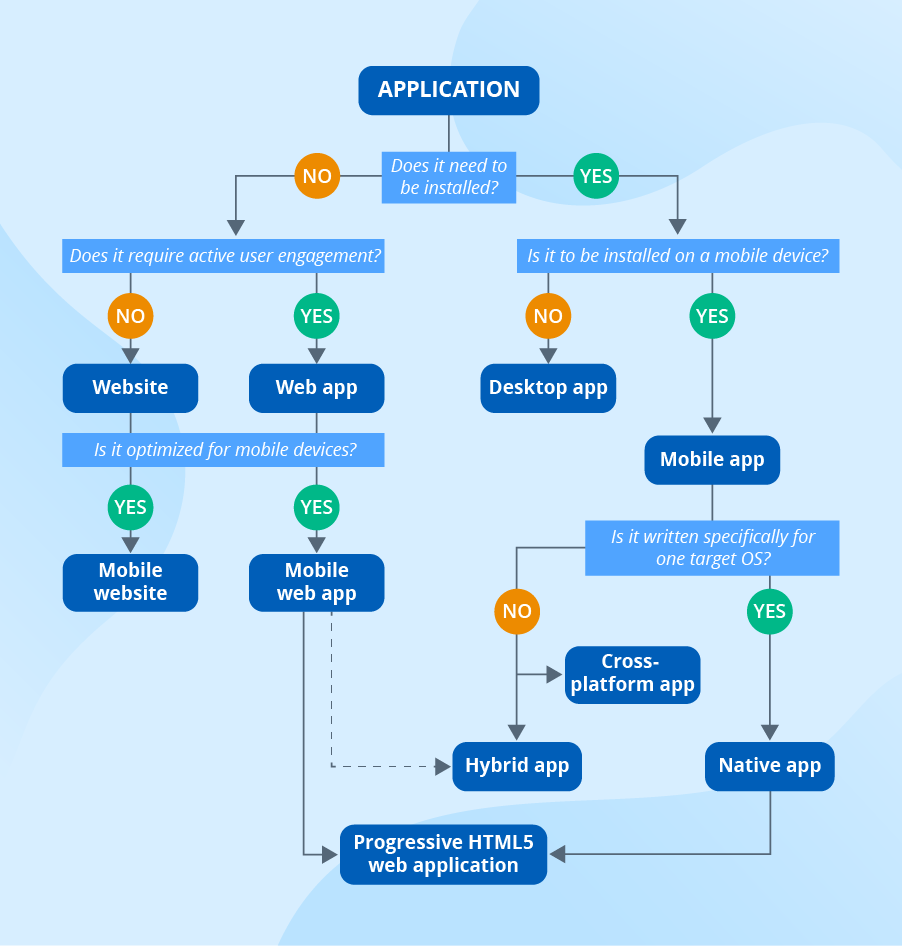
For clarity, let’s spell out something very obvious. Even if we talk mobile, the small difference between a mobile phone Website in a cell phone Web application does not change. In other words, a responsive (mobile) website has little to no interactive functionality and consists of pages with textual or media information that can be conveniently viewed on mobile devices. At the same time, a mobile web app is not only about mobile-optimized page display, but also about mobile-optimized user engagement features.
Finally, websites that are distorted on a smartphone (must be rendered or have a “broken” layout) are not mobile-optimized and therefore only exist as desktop-oriented websites. Hopefully there will be fewer and fewer of those as time goes on.
Mobile Web App vs. Native App
Basically, every mobile web application is a feature-rich responsive website. It exists in your mobile device browser, can be easily found via a search engine and does not need to be installed on the device (although some apps can are, as you will see later). The existence of web apps in the browser does not allow them to function without an Internet connection or to use the potential of a mobile device to the fullest, but with the progressive web app development, this is gradually changing.
Meanwhile, a native mobile app is a piece of software written specifically for a target mobile OS in the OS compatible languages and installed on the storage of a mobile device. Native apps don’t need a browser and can work offline. Unlike a mobile web app, a native app also offers the highest possible performance, as it can freely take advantage of all OS and hardware functionality.
An apparent advantage of a mobile web application over a native app is that users can easily discover it on the web, like any other website. Even if your brand is popular or your marketing is fun and proactive, your native app living in an app store will never get the same exposure as a web app.
Businesses, however, are trying to increase the discoverability of their new content. Some run campaigns where they give users points for clicking on the latest apps icons and give out a free app/theme download as a reward. Nevertheless, the effectiveness of these campaigns remains to be studied, while properly optimized search engine exposure almost guarantees success.
Mobile Web App vs. Hybrid App
The term “hybrid” was coined to describe something that is between a mobile web application and a native app. Similar to a web app, this type exists in a browser (although not in a regular but in the OS built-in WebView) and does not have complete and free access to the device. Similar to a native app, it needs to be installed on a device’s storage and doesn’t necessarily need an internet connection to work.
You can choose to develop a mobile hybrid app instead of a mobile web app mainly if you want to drive more engagement by asking users to install it on their devices, use it offline and have the option to send push notifications. However, the possibilities of progressive web apps can quickly drive out hybrid apps completely.
The offering of a progressive HTML5 web application
You probably already picked up from the name that progressive HTML5 web apps are the result of web app evolution. Their enhanced functionality brings out existing advantages of a regular mobile web application and introduces strong points of native and hybrid apps.
For example, while still being discovered via web search, progressive web apps can be installed on a mobile device. When viewing an HTML5 web application, you should tap the “Create a bookmark” line in your browser menu. This will automatically create an app icon on your home screen and add it to your list of installed apps. The icon can serve as a simple shortcut to a website or have a practical separate UI and functionality, which almost turned it into a hybrid app.
Technical possibilities of progressive web apps exceed those of hybrid apps now and approach the native app functionality. As of now, an average HTML5 web application can:
- Send push notifications.
- Work offline.
- Responds to any type of data input (touch gestures, accelerometer output, speech recognition).
- Go full screen or change the layout according to the orientation of the device.
- Access geolocation, camera, microphone, device vibration, battery status, etc.
Final thoughts
After starting as a web app counterpart for mobile devices, a mobile web application type has come a long way and is still considered a valid development option on par with native and hybrid apps. Thanks to the continuous support of Google since 2015, web apps have evolved into improved ‘progressive’ web apps. Although it is highly unlikely that mobile web apps will ever replace native apps, they have already leveled the score with hybrid apps, as they combine search engine exposure with the ability to install and use device functionality.