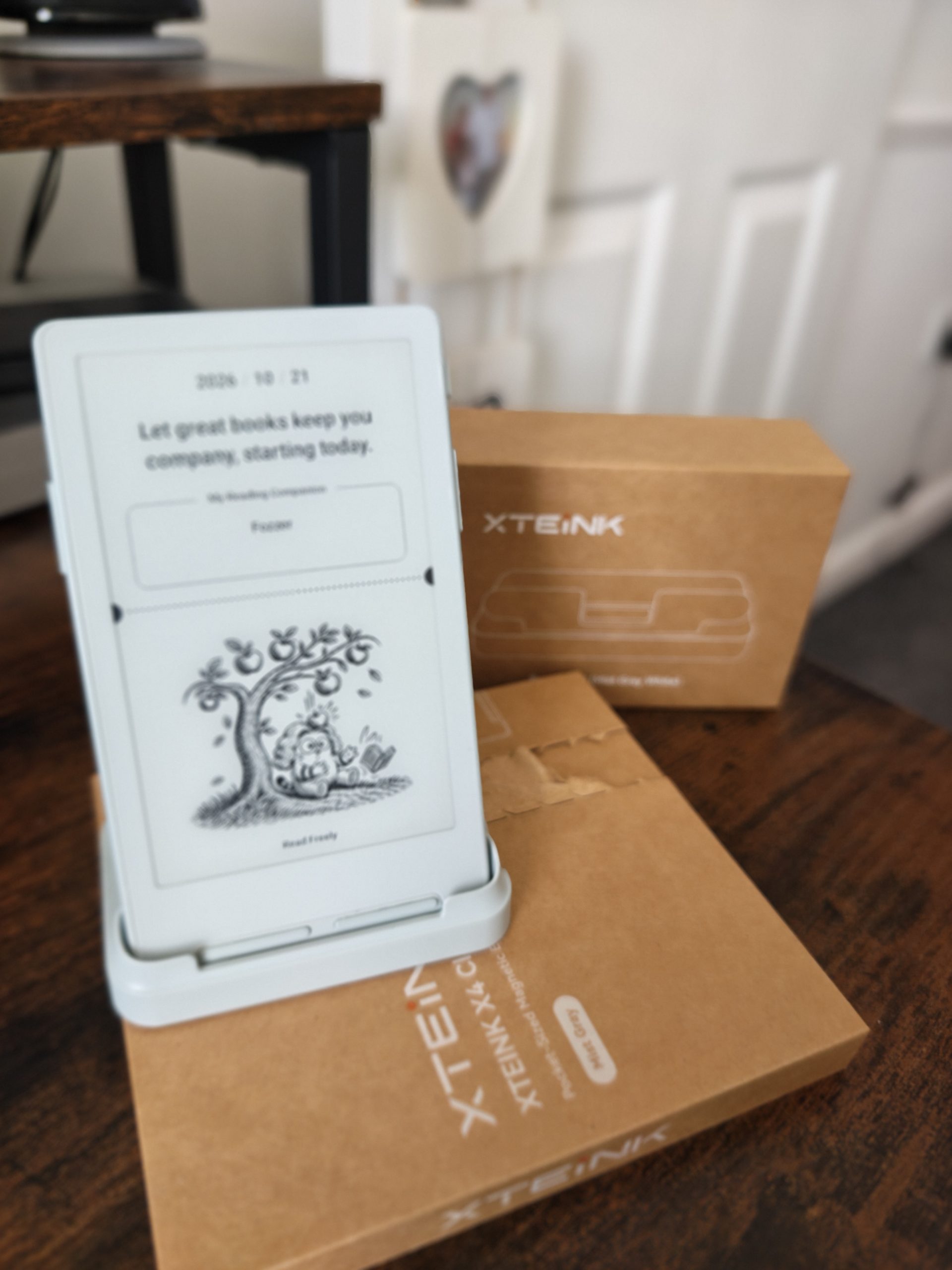
 In an era where personal devices constantly compete for our attention with notifications, algorithmic feeds, and vibrant OLED screens, a growing subculture of readers is seeking pure, minimalist alternatives. Enter the XTEINK X4 Classic (often referred to as the X4 V2). Retailing at $79 / £79, this ultra-compact, pocket-sized E Ink reader promises a return to single-purpose reading without the bloat of Android apps or the heavy distraction of social media.
By stripping away non-essential features—namely the capacitive touchscreen digitizer and the internal LED front light—XTEINK has engineered a device that measures just 4.9 mm thin and weighs a mere 68 grams. However, these design choices introduce distinct trade-offs, such as replacing the standard USB-C port with a magnetic pogo-pin connector and relying purely on physical button navigation.


Here is an in-depth review of the XTEINK X4 Classic, examining its hardware, display optics, software performance, real-world battery endurance, and overall position in the current portable e-reader market.
Core Specs
The XTEINK X4 Classic is designed explicitly as an Everyday Carry (EDC) secondary reader. It is built for daylight reading, outdoor commutes, micro-reading sessions throughout the day, and readers who value weightless portability above all else.
Key Specifications
| Specification | XTEINK X4 Classic | XTEINK X4 Pro | Original XTEINK X4 | Amazon Kindle Basic (2024) |
| Display Size | 4.3 inches | 4.3 inches | 4.3 inches | 6.0 inches |
| Resolution / PPI | 219 PPI | 219 PPI | 219 PPI | 300 PPI |
| Touchscreen | No (Buttons only) | Yes (Capacitive) | No (Buttons only) | Yes (Capacitive) |
| Front Light | No | Yes (Cool white) | No | Yes (Adjustable) |
| Dimensions | 114 x 69 x 4.9 mm | 114 x 69 x 6.2 mm | 114 x 69 x 5.8 mm | 157.8 x 108.6 x 8.0 mm |
| Weight | 68 grams | 72 grams | 74 grams | 158 grams |
| Processor | ESP32-S3 | ESP32-S3 | ESP32-C3 | MediaTek / Custom |
| Battery Capacity | 920 mAh | 1,100 mAh | 650 mAh | ~1,040 mAh |
| Charging Port | Magnetic Pogo Pin | USB-C / Pogo Pin | USB-C | USB-C |
| Storage | 16GB (MicroSD incl.) | 16GB (MicroSD incl.) | 16GB (MicroSD incl.) | 16GB / 32GB Internal |
| Connectivity | 2.4 GHz Wi-Fi, Bluetooth | 2.4 GHz Wi-Fi, Bluetooth | 2.4 GHz Wi-Fi, Bluetooth | 2.4/5 GHz Wi-Fi, Bluetooth |
| Price | $79 / €79 | $99 / €99 | ~$69 (Discontinued) | $109 / £94.99 |
Design, Build Quality, and Ergonomics
The 4.9 mm Frame and Pocketability
The most striking aspect of the X4 Classic when holding it for the first time is its physical presence—or lack thereof. At 4.9 mm, it is currently the slimmest dedicated E Ink device in production, beating out XTEINK’s own ultra-compact X3 (5.1 mm) and the original X4 (5.8 mm).
Weighing 68 grams, it weighs less than half of an iPhone 15 or Kindle Basic. You can slide it into a front shirt pocket, suit jacket, or rear denim pocket without feeling any pull or sag. For commuters, hikers, or readers who balk at carrying a full-sized tablet or e-reader in a gear bag, the X4 Classic represents the gold standard of EDC hardware.


Color Finishes: Space Black vs. Mist Grey
XTEINK produces the X4 Classic in two matte plastic finishes: Space Black and Mist Grey.
Space Black offers a sleek, modern, dark frame that creates a high contrast border around the screen.
Mist Grey provides an optical advantage: the shade of grey used for the front bezel closely matches the ambient background tone of the unlit E Ink panel. This reduces the perception of frame borders, making the digital page visually blend into the edges of the device casing.
Rear Magnetic Ring Assembly
The back panel incorporates a built-in magnetic array arranged in a MagSafe-compatible pattern. Compared to the original X4, XTEINK shifted the internal magnet alignment slightly toward the top edge (matching the X4 Pro layout).

This magnetic ring allows users to stick the reader directly onto the back of a MagSafe-compatible smartphone or phone case. While a 4.3-inch frame protrudes slightly on compact phones, it mounts flush on larger devices like iPhone Pro Max or Android Ultra models, effectively turning your phone into a dual-sided device with an e-paper back panel. The magnets also dock securely with XTEINK’s proprietary magnetic clip-on reading lamp and official protective cases.

Button Ergonomics
Because the X4 Classic lacks a touchscreen, all interactions rely on physical micro-switches:

Side Page-Turn Buttons: Relocated higher along the side rail compared to the original X4. This allows comfortable single-handed operation with either right or left thumbs without requiring awkward hand readjustments.
Front Navigation Keys: Positioned beneath the display for back, home, and menu actions. The buttons click with a soft, tactile snap, feeling considerably more durable and less mushy than earlier XTEINK iterations.
The Pogo Pin Charging Trade-Off

To achieve a sub-5 mm chassis, XTEINK eliminated the traditional USB-C port entirely, replacing it with a custom 2-pin magnetic Pogo Pin connector on the bottom edge.
The Advantage: Removing the bulky USB-C port assembly allowed engineers to slim the body down to 4.9 mm while simultaneously increasing the battery size from 650 mAh to 920 mAh.
The Disadvantage: Users must carry the included USB-A-to-Pogo magnetic adapter cable. If you lose or forget the cable while traveling, you cannot top up using a standard USB-C phone charger. Fortunately, the magnetic connector snaps into place with reasonable force, and because E Ink draw is low, charging is required only once every few weeks.
Display Optics: Why “No Touchscreen” Means Superior Contrast
On paper, a 4.3-inch E Ink display running at 219 PPI might appear inferior to the 300 PPI panels standard on current Kindles and Kobos. However, optical performance involves more than raw pixel density; the thickness and clarity of the overlay layers play a crucial role.
The Zero-Layer Display Advantage
Standard modern e-readers feature a multi-layer sandwich stacked on top of the raw E Ink microcapsule plane:
E Ink Display Panel
Capacitive Touch Digitizer Grid
Light Guide Panel (for frontlight distribution)
Protective Matte Glass/Plastic Cover Lens
Each added layer scatters light, slightly reduces contrast, and elevates the text away from the physical top glass surface, creating a subtle visual gap.
Because the X4 Classic omits both the touch digitiser grid and the front light guide panel, there are zero extra layers between the E Ink microcapsules and your eye. The black pigment particles sit directly underneath the top surface.

Contrast vs. Sharpness
This zero-layer architecture yields two distinct visual effects:
Inky Black Contrast: Text appears noticeably darker and bolder than on the X4 Pro or litKindle models. White areas appear brighter because light doesn’t pass through a diffusing light-guide layer.
Paper-Like Tactility: Text looks as though it is printed directly on the outer casing, mimicking actual newsprint or book paper under direct natural sunlight.
Pixel Density Trade-Off: At 219 PPI, close inspection reveals slight aliasing (jagged edges) on rounded letter curves compared to a 300 PPI panel. However, at a normal reading distance of 30–40 cm, the increased contrast makes text easier to read in bright sun than higher-density screens behind thick digitizers.

Hardware Performance, Firmware, and Battery Endurance
The ESP32-S3 Upgrade
Under the hood, XTEINK replaced the older ESP32-C3 microcontroller found in the original X4 with the higher-performance ESP32-S3 chip (matching the processor in the X4 Pro).
Boot Time: Powers up cold in roughly 4 seconds directly into the last open page of your current book.
Page Turn Speeds: Page-turn latency has been reduced significantly. While E Ink physics still dictates a slight refresh lag, page flips feel crisp and instant for a micro-controller reader.
Input Buffer: Like all ESP32-based e-readers, the device enforces a micro-lockout between rapid keypresses to prevent screen ghosting overruns. It isn’t designed for rapid skim-flipping through 50 pages in 5 seconds, but for steady reading, page flips keep up smoothly.
Real-Time Clock (RTC) & Shake-to-Flip
RTC Integration: Unlike the first-generation X4, the Classic includes an integrated hardware Real-Time Clock module, ensuring time stamps, reading logs, and sleep-screen clocks remain accurate without needing constant Wi-Fi sync.
Shake-to-Flip: An internal accelerometer enables an optional “Shake-to-Flip” feature, allowing users to advance pages with a gentle wrist motion—convenient when wearing thick gloves during winter commutes.
Battery Endurance
By pairing a low-power ESP32-S3 microcontroller with a expanded 920 mAh battery (a 41% increase over the original X4’s 650 mAh cell) and omitting an energy-draining frontlight, the X4 Classic delivers impressive battery longevity.
Daily Reading (1 to 1.5 Hours/Day): Easily achieves 3 to 4 weeks of use on a single charge with Wi-Fi disabled.
Standby Drain: Minimal self-discharge in deep sleep mode; the device can sit in a bag for two weeks and wake up with almost no drop in battery percentage.
Software Ecosystem, Sideloading, and Custom Firmware
Out-of-the-Box Software Experience
The stock XTEINK operating system is a lightweight, bare-metal interface built for speed and simplicity. It avoids complex nested submenus in favor of a straightforward layout:
Library View: Displays book covers, list views, and recent reading history.
Reading Engine: Offers adjustable font sizes, line spacing adjustments, page orientation flips (portrait and landscape), and margin controls.
Language Support: Out of the box, language settings can be easily switched from Chinese to English, German, French, Spanish, and other major languages during initial boot.
Getting Books onto the Device
The X4 Classic relies entirely on DRM-free content (EPUB, TXT, and custom XTC formats). Since there is no native Kindle or Kobo store integration, (which I find as the devices main tripping point, only because I’ve been to ingrained in the Kindle Ecosystem for too long) content transfer is handled via three main methods:

Community & Custom Firmware (Crosspoint & Licorice)
One of the primary advantages of the XTEINK hardware ecosystem is its open developer community. Because units shipped directly from XTEINK have unlocked bootloaders, users can flash open-source community firmwares:
Crosspoint: A popular community OS replacement that introduces advanced typography options, customizable font anti-aliasing engines (smoothing out the 219 PPI text), custom reading stats, and fine-tuned UI layouts.
Licorice: A streamlined reader interface that optimizes file tree folder browsing and enhances battery management.
For tinkerers and open-source enthusiasts, this flexibility elevates the X4 Classic from a basic budget reader into a highly customizable open-platform pocket device.
Accessories & System Upgrades
Because the X4 Classic lacks a built-in front light, night reading requires ambient light or dedicated accessories.
1. Magnetic Clip-On Reading Lamp
XTEINK sells a dedicated $9.99 / €9.99 magnetic LED reading light that snaps directly onto the top magnetic backplate of the X4 Classic. It features adjustable warm and cool LED color temperatures and illuminates the unlit E Ink panel evenly from above without adding significant bulk.
2. Cases and Screen Protectors
Magnetic Flip Covers: Snaps to the updated top magnetic plate, offering automatic sleep/wake functionality when opening the cover. (Note: Due to changed magnet positions, original X4 cases are incompatible with the X4 Classic).
Matte Screen Protectors: Included free in the box. While the bare screen provides excellent glare resistance, applying the matte protector shields the panel from key scratches inside pockets without compromising viewability.
- Base Charging Stand.


Comparative Analysis: X4 Classic vs. Competitors
To contextualize where the X4 Classic sits in the 2026 e-reader landscape, consider how it compares to three key alternatives:
1. XTEINK X4 Classic vs. XTEINK X4 Pro
Choose the X4 Pro ($99) if you need an all-in-one night and day reader with an integrated frontlight, touchscreen navigation, and a standard USB-C port.
Choose the X4 Classic ($79) if you want maximum screen contrast, a thinner/lighter body (4.9 mm vs 6.2 mm), longer battery life, and prefer physical button controls without screen smudges.
2. XTEINK X4 Classic vs. XTEINK X3
The older X3 features a smaller 3.7-inch display and 650 mAh battery. The X4 Classic provides a significantly larger 4.3-inch reading area, faster ESP32-S3 chip, and better side button ergonomics while actually beating the X3’s thickness (4.9 mm vs 5.1 mm).
3. XTEINK X4 Classic vs. Amazon Kindle Basic
The Kindle Basic offers a sharper 300 PPI display, built-in frontlight, touchscreen, and direct access to the Amazon Kindle Store. However, it is more than double the weight (158g vs 68g), much wider, and locks you into a mainstream commercial ecosystem. The X4 Classic is designed for pocket EDC convenience rather than as a primary couch or bedside reader.
Strengths and Weaknesses
Pros
Ultra-Slim & Featherlight: At 4.9 mm and 68g, it is currently the most pocketable 4.3-inch E Ink reader available.
Exceptional Screen Contrast: Absence of touch digitizer and frontlight layers allows text to sit directly on the display surface with deep, paper-like blacks.
Upgraded ESP32-S3 Processor: Fast 4-second boot times, responsive page turns, and reliable time-keeping (RTC).
Extended Battery Life: 920 mAh battery delivers 3–4 weeks of active daily reading.
Tactile Button Layout: Ergonomically placed side buttons and solid front navigation switches.
Open Platform: MicroSD expansion up to 256GB, Wi-Fi web transfer, and full support for custom open-source firmwares (Crosspoint/Licorice).
Affordable Price: Exceptional value at $79 / €79.
Cons
No USB-C Port: Relies on a proprietary magnetic Pogo Pin charging adapter.
No Built-In Frontlight: Requires external ambient light or the clip-on magnetic lamp for low-light or night reading.
No Touchscreen: Navigation relies entirely on physical buttons, which can make long menu scrolling or typing Wi-Fi passwords tedious.
219 PPI Resolution: Lower pixel density than 300 PPI readers; small fonts may show slight aliasing without custom firmware smoothing.
Sideloading Required: No native Amazon/Kobo cloud store integration; best suited for users comfortable managing their own DRM-free EPUB libraries.
Final Verdict
The XTEINK X4 Classic is a intentionally focused, distraction-free pocket e-reader. By foregoing touchscreens, frontlights, and Android app stores, XTEINK has produced a device that excels at its primary objective: providing a lightweight, paper-like reading experience that fits seamlessly into a shirt or jacket pocket.
While the loss of USB-C and the lack of a frontlight mean it won’t replace a primary 6-inch or 7-inch paperwhite reader for late-night bedside reading, it shines as an EDC secondary device. For commuters, outdoor enthusiasts, minimalists, and DRM-free book collectors looking for a reliable, highly portable reading tool, the X4 Classic is one of the most compelling micro-readers available today.
Final Score: 8.5 / 10