ZDNET’s key takeaways
- Agent workflows are a means to simplify your day.
- Use workflows to help tackle tedious, time-consuming tasks.
- Each AI tool’s workflow functionality will vary.
For some, AI is a way to cheat, to not learn something because you can easily make AI work for you. For others, AI is a way to automate otherwise time-consuming tasks so that the day doesn’t become overwhelming.
Also: 50 AI agents tried to build a thriving Minecraft civilization – it didn’t end well
That’s what agent workflows are for. You create workflows so that you can enter a quick query into your AI tool of choice and the workflow allows those time-consuming tasks to be taken care of for you. The results of these inquiries can then be used to inform your day or help lighten your load a bit.
If you’re still not sure what an agent workflow is, I’d like to help you with that by describing a few that I’ve created to hand over various tasks to AI.
My Favorite AI Agent Workflows
Here is a list of agent workflows that I find helpful.
Also: 5 Reasons Your Company Needs a Chief AI Officer in 2026
1. Summary news
With this agent workflow, I can instruct AI to crawl a particular website and use an LLM to filter the posts based on a particular topic of interest. This workflow helps me quickly find articles on topics I need for research and educational purposes. I can create different workflows to scrape different sites so the workflow doesn’t get too complicated.
2. Debugging code
Ever since I started creating my own writing app, I’ve had to do a lot of debugging via AI. The goal of a debugging code workflow is to find the cause of a problem, implement the smallest and safest fix, and verify that it works correctly. This workflow is not designed to fix the problem, but to find the problem and present possible solutions. I can then either fix the problem myself or interact with AI to implement the solution. The reason I use this workflow is that AI is exponentially faster at finding problems and discovering possible fixes.
3. Weather advise
If you travel a lot, this workflow can be quite helpful, as it brings up a seven-day forecast for your destination and outputs a localized weather summary. I even attach a packing list based on that summary, so I don’t have to worry about forgetting to bring anything I need due to the weather. I’m not very good at traveling, and my ability to know what to pack is even worse. In the past, I have experienced several instances where this workflow would have helped me quite a bit.
4. Invoice and receipt organizer
I’m really bad at organizing things, including invoices and receipts (especially those that can be used for tax purposes). To this end, I use a workflow that helps me manage my expenses. This workflow is triggered by an email containing a certain keyword (such as a “receipt” label or an attached document). The AI then examines the email or attachment, extracts specific information (such as seller, date, amount, applicable taxes and category), and then adds the information to a spreadsheet. Without this workflow, I would miss a lot of important information that could save me money at tax time.
Also: Github competitor Entire is now live – how the agent-first platform works
5. Convert speech to text
Every so often, I have to do a mind dump about speech-to-text. I often do this when ideas start to overwhelm me (because they often come in droves). This workflow converts the audio to raw text and transcribes the transcript into whatever format I need (such as a book idea to be saved in my to-be-written document, a social media post, or a description for a particular idea). The workflow then saves the draft into a document for later use. I can also instruct the workflow for what the word salad I dictated is intended for, such as “Convert this audio into a usable description for a book idea.”
6. Home maintenance
This is really handy because I often forget to do things like this. What this flow does is help me keep up with things like replacing the furnace filter, appliance care (like replacing the water filter in the refrigerator), and seasonal tasks (like getting the AC unit/furnace checked). Here’s how it might work: You buy a new device that comes with a downloadable PDF manual. Save the PDF in a specific Google Drive folder. The agent then populates a home maintenance calendar with alerts such as “Change Furnace Filter – Size 16 x 20 x 1” and then adds an Amazon purchase link for the specific filter in the calendar notes.
Now that you have an idea of some of the workflows I used, let me show you how to create them. Again, how these are created depends on the specific tool you are using. I will demonstrate creating the first workflow I mentioned in AnythingLLM.
It is important to understand that the process of creating a workflow requires:
- Mapping the manual workflow, such as identifying a repetitive task, writing down the steps and identifying what is required for the task.
- Finding the bottleneck.
- Choosing an AI process.
- Definition of the data source and context.
- Build and test a minimum workflow.
- Add protective shields and iteration (if necessary).
How to create an AI agent workflow in AnythingLLM
To create a workflow in AnythingLLM, you need the following bits of information:
- A title
- A description
- variables required
- Flow blocks for the website URL, the topic of interest, and the page content
1. Create the workflow
Also: Stop sharing your passwords with AI agents, Bank of America warns customers
To do this, open AnythingLLM and go to Settings > Agent Skills > Open Builder.
On the resulting page, click + New Flow. At the top of the flow builder, fill in the title and description like this:
Title: Linux News Headline Viewer
Description: This tool can be used to visit Y Combinator and extract ALL headlines and links from the page related to a particular topic.
Available options for `page`:
(blank) – front page
“Newest” – Newest posts page
Examples of how to use this flow:
“Find Linux-related posts”
“Show me today’s Linux news”
The flow will return relevant articles as clickable Markdown links.
2. Fill in flow variables
After adding the above information, you will then need to fill in the necessary flow variables that you will create. You can name them whatever you want, but each one must serve a specific purpose and have a unique name. Here are the variables I created for this agent flow:
- linuxNewsURLPath – leave the initial value empty.
- topicOfInterest – Add whatever theme you need (like Linux).
- pageContentFromSite – leave the initial value empty.
Also: Do you need AI agent liability insurance? What you need to know before you sign up
You will see how the above variables are used in a moment.
 Jack Wallen/ZDNET
3. Create Web Scraping Block
Next, create a web scraping block (by clicking + Add Block and selecting Web Scraping). The values you will add for this are:
- URL to scrape:
- Capture Page Content As: Text content only
- Content Summary: pageContentFromSite
Also: Who is responsible for catching rogue AI agents? You are
 Jack Wallen/ZDNET
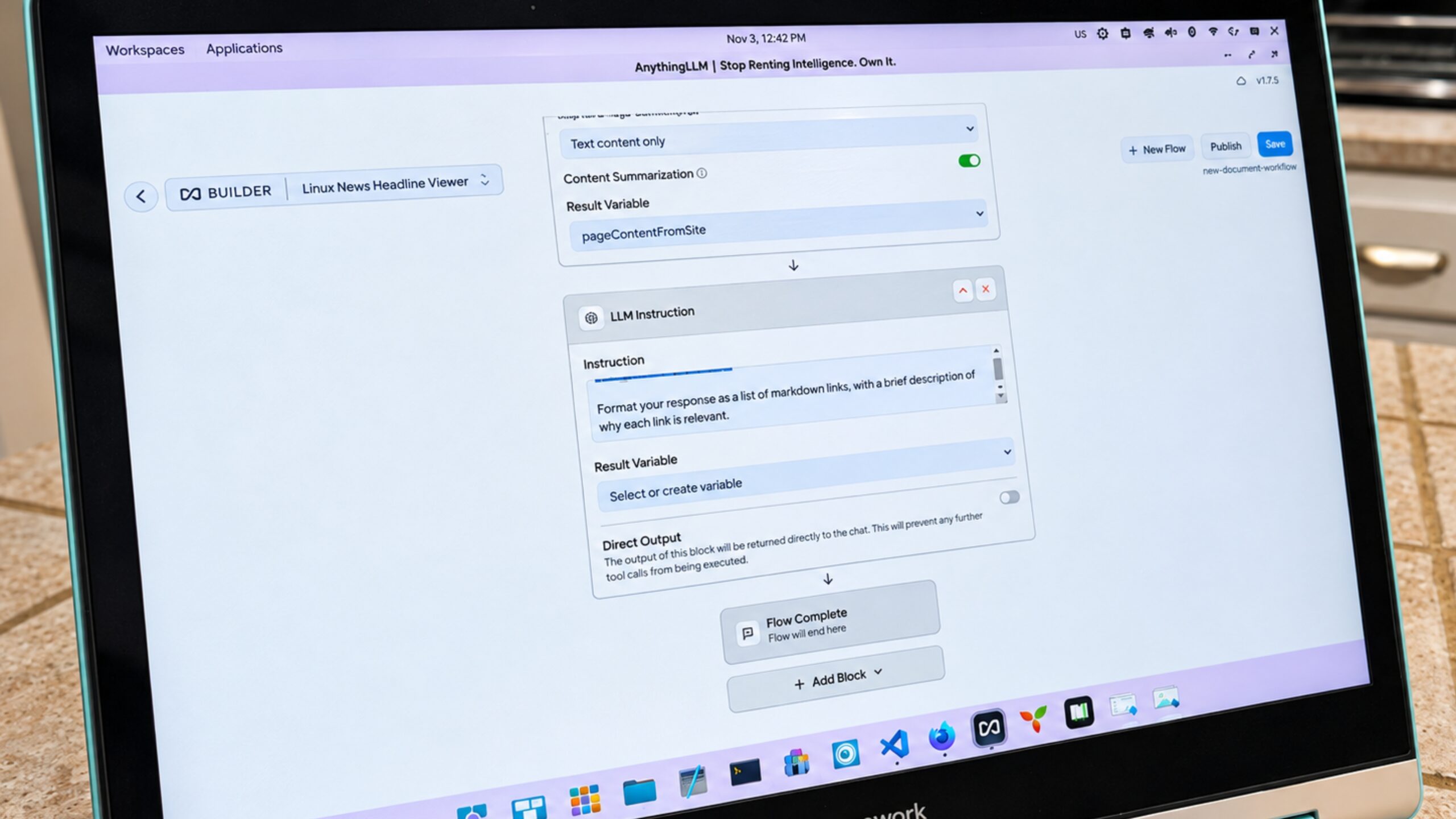
4. Create LLMInstruction block
Create an LLMInstruction block and configure it like this:
- Instruction: Extract all links from this content that are relevant to this topic: ${topicOfInterest}
- Content: ${pageContentFromSite}
Extract all links from this content that would be relevant to this topic: ${topicOfInterest}
Contents:
${pageContentFromSite}
Format your answer as a list of Markdown links, with a brief description of why each link is relevant.
If no relevant links are found, say “No relevant articles found.”
- Result variable: leave as default
 Jack Wallen/ZDNET
5. Type your request
Once you’ve done that, save the block. You can then go to the AI prompt and type your query. You will see the agent checking ycombinator.com for today’s Linux news posts, and then they will present them to you (if there are any to present).
 Jack Wallen/ZDNET
And that is the general sense of creating an agent workflow. Again, it will vary depending on which AI agent/service you’re using, so you’ll want to research how to create these in the AI tool you’re using. The most important thing is to create agent workflows with all the necessary information already in hand (such as what you want the workflow to achieve and how it will go). With this information in hand, consult your tool’s documentation on how to implement the workflow.

See full bio