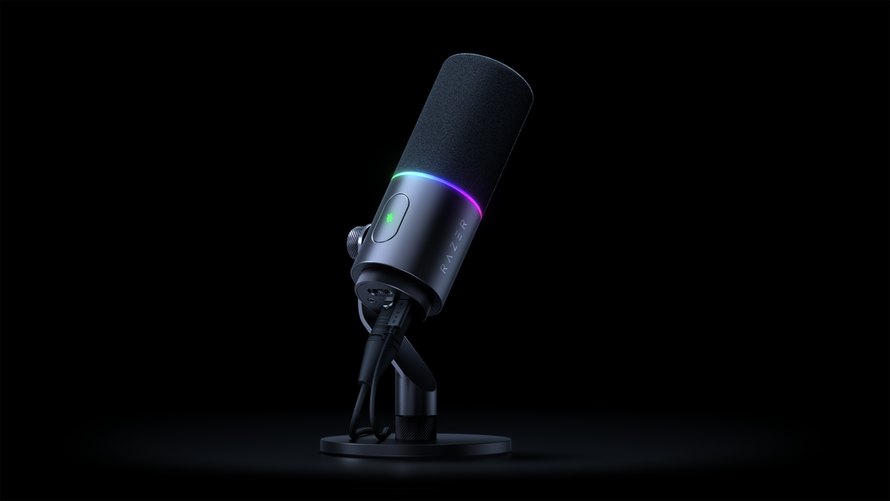
Capsule30mm dynamic versus 16mm supercardioid condenser.
ConnectionsUSB-C + XLR on Pro; USB-C to Chroma 32-bit DSP.
SoftwareCheck the Windows/Synapse requirements for advanced features.
Those Razer Series V3 Pro in the Seiren V3 Chroma 32-bit DSP both put the audio processing in a desktop microphone, but they serve different recording setups. The Pro combines a dynamic capsule with USB-C and XLR connections. The Chroma is a USB condenser microphone with more eye-catching RGB lighting. Choosing between them starts with the microphone and connection you need, rather than treating every reference to 32-bit audio as the same feature.
Dynamic or condenser voice capture?

The Pro uses a 30 mm dynamic capsule with a cardioid pickup pattern. Razer specifies a 50 Hz – 16 kHz frequency response and positions it for streaming, podcasting and music recording. Its built-in shock absorber and removable pop filter handle noise and plosives. These features are relevant for a tight linguistic setup, although they do not determine how a particular voice will sound in your room.
The Chroma 32-bit DSP uses instead a 16mm supercardioid condenser capsule. Its narrower directional pickup is intended to favor the person who talks over sounds coming from other directions. Both microphones advertise noise reduction processing, but microphone placement is still important. Orient the speaking page correctly and consider the positions of the keyboard and computer fans before relying on an automatic processing mode.
Read the 32-bit claims carefully

Pro supports 32-bit float recording through Razer Synapse on Windows. Razer describes this as providing a larger recording space when sound levels change. It’s a workflow feature with a software requirement, not a reason to ignore the input settings of your recording or streaming application. Check the capture format you are actually using before assuming a session will be recorded in that mode.
The name of Chroma emphasizes 32-bit digital signal processing. Its onboard tools include AI noise reduction, automatic EQ, compression and limiting. Its product FAQ also lists 24-bit and 32-bit depth settings. These specs shouldn’t be lumped into a claim that it duplicates the Pro’s entire recording path. The capsule type, the available connections and the documented float-recording workflow remain separate differences.
USB convenience or an XLR way?

Both can connect directly to a computer via USB. The Pro adds a three-pin XLR output for a mixer or audio interface, it becomes a second role in a larger recording setup. The Chroma 32-bit DSP is the simpler USB-only choice. Buying an XLR-capable microphone is most useful if this connection is part of your plan; it does not remove the need to control the rest of the signal chain.
For the Chroma 32-bit DSP, Razer lists 48 or 96 kHz sample-rate settings alongside its bit-depth options. The brand names Discord, OBS Studio and Streamlabs Desktop among compatible applications. These details make it important to distinguish a basic USB input from a deliberately configured recording session: select the microphone in the application, then confirm its input format and the processing you want to keep active.
Razer’s Pro manual specifies Windows 11 or later for Synapse. Basic connectivity and advanced configuration are different considerations, especially when moving between computers. Confirm operating system support for the exact software features you want to use. The onboard controls and a direct USB connection can simplify everyday operation, while custom audio, lighting and command settings add another layer of setup.
Controls, lighting and the exact US models

The Pro pairs a physical gain dial with touch mute and a Chroma RGB status ring. The Chroma 32-bit DSP features tap-to-mute plus configurable double- and triple-tap actions and stream-reactive lighting. Both can be used in an arm-based desk arrangement, but check the selected mounting hardware and package rather than the boom arms shown in promotional scenes being included.
The links below select Black: RZ19-05500100-R3U1 for the pro RZ19-05990100-R3U1 for the Chroma 32-bit DSP. The latter is the 2026 DSP model, not the previous standard Seiren V3 Chroma. For an alternative microphone arrangement built into a gaming headset, check out our Razer BlackShark V3 Pro versus V3 comparison.
Razer’s US pages reviewed on November 2, 2026 start at $249.99 for the Pro and $119.99 for the Chroma 32-bit DSP. Choose the Prof for its dynamic capsule, documented float-recording workflow and XLR option, or the Chroma 32-bit DSP for a USB condenser setup with onboard processing and reactive lighting. Check out the current product requirements at Razer.
| function | Seiren V3 Pro | Seiren V3 Chroma 32-bit DSP |
|---|---|---|
| Link US model/color | RZ19-05500100-R3U1 / Black | RZ19-05990100-R3U1 / Black |
| Capsule | 30 mm dynamic | 16 mm condenser |
| pickup pattern | Cardioid | Supercardioid |
| Connections | USB Type-C and three-pin XLR | USB Type-C |
| 32-bit function | 32-bit float support through Synapse on Windows | 32-bit DSP; 24-/32-bit depth settings listed |
| Audio processing | AI noise remover, compressor, limiter, expander | AI noise reduction, automatic EQ, compression, limiting |
| Controls / Lighting | Win dial, touch mute, chroma status ring | Tap-to-mute and configurable tap; reactive Chroma RGB |
| Start date | June 9, 2026 | July 21, 2026 |
| Where to buy | Buy on Amazon | Buy on Amazon |

Please confirm the exact model before purchasing
Both links choose Black. Choose the 2026 Chroma 32-bit DSP model instead of the previous standard Chroma.
Chroma 32-bit DSP – Black