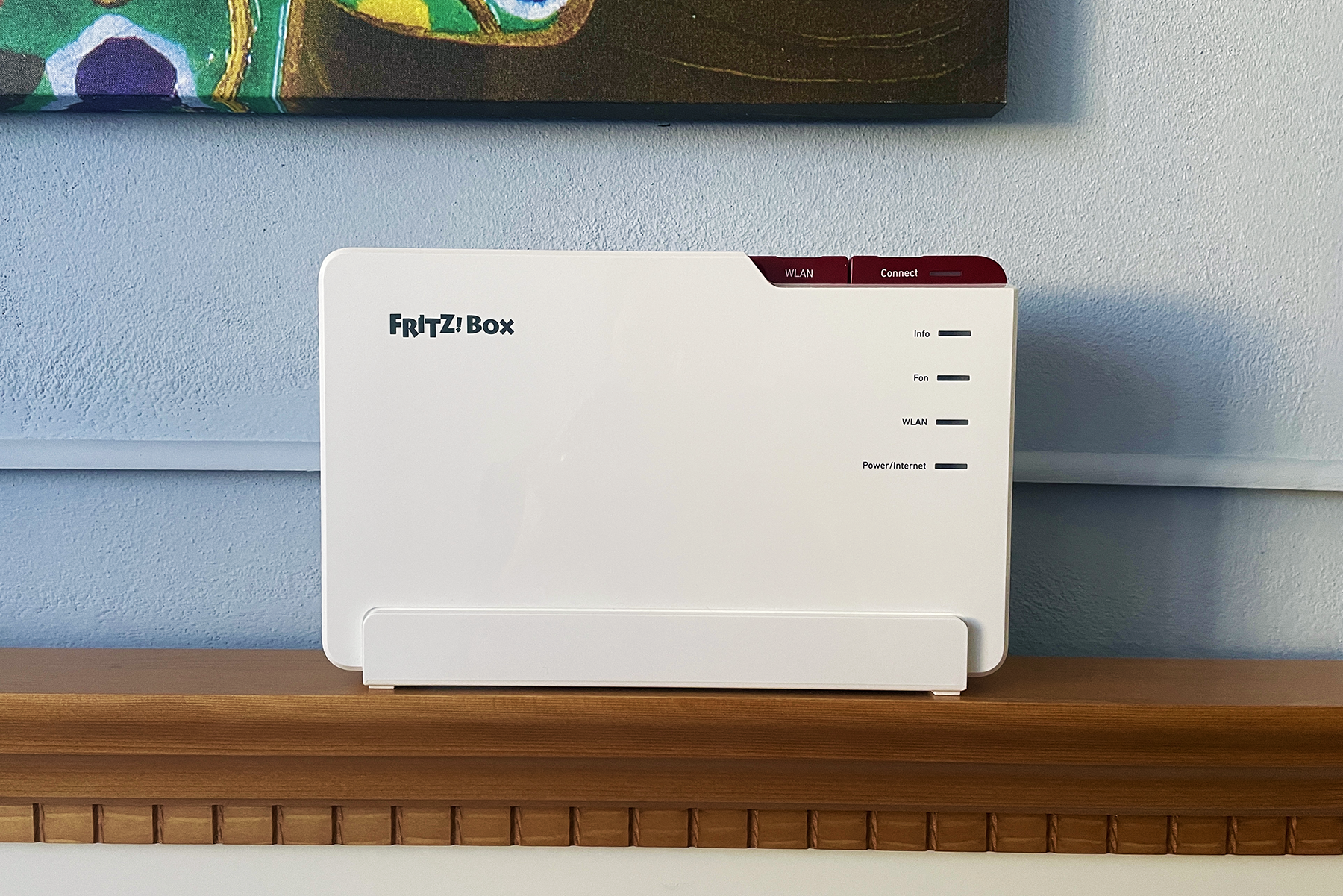
It’s been a while since I last tested a FRITZ!Box router and this time I got the opportunity to check out one of their more powerful Wi-Fi 7 devices, the FRITZ!Box 5690 Pro. This is a tri-band device that supports 6GHz and 320MHz channel width, no dual-band 2.4/5GHz MLO gimmick that other brands shamelessly push within the same price range.
And just like the 7590 that I tested years back, the FRITZ!Box 5690 Pro has a lot of unusual features which make it particularly attractive for ISPs and perhaps SMBs.
There’s support for DSL and fibre optic, support for DECT and Zigbee devices, as well as an integrated phone system. That’s besides the Wi-Fi performance-related features, such as MLO, OFDMA and MU-MIMO.
The Design and Build Quality
You can never mistake a FRITZ!Box for another brand, the unusual design being a characteristic for pretty much all AVM routers. And that’s true for the FRITZ!Box 5690 Pro as well, sporting a rectangular white case and housing all its antennas internally. There is a red band that surrounds the device and it’s where you will find the two large buttons, one for WLAN and the other for WPS Connect. Yes, those are actual buttons.
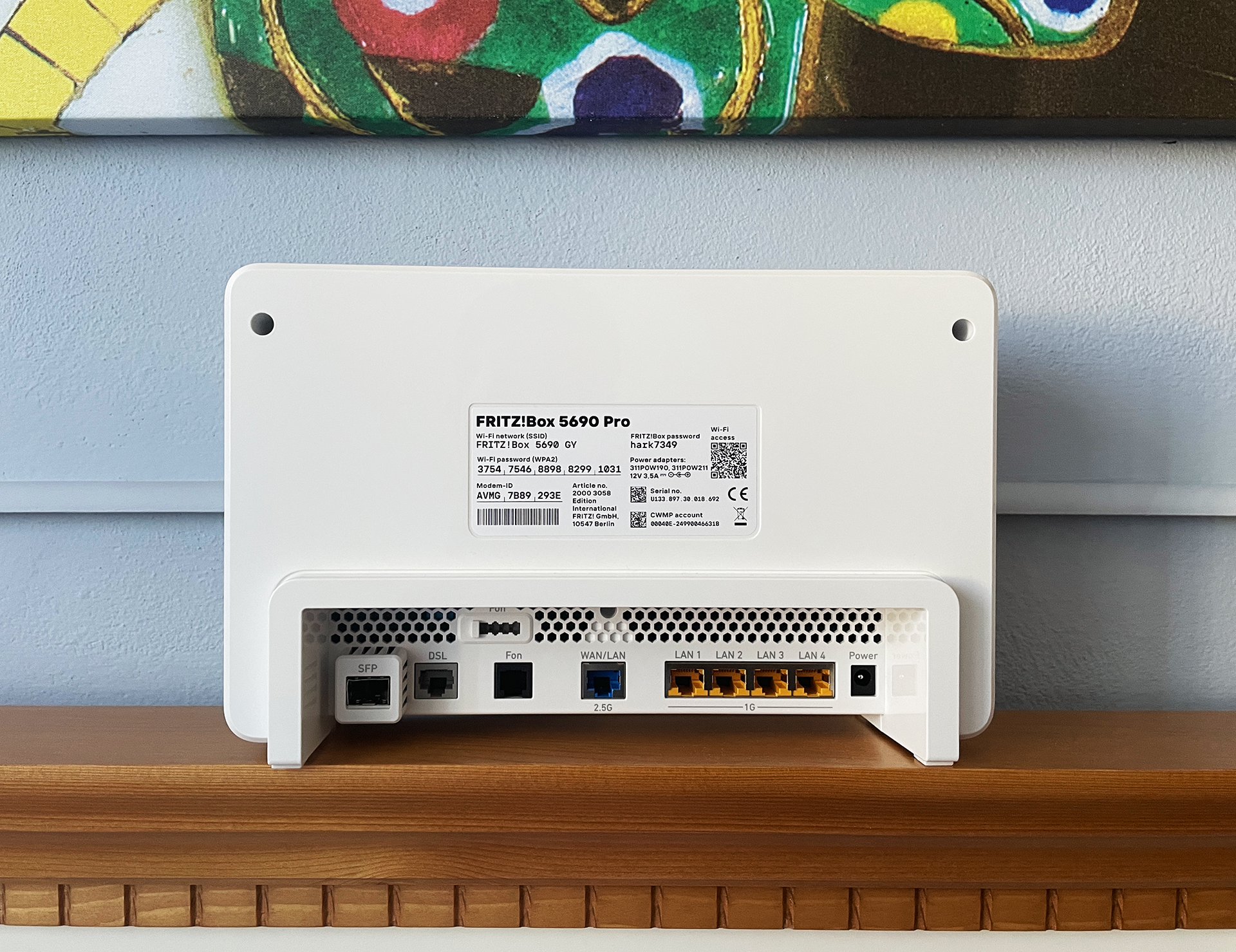
Turn the device around and within a recessed zone, we get to see an SFP slot and I was surprised to see that the manufacturer did include two modules inside the box which is excellent. If you don’t get fiber, there is a port for DSL (supports VDSL) while next to it, we get two Fon connectors, the first is an RJ11 socket, the other is a TAE plug, a German standard, both suitable for physical phones. I did mention the support for DECT which allows the connection of up to 6 cordless phones at the same time. Next to these connectors, there’s the 2.5GbE WAN port which can be used as a LAN port and four Gigabit LAN ports.
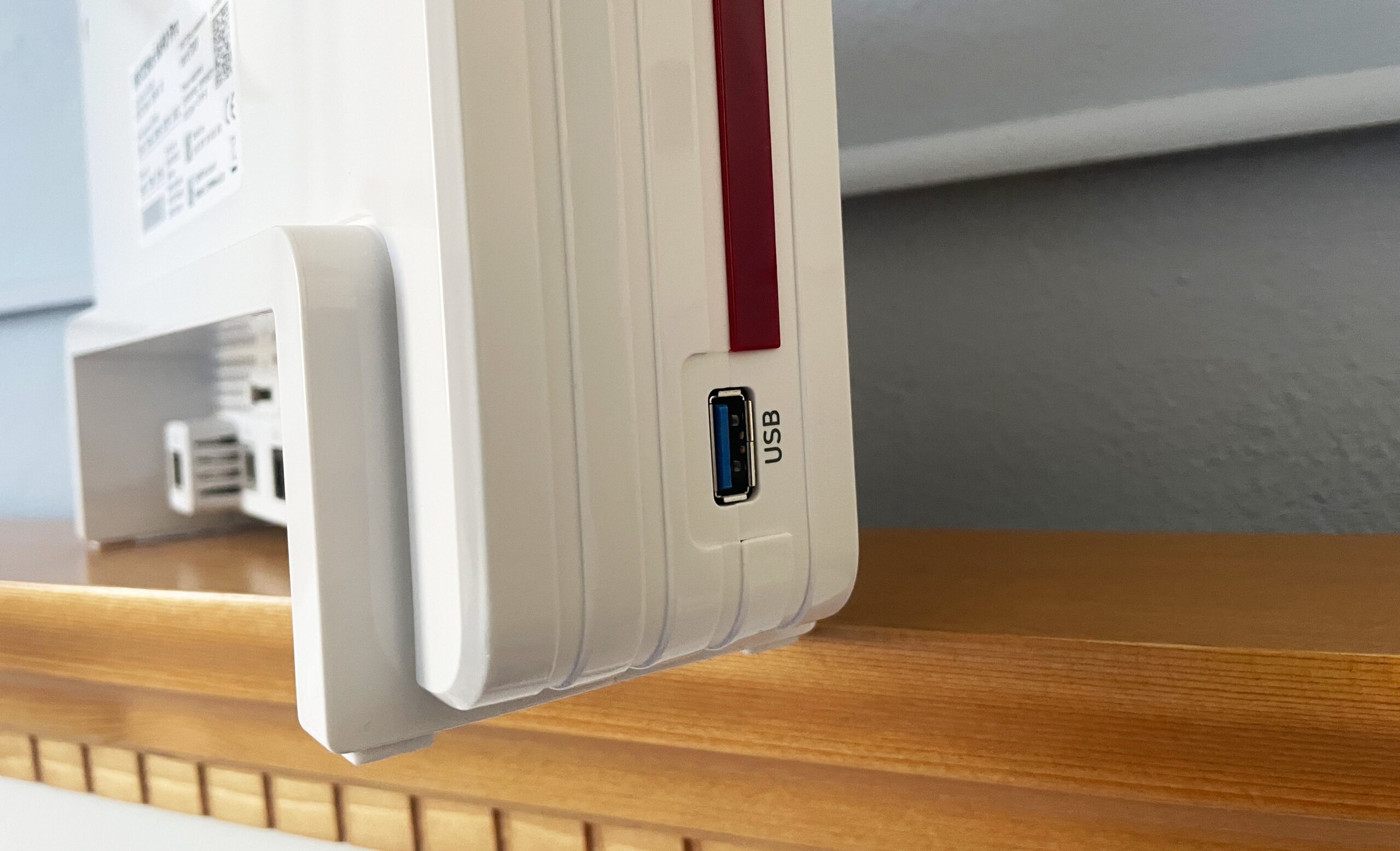
Lastly, there’s the Power connector and you can also find a USB port on the side, but there is no physical Reset button. Let’s now see the wireless performance of the router.
Wireless Performance and Test Lab
After running more than 70 hours of tests, the collected data was introduced into the Test Lab, so that it is very easy to check the performance based on various combinations and to compare the FRITZ!Box 5690 Pro with other devices I have tested so far.
MBReviews Lab: AVM FRITZ!Box 5690 Pro Tested in 2026 on firmware 279.08.25. Tests available: single-client distance and signal-strength throughput, MLO, long-duration stability, multi-client application latency. Compatible devices can be compared here.
Test details
Test year: 2026. Firmware: 279.08.25.
Charts use measurements stored in the MBReviews benchmark database. Stability charts are downsampled for display; the full one-second series remains in the database.
Read the full MBReviews Wi-Fi testing methodology.
Explorer version: 0.24.2.
OK, so before running the tests, I had to do a couple of things so that I could actually check the performance. First is the switching of the WAN port to a LAN port. This way, the 2.5GbE hard limit is negotiated with the server device and will be our Wi-Fi throughput limit as well. The next one was a work around a software limitation. There is no way to manually switch between the channel bandwidth, it is all handled by an algorithm.
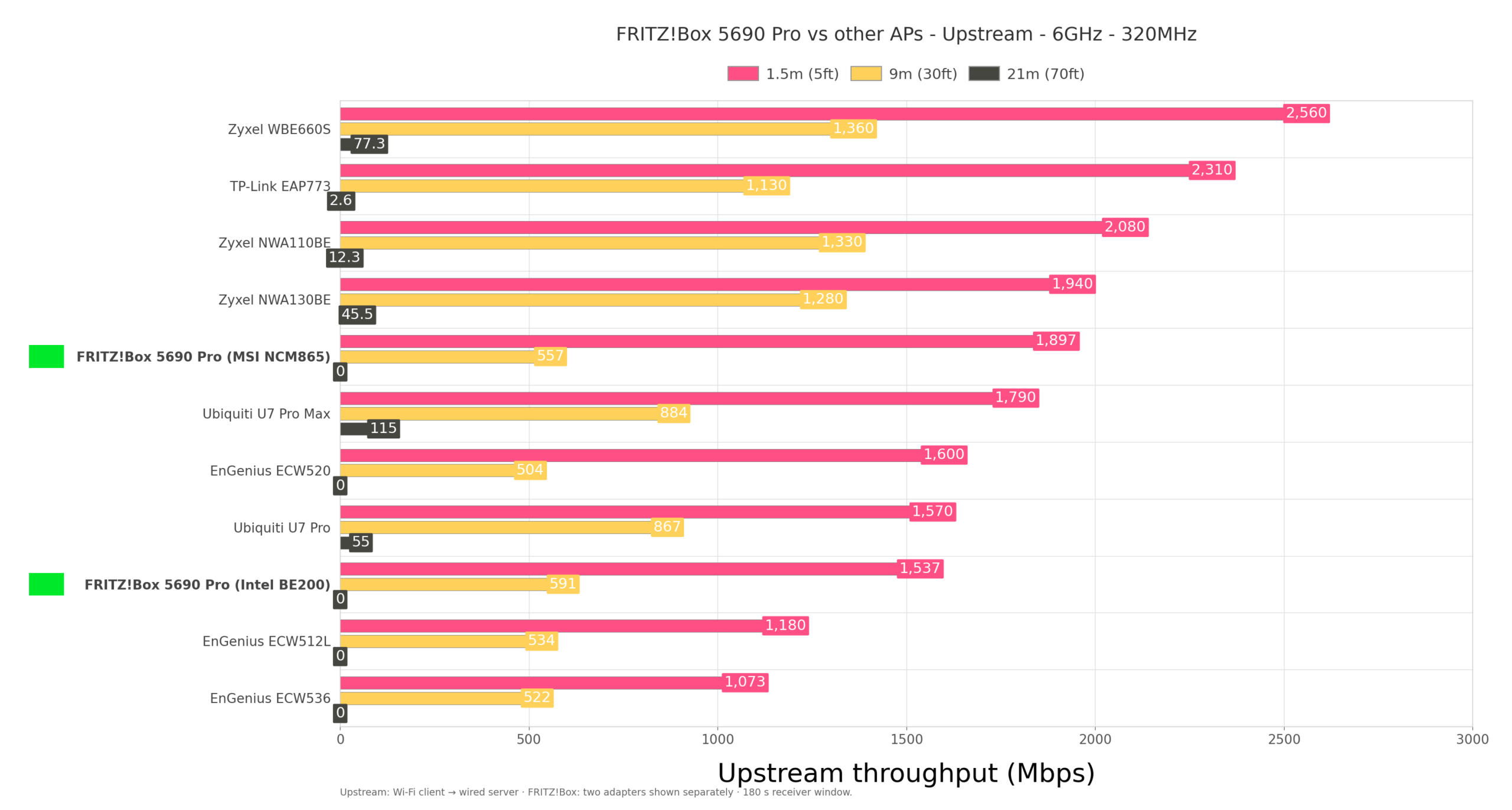
So I had to alter the backup file to force the device to run the channel width I wanted. Needlessly complicated since it’s better to keep the manual adjustment as well besides their algorithms. That being said, I used a couple of different Wi-Fi 7 adapters one from Qualcomm, the other from Intel and the 6GHz close range tests pushed the throughput close to the 2.5Gbps upper limit using the BE200.
At the same time, you will see that at 70 feet, the connection dropped. The RSSI does show the reason. The 6GHz radio can provide a high throughput as long as the signal is strong, but it does not do well with walls and floors. Even at 5 feet, the RSSI is already worse than what the clients showed when they were connected to the 5GHz radio. And it’s normal behavior.
The 5GHz throughput is also impressive reaching near 2Gbps with either Wi-Fi 7 adapters at 160MHz and this time, I decided to also include all the channel bandwidth configurations in case you may need to lower to 40 or even 20MHz in a very crowded environment.
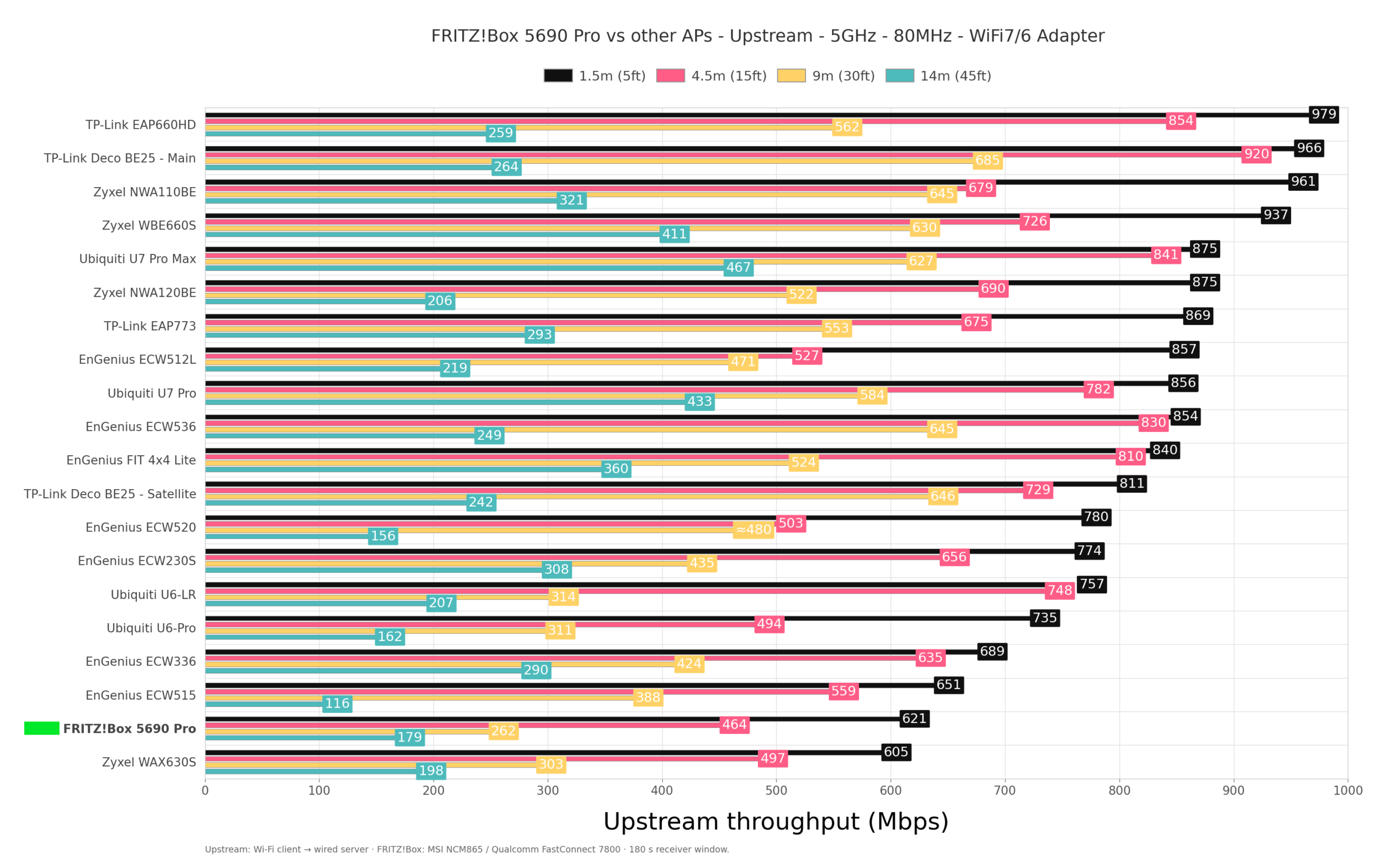
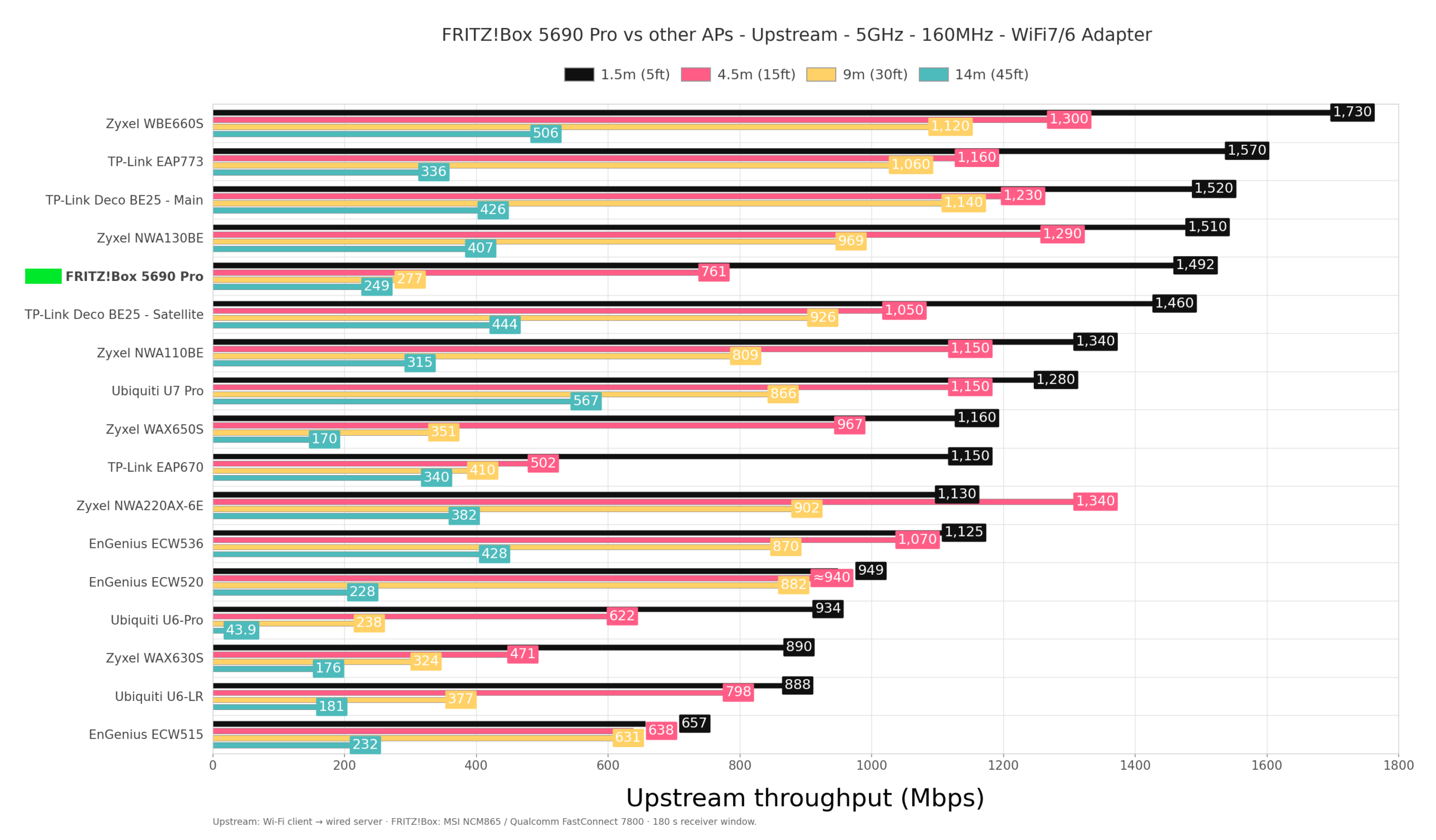
The range is better than with the 6GHz radio and it seems that 80MHz provided the best balance in my tests, maintaining usable connectivity and throughput at locations where the RSSI had falled below -80dBm on all client devices, be it a part of the Wi-Fi 7, Wi-Fi 6 or even Wi-Fi 5 standards.
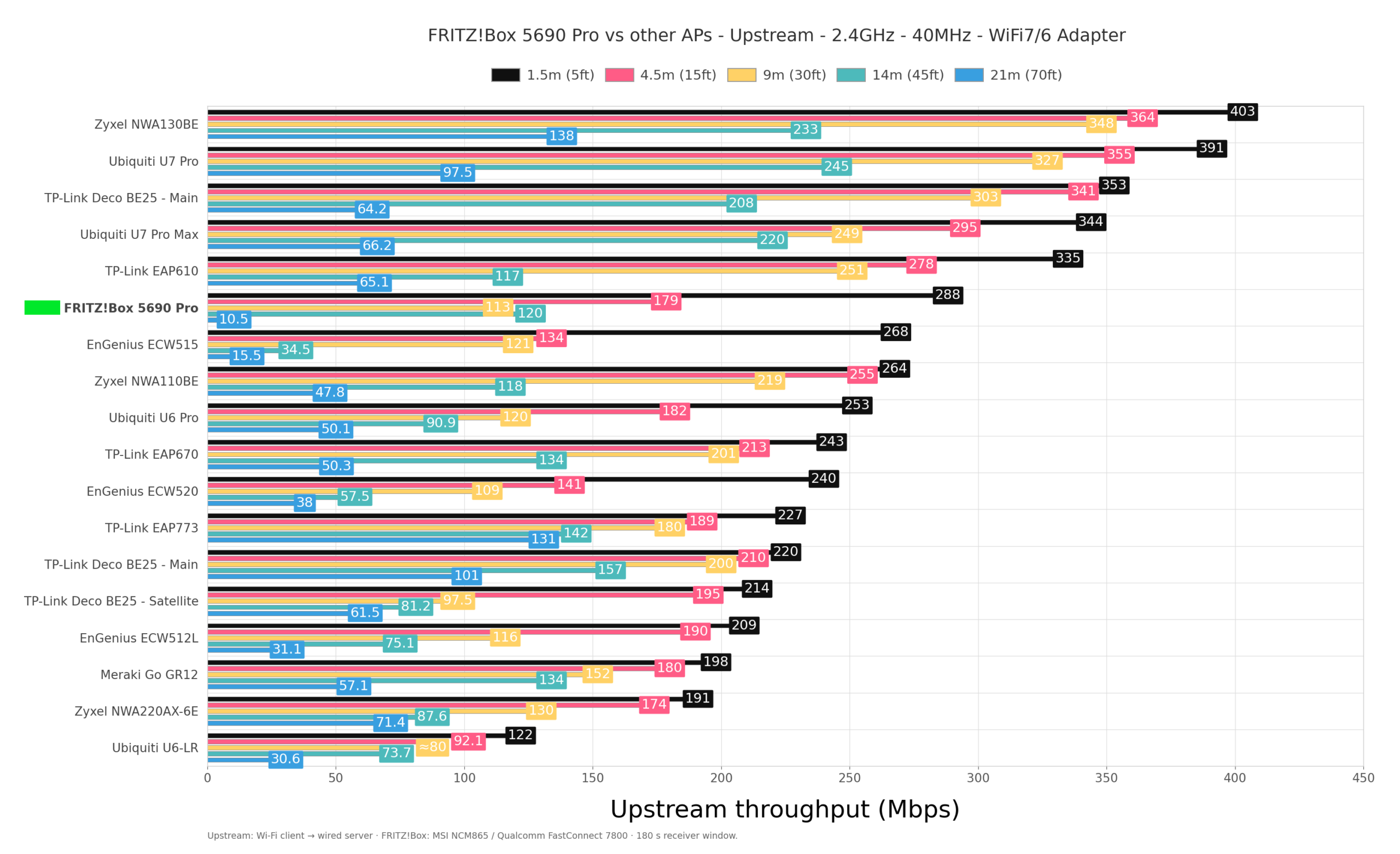
The 2.4GHz performance was a bit peculiar because the signal strength remained very strong reaching far beyond the 70feet limit I put in place. So, the throughput slowly lowers across the entire house despite having clients on different floors or after multiple thick concrete walls.
But, if you check the stability graphic, we do see that it does experience some instability. One thing to not forget is that if you don’t have really old legacy devices, make sure to disable this function: Wi-Fi coexistence enabled (2.4-GHz frequency band). If you don’t, the 2.4GHz network will always stay at 20MHz.
Important: I did notice that some clients would refuse to connect to the 5GHz network when it was set to 20MHz at specific locations, not all. It happened with the MSI Qualcomm WiFi 7 adapter, a BE200 and a Pixel 2 XL. I did switch between Wi-Fi 7 and Wi-Fi 6 in the router’s GUI with no effect but do bear in mind that I had to forcibly switch to the desired channel bandwitdh by backup file upload, so this could be a reason for this behavior.
The MLO Performance
First, how do you set up MLO on the FRITZ!Box 5690 Pro? There is no MLO enable switch, you leave all radio bands under one SSID, use a compatible client device and hope for the best.
You saw the connection drop at 70 feet on both Wi-Fi 7 clients when using the 6GHz radio, but can MLO increase the range? It can, but first let’s make some clarifications. The FRITZ!Box 5690 Pro does support MLMR and eMLSR, the first aggregating the links (STR includes transmitting on one link and receiving on the other), the second would switch between radios depending on the conditions. I know, it’s more complex, so check the in-depth explanation on the web.
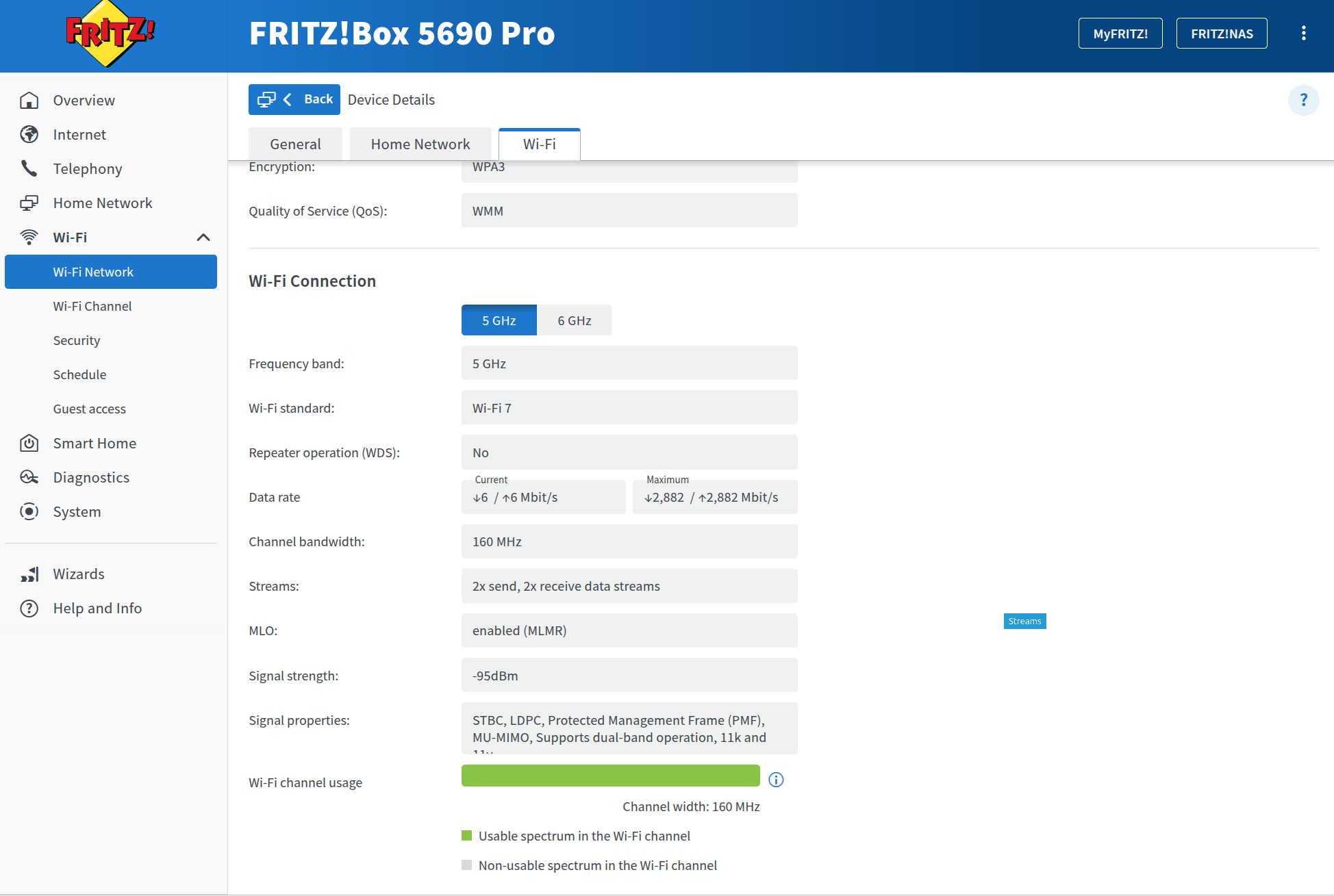
The idea is that most prefer to have the former, but will end up with the latter. That’s because the majority of Wi-Fi 7 clients on the market support only eMLSR. The reason is the technological complexity: the adapter needs to be adjusted to support two radios transmitting at the same time with little interference between the two and by also taking into account the power consumption. The BE200 supports only eMLSR, but the MSI Qualcomm adapter does support MLMR, the issue is that it would not work with Linux.
I developed an allergy to using Microsoft products lately, so I had to rely on a custom-built driver patch to make it work. I didn’t have the means to confirm STR, but MLMR was definitely active, with both links transmitt ing and receiving data. And this is important because when you check the Test Lab, the performance is different. Yes, the throughput is generally very strong and the MSI seems to offer a better throughput in the 160MHz on each link configuration than the BE200. At the same time, the BE200 reaches farther and that’s due to its link switching abilities: it used 5GHz at 70 feet..
The Multi-Client Tests
For the multi-client tests, I ran the usual tests in order to have some basis for comparison with other previously tested devices, but I also included new behavior analysis such as five gaming clients, mixed household client behavior (including gaming, downloading, video streaming and VoIP). Check the data in the Test Lab.
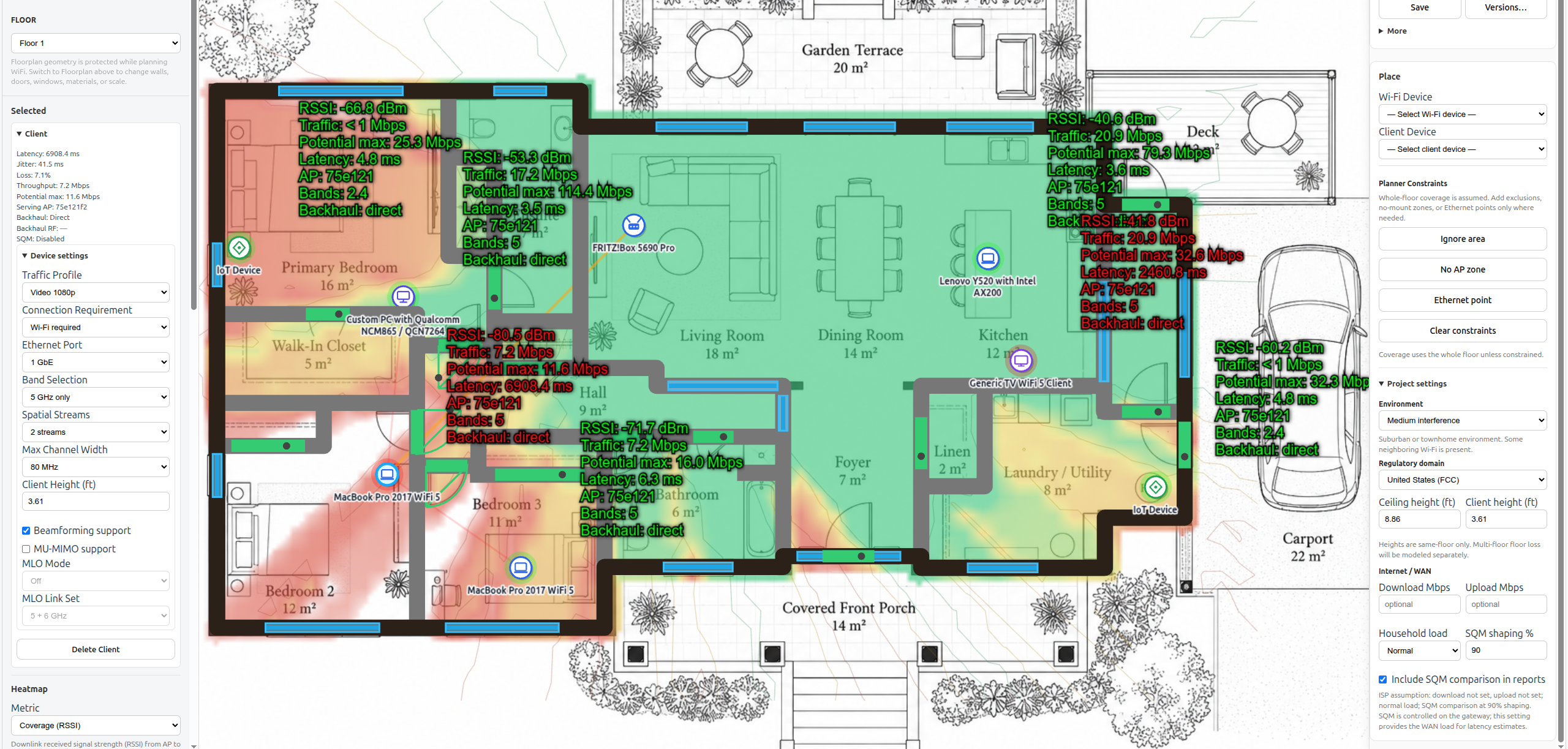
I also fed the much larger underlying test dataset which goes beyond the results shown here and in the Test Lab, into the Signal Wisp Wi-Fi planner. This way, the FRITZ!Box 5690 Pro’s measured behavior can be simulated across virtually any floorplan. The tool is not yet available to the public but do check the video review for a sneak peek on what to expect from the FRITZ!Box 5690 Pro.
The Thermal Management
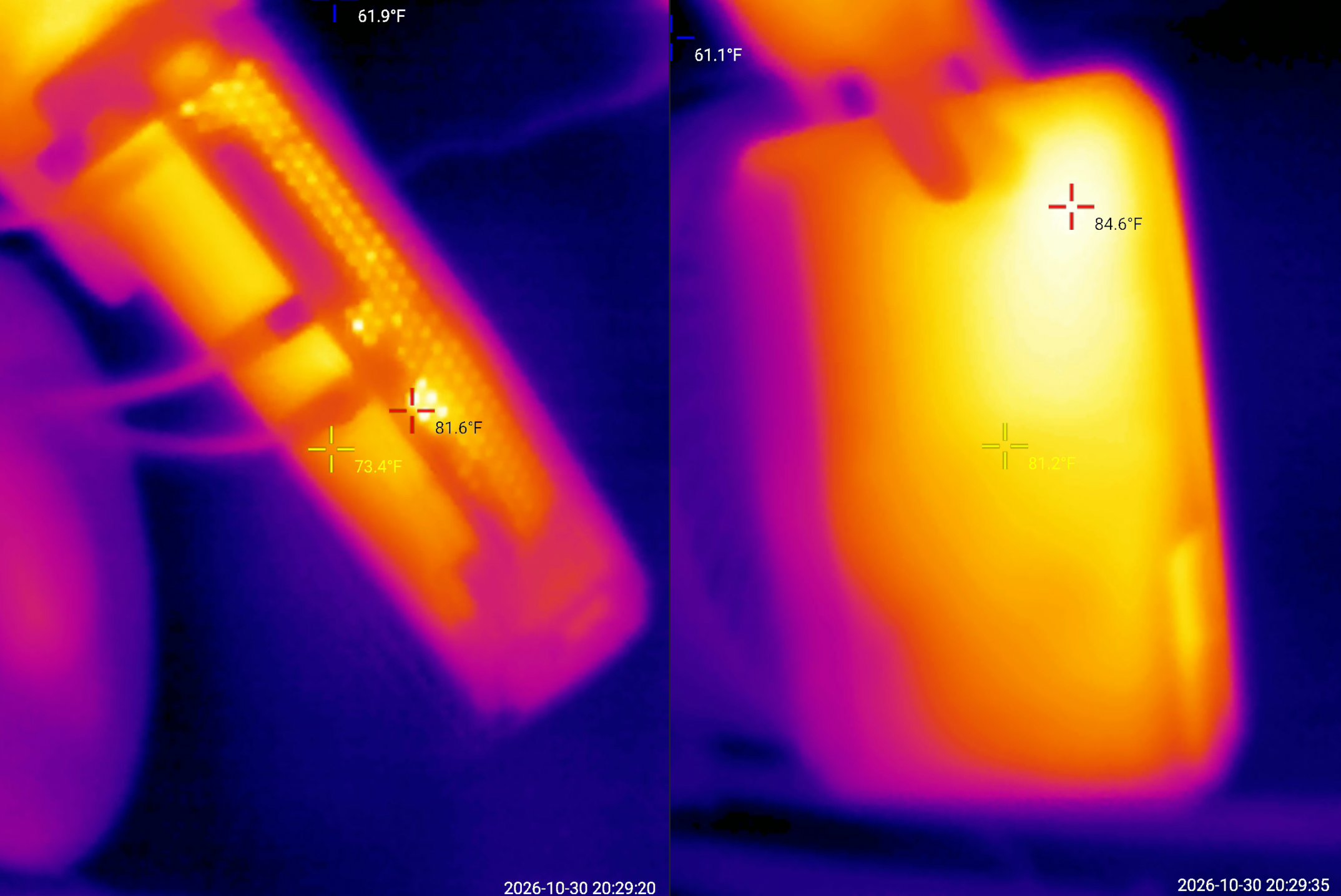
I know some other testers checked the thermal management, but I found that it’s not as useful to check it when the router is idle, but when the FRITZ!Box 5690 Pro needs to do some heavy lifting. So, immediately after I finished running the multi-client tests, I got to see how hot the case got. And it’s very reasonable, so the thermal management is very well done.
The FRITZ!Box 5690 Pro Teardown
As usual, I also opened the FRITZ!Box 5690 Pro to see its inner bits and the teardown process is fairly easy and straightforward as long as you have the right screwdriver. The outer plastic shell needs a bit of force to disconnect and then we get to see the PCB with the main components mostly on one side.
Hardware Comparison
| FRITZ!Box 5690 Pro | Zyxel NWA130BE | Ubiquiti U7 Pro | EnGenius ECW536 | |
| CPU | quad-core 2.2GHz Qualcomm IPQ9574 (A73) | quad-core 1.5GHz Qualcomm IPQ5322 (Cortex-A53) | quad-core 1.5GHz Qualcomm IPQ5322 | quad-core 2.2GHz Qualcomm IPQ9570 (A73) |
| RAM | 2GB (2x Nanya NT5AD512M16C4-JR) | 1GB Micron 3UR77 D8BPK (DDR4) | 1GB Samsung (SEC 340 K4A8G165WC) | 2GB (2x Nanya NT5AD512M16C4-HRI) |
| Storage | 4GB eMMC THGBMTG5 D1LBAIL | 512MB (MXIC X233662 MX35UF46E4AD-241)/ 16MB NOR flash (MXIC MX25U12832F) | 512MB KINGSTON (2401032 EMMC04G-M627) | 512MB NAND (MXIC MX35UF4GE4AD) |
| Switch | Qualcomm QCA8081 Ethernet PHY | Qualcomm QCA8385 Ethernet PHY | Qualcomm QCA8081 Ethernet PHY | 2x RealTek RTL8261N N2068H3 |
| 6GHz Radio | Qualcomm QCN6274 802.11be 4×4 | Qualcomm QCN6274 802.11be 2×2:2 | Qualcomm QCN6274 802.11be 2×2:2 | Qualcomm QCN6274 802.11be 4×4:4/td> |
| 5GHz Radio | Qualcomm QCN6224 802.11be 4×4 | Qualcomm QCN6274 802.11be 2×2:2 | Qualcomm QCN6274 802.11be 2×2:2 | Qualcomm QCN6224 802.11a/n/ac/ax 4×4 4×4:4 |
| 2.4GHz Radio | Qualcomm QCN5024 802.11b/g/n/ax 4×4 | Qualcomm IPQ5322 802.11b/g/n/ax 2×2:2 | Qualcomm IPQ5322 802.11b/g/n/ax 2×2:2 | Qualcomm QCN6214 802.11b/g/n/ax 4×4:4 |
The Software Experience
Regarding the software, the developers went for a simple, minimalist layout and in a sense, it appears to be tailored as a perfect fit for ISPs to offer the FRITZ!Box 5690 Pro on their higher tiers. The setup process is easy and painless, but it does walk a fine line between appearing to provide some configuration flexibility and holding your hand tight. The Internet tab does provide a healthy number of options and status options, including NAS settings under Permit Access.
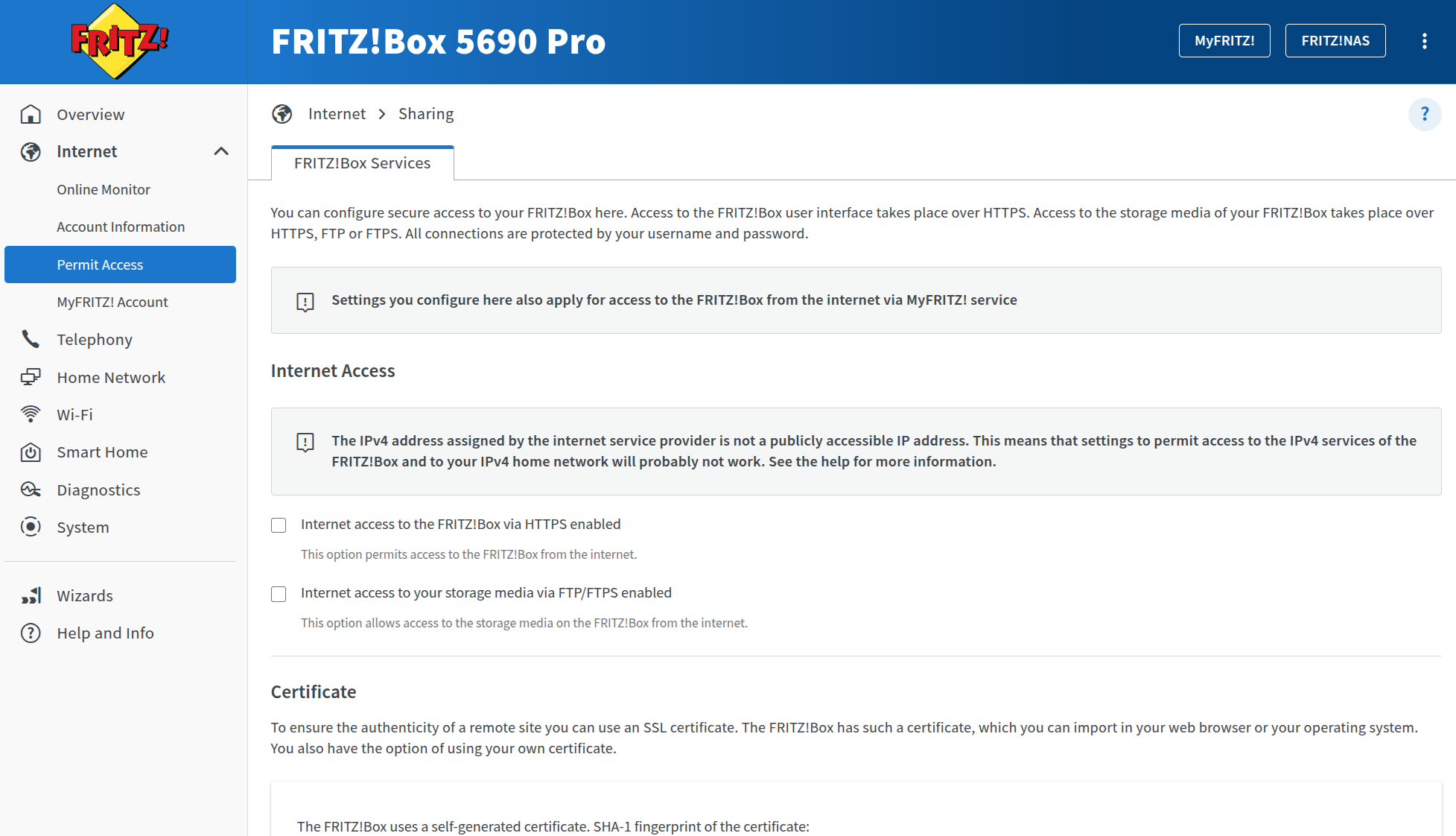
The Telephony tab is very comprehensive, something that small and medium businesses will greatly appreciate and then we get to the Home Network and the WiFi sections. I see that there is support for Mesh which I appreciate since you get to use multiple FRITZ!Box routers to cover a larger house or office. And then we get to Wi-Fi where we can set up the usual things minus the channel bandwidth.
The developers seem to be very confident in their automatic algorithm because it’s a core part of the Wi-Fi experience where it analyzes the interference, the other networks in the vicinity and automatically assigns clients to their appropriate networks, and changes the channel and channel bands automatically. Which is fine for most people. And yes, removing some settings that people could find confusing may seem sensible, but then the troubleshooting becomes an unnecessary complication, so instead of making matters clearer in case something goes wrong, the complexity of solving it is pushed onto you, the user. And for no good reason, just add back the channel bandwidth switch.
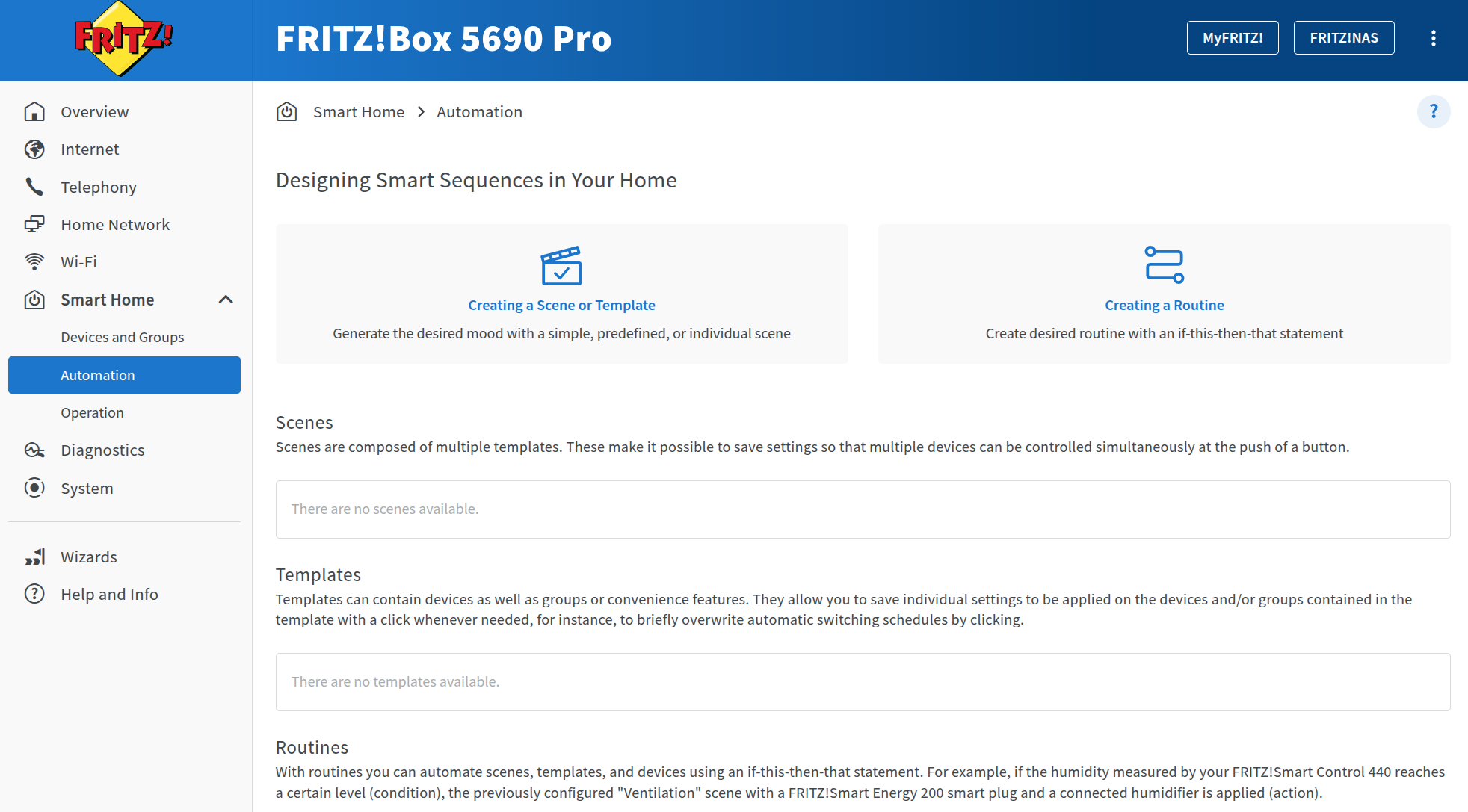
I also need to mention the Smart Home automation support where you can add DECT or ZigBee devices from other brands as well. And also, there’s the Diagnostics section which gets divided into Function and Security (and there is quite a lot of data to check if something goes wrong).
Conclusion
If you’re in Europe and have a good fiber plan, then there is a good chance that the ISP will offer the FRITZ!Box 5690 Pro as the modem router. And it’s a good idea to accept because it is a powerful device with a good range especially on the 5GHz radio. If you have newer devices with a WiFi 7 adapter, then the 6GHz radio will show you what good throughput looks like. And that’s besides all the extra features that not only allow the router to act as a smart home hub, but also as an all-rounder SMB solution.
FRITZ!Box 5690 Pro
Pros
- Fast close-range 6 GHz performance
- Substantial MLO gains with the MSI/Qualcomm setup,
- Integrated DECT and Zigbee
- Strong 2.4 GHz coverage
- Versatile broadband connectivity
Cons
- Only one 2.5 GbE port, shared between WAN and LAN
- Poor direct control over channel widths
- Wi-Fi 7 is limited to 5 and 6 GHz
Views: 12