I just finished another small ESP8266 project, and although the result is not particularly complicated, the development experience was interesting enough to make it worth writing about.
The hardware is about as simple as it gets: an inexpensive ESP8266 NodeMCU board, a small (again inexpensive) 128×64 SSD1306 OLED display and a single WS2812B RGB LED.
The job of the device is to sit there continuously pinging an IP address and giving me an immediate indication of what is happening.
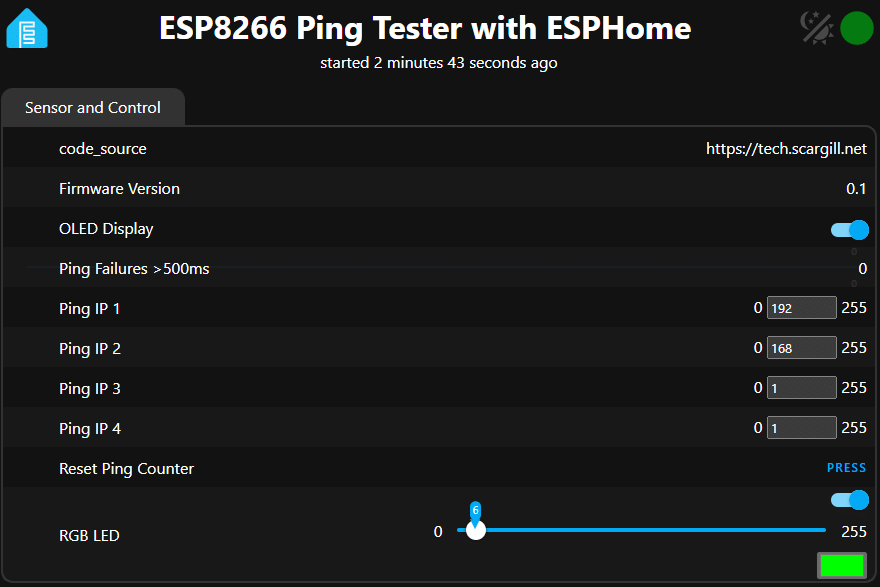
The OLED displays the target IP address, current ping result and latency, while the RGB LED provides a quick visual indication of performance. There is also a heartbeat indicator, a persistent count of pings that take more than 500ms, a reset button and a web interface to change the target IP address.
And here is what I found most interesting: The ESP8266 only uses about 41% of its RAM and 43% of its flash. That is after adding all this functionality.
What the little tester does
The finished unit currently offers:
- Continuous ping testing every five seconds
- User-selectable IP address
- OLED display shows the current result
- Ping latency in milliseconds
- Different RGB colors according to latency
- A heartbeat indicator
- A persistent number of pings that take more than 500ms
- A web UI
- Persistent IP address settings
- A persistent OLED On/Off setting
- A web UI button to reset the failure counter
- Startup indication so that the first failed ping is not falsely reported as an error
- Correct handling of complete ping errors
- Non-volatile storage of important settings
The OLED is intentionally updated every two seconds instead of every second. I discovered during development that the hammer of the small ESP8266 with display updates could interfere with Wi-Fi authentication. Two seconds was a good compromise.
The RGB LED is also useful because I can look at the device without looking at the display. Green means the ping is good, moving through yellow-green and yellow as latency increases, with orange for bad latency and red for a complete failure.
The ESPHome advantage
This is where things get interesting: I’ve done a lot of work with Tasmota over several years (it’s all in the blog), and I still use it extensively, although recently I’ve done projects with almost every variation of ESP23 out there.
Tasmota is an excellent piece of software, especially if you want to turn an ESP into a network-connected switch, sensor, or other conventional IoT device, but I also found myself running into its limitations when trying to make a small device do something outside of the standard Tasmota model.
In particular, I previously found myself running out Rules.
You can get an extraordinary amount out of Tasmota rules, but once a project gets reasonably complicated, the rules language starts to become a project in itself.
Then it’s Berry: Berry is powerful and can solve problems that are difficult or impossible with ordinary Tasmota rules. But at the moment I don’t easily configure a device anymore. I’m effectively programming a different language within Tasmota and for some work I’ve also ended up needing a special Tasmota build that includes additional functionality – including ping support.
This all works, but it gets rather more complicated than I really wanted for a small network tester.
Take a look at my previous attempts at ping testing with Tasmota and both ESP8266 (custom build) and ESP32.
ESPHome felt much more natural
With ESPHome I was able to describe most of the device in YAML and then use ordinary C++ where I actually customized something.
The ping library is included as an Arduino library:
libraries:
  - ESPping@1.0.5
and the actual ping operation is normal C++:
IPAddress target(
  id(ip1),
  id(ip2),
  id(ip3),
  id(ip4)
);

if (Ping.ping(target, 3)) {
  id(ping_ms) = (int) Ping.averageTime();
}
That’s a big difference in mindset: I’m not trying to convince a device designed around a predefined feature set to do something it wasn’t really meant to do…
The OLED is similarly simple. ESPHome already knows how to drive the SSD1306, so the custom part is simply what is drawn on the screen. The same applies to the WS2812B.
And the web interface, API, OTA updates, Wi-Fi configuration and Home Assistant integration all come with ESPHome.
The persistent settings were particularly useful
I wanted the ping target to survive a power outage, so instead of writing a full configuration system, I used persistent ESPHome globals for the four IP address octets.
So I can change: 192.168.1.1 to something like: 8.8.4.4 from the web UI and the setting survives a reboot.
The failure counter is also persistent. That means the little board can run for days or weeks (ptrf on UPS) and I can see how many measured pings have exceeded my 500ms threshold.
This is not just a ping display
One thing I deliberately built into the tests was a distinction between different types of failure: A failed ping during startup does not immediately result in a big red FAILED indication.
The device first displays: WRITE UP. If it has been successfully determined that the ping is working, subsequent errors are treated as genuine errors.
There is also an important difference between: PING FAILED in the: PING TOK>500ms
The persistent counter records only the last. That’s useful because a completely lost ping and a very slow but successful ping are different things when trying to diagnose a network.
And the memory usage? Are you ready?
This is probably the part that surprised me the most: After adding all this functionality, the ESP8266 build amounts to approximately:
41% RAM used in 43% flash used
That’s remarkably convenient for an ESP8266. I expected this little project to push the old chip a lot harder once the web UI, OLED, RGB LED, Ping library, persistent storage and Home Assistant API were all involved.
It didn’t. There is still a lot of space.
What about an ESP32-C3?
An ESP32-C3 would obviously be more capable hardware. You get a significantly more modern MCU architecture, significantly more processing capacity, more RAM and generally a lot more breathing room for a project like this.
If I were starting a new design and already had ESP32-C3 boards available, I wouldn’t hesitate to use one… but that’s actually part of the point of this experiment.
I don’t need anyone.
The humble ESP8266 does the job perfectly well.
For a device whose primary function is:
Wi-Fi → Ping something → show the result → blink an LED
the ESP8266 still quite adequate.
An ESP32-C3 would give me more room for future additions – maybe more sensors, a more sophisticated display, additional network tests or other functionality – but it wouldn’t make the current ping test noticeably better. The ESP8266 is already comfortable within its limits and I could add a lot more.
ESP8266 vs. ESP32-C3
For this particular application I would put it roughly like this:
| ESP8266 (NodeMCU type) | ESP32-C3 | |
|---|---|---|
| Ping test | More than adequate | Simply adequate |
| OLED | More than adequate | Simply adequate |
| WS2812 | More than adequate | Simply adequate |
| Web UI | Works well | More headroom |
| Home Assistant API | Works well | More headroom |
| RAM | 41% used in this project | Many more available |
| Flash | 43% used in this project | Many more available |
| WiFi | 2.4 GHz | 2.4 GHz |
| Future expansion | reasonable | Much better |
| costs | Extremely cheap | Very cheap |
| Existing stock | I already had them | Also readily available |
So if you have an old NodeMCU type ESP8266 sitting in the drawer, don’t throw it away. It can still do a lot.
The bigger lesson
For me, the interesting part of this project is not the ping tester. It is that ESPHome has blurred the line between Configuration in the programming in a very useful way.
I can use YAML for all the things that ESPHome already understands:
- WiFi
- Web UI
- API
- OTA
- GPIO
- LEDs
- shows
- sensors
- persistent values
And if I need something that ESPHome doesn’t directly provide, I can fall back to plain C++.
That’s significantly more convenient than trying to squeeze an increasingly complicated application into Tasmota rules, then moving to Berry, and sometimes discovering that I need a specially compiled Tasmota build to get the functionality I want.
Tasmota remains an excellent tool – and the timeline of continued development speaks volumes, and for many ESP projects I would still choose it, but for this particular job, ESPHome was simply the more comfortable development environment.
And the fact that the finished application sits approx 41% RAM and 43% Flash on an ESP8266 suggests that there is still a lot of life left in these old boards.
Final notes
Why have an on-off switch for the OLED? Unlike the RGB LED that should run for years, these small OLEDs have an on-life measured in months (bitter experience). Also one last note about the NodeMCU board – it makes a handy base for the OLED display and I just have a number of individual ws2812 LEDs on small boards that also easily stick to the remaining space on the NodeMCU. My only gripe is the old-style MicroUSB connectors but you can’t have everything… before today’s ridiculous EU duty on small packages from AliExpress – I think I paid 1.50 euros for the NodeMCUs.
Also – note that instead of the single set of secrets for IP address in the code below – or the two IP addresses max for Tasmota, I have included all my SSIDs (big house – shared password as it happens). Also note that I’ve added a version number in the code that appears in the WebUI and I’m still at 41% and 43% usage respectively – I could expand on this forever.
The hardware is also almost ridiculously cheap. I paid less than €2 each for my NodeMCU boardsand even less so for the Wemos D1 boards I’ve used elsewhere here. The price you see for small AliExpress purchases in Europe can be significantly higher when adding VAT and the various costs associated with importing small individual purchases, but the underlying hardware is amazingly inexpensive.
And now, the actual code: Simply change IP reference if you don’t start at 192.168.1.1 internally
substitutions:
  device_name: oled-test
  friendly_name: ESP8266 Ping Tester with ESPHome
  device_version: "0.1"
  code_source: "

esphome:
  name: ${device_name}
  friendly_name: ${friendly_name}

  libraries:
    - ESPping@1.0.5

  includes:
    -

  on_boot:
    priority: -100
    then:
      - light.turn_on:
          id: rgb_led
          red: 100%
          green: 40%
          blue: 0%

esp8266:
  board: nodemcuv2
  restore_from_flash: true

logger:
  level: DEBUG

api:

web_server:
  version: 3

ota:
  - platform: esphome

wifi:
  networks:
    - ssid: !secret wifi_ssid
      password: !secret wifi_password
    - ssid: !secret wifi_ssid2
      password: !secret wifi_password
    - ssid: !secret wifi_ssid3
      password: !secret wifi_password
    - ssid: !secret wifi_ssid4
      password: !secret wifi_password
    - ssid: !secret wifi_ssid5
      password: !secret wifi_password

  power_save_mode: none
  post_connect_roaming: true


  ap:
    ssid: "${device_name} Fallback"
    password: "12345678"

captive_portal:

preferences:
  flash_write_interval: 10s

# ==================================================
# GLOBALS
# ==================================================

globals:

  - id: ping_state
    type: int
    restore_value: no
    initial_value: "0"

  - id: ping_ms
    type: int
    restore_value: no
    initial_value: "0"

  - id: heartbeat
    type: bool
    restore_value: no
    initial_value: "false"

  # Persistent ping target IP
  - id: ip1
    type: int
    restore_value: yes
    initial_value: "192"

  - id: ip2
    type: int
    restore_value: yes
    initial_value: "168"

  - id: ip3
    type: int
    restore_value: yes
    initial_value: "1"

  - id: ip4
    type: int
    restore_value: yes
    initial_value: "1"

  # Persistent count of successful pings taking >500ms
  - id: failed_ping_count
    type: uint32_t
    restore_value: yes
    initial_value: "0"

# ==================================================
# FONT
# ==================================================

font:
  - file: "gfonts://Roboto"
    id: font_small
    size: 12
  - file: "gfonts://Roboto"
    id: font_heading
    size: 16

# ==================================================
# I2C OLED
# ==================================================

i2c:
  sda: D2
  scl: D1

# ==================================================
# OLED DISPLAY
# ==================================================

display:
  - platform: ssd1306_i2c
    model: "SSD1306 128x64"
    address: 0x3C
    update_interval: 2s

    lambda: |-

      // OLED disabled
      if (!id(oled_display).state) {
        it.fill(COLOR_OFF);
        return;
      }

      // Header
      it.print(0, 0, id(font_heading), "PING TEST");

      // Heartbeat
      if (id(heartbeat)) {
        it.print(118, 0, id(font_small), "*");
      }

      // Ping status
      if (id(ping_state) == 0) {

        it.print(0, 20, id(font_small), "SETTING UP");

      } else if (id(ping_state) == 1) {

        it.printf(
          0, 20,
          id(font_small),
          "OK   %d ms",
          id(ping_ms)
        );

      } else {

        if (id(ping_ms) > 500) {

          it.printf(
            0, 20,
            id(font_small),
            "FAILED %d ms",
            id(ping_ms)
          );

        } else {

          it.print(0, 20, id(font_small), "FAILED");

        }
      }

      // Target IP
      it.printf(
        0, 36,
        id(font_small),
        "%d.%d.%d.%d",
        id(ip1),
        id(ip2),
        id(ip3),
        id(ip4)
      );

      // Persistent failure counter
      char fail_text[20];
      sprintf(fail_text, "Failures: %d", (int) id(failed_ping_count));

      int fail_width;
      int x_offset;
      int baseline;
      int height;

      id(font_small).measure(
        fail_text,
        &fail_width,
        &x_offset,
        &baseline,
        &height
      );

      it.print(
        128 - fail_width,
        50,
        id(font_small),
        fail_text
      );

# ==================================================
# RGB LED
# ==================================================

light:
  - platform: neopixelbus
    id: rgb_led
    type: GRB
    variant: WS2812
    pin: D6
    num_leds: 1
    name: "RGB LED"
    gamma_correct: 1.0

    initial_state:
      brightness: 26%

    restore_state: all

text_sensor:
    - platform: template
      name: "Firmware Version"
      lambda: |-
        return {"${device_version}"};
      update_interval: 60s

    - platform: template
      name: "code_source"
      lambda: |-
        return {"${code_source}"};
      update_interval: 60s
# ==================================================
# PING IP ADDRESS
# ==================================================

number:

  - platform: template
    name: "Ping IP 1"
    id: ping_ip1
    min_value: 0
    max_value: 255
    step: 1
    mode: box

    lambda: |-
      return id(ip1);

    set_action:
      - lambda: |-
          id(ip1) = (int)x;

  - platform: template
    name: "Ping IP 2"
    id: ping_ip2
    min_value: 0
    max_value: 255
    step: 1
    mode: box

    lambda: |-
      return id(ip2);

    set_action:
      - lambda: |-
          id(ip2) = (int)x;

  - platform: template
    name: "Ping IP 3"
    id: ping_ip3
    min_value: 0
    max_value: 255
    step: 1
    mode: box

    lambda: |-
      return id(ip3);

    set_action:
      - lambda: |-
          id(ip3) = (int)x;

  - platform: template
    name: "Ping IP 4"
    id: ping_ip4
    min_value: 0
    max_value: 255
    step: 1
    mode: box

    lambda: |-
      return id(ip4);

    set_action:
      - lambda: |-
          id(ip4) = (int)x;

# ==================================================
# PING FAILURE COUNTER SENSOR
# ==================================================

sensor:

  - platform: template
    name: "Ping Failures >500ms"
    id: failed_ping_counter_sensor
    accuracy_decimals: 0
    update_interval: 5s

    lambda: |-
      return (float) id(failed_ping_count);

# ==================================================
# OLED ON/OFF SWITCH
# ==================================================

switch:

  - platform: template
    name: "OLED Display"
    id: oled_display

    restore_mode: RESTORE_DEFAULT_ON

    optimistic: true

    turn_on_action:
      - lambda: |-
          // OLED enabled

    turn_off_action:
      - lambda: |-
          // OLED disabled

# ==================================================
# RESET PING COUNTER
# ==================================================

button:

  - platform: template
    name: "Reset Ping Counter"
    id: reset_ping_counter

    on_press:
      - lambda: |-
          id(failed_ping_count) = 0;

      - component.update: failed_ping_counter_sensor

# ==================================================
# PING TEST
# ==================================================

interval:

  - interval: 5s

    then:

      - lambda: |-

          id(heartbeat) = !id(heartbeat);

          IPAddress target(
            id(ip1),
            id(ip2),
            id(ip3),
            id(ip4)
          );

          if (Ping.ping(target, 3)) {

            id(ping_ms) = (int) Ping.averageTime();

            bool was_running = (id(ping_state) != 0);

            // Count only successful pings taking longer than 500ms.
            // Do not count the first successful ping after startup.
            if (was_running && id(ping_ms) > 500) {
              id(failed_ping_count)++;
            }

            if (id(ping_ms) > 500) {
              id(ping_state) = 2;
            } else {
              id(ping_state) = 1;
            }

            auto call = id(rgb_led).turn_on();

            bool local_target =
              (id(ip1) == 192 &&
               id(ip2) == 168);

            if (local_target) {

              if (id(ping_ms) < 20) {

                call.set_rgb(0.0, 1.0, 0.0);

              } else if (id(ping_ms) < 50) {

                call.set_rgb(0.5, 1.0, 0.0);

              } else if (id(ping_ms) <= 100) {

                call.set_rgb(1.0, 1.0, 0.0);

              } else {

                call.set_rgb(1.0, 0.4, 0.0);
              }

            } else {

              if (id(ping_ms) < 75) {

                call.set_rgb(0.0, 1.0, 0.0);

              } else if (id(ping_ms) < 125) {

                call.set_rgb(0.5, 1.0, 0.0);

              } else if (id(ping_ms) <= 175) {

                call.set_rgb(1.0, 1.0, 0.0);

              } else {

                call.set_rgb(1.0, 0.4, 0.0);
              }
            }
            call.perform();

          } else {

            // Complete ping failure does NOT increment the counter.

            if (id(ping_state) == 0) {

              // Still starting up.
              // Remain in SETTING UP state.

              auto call = id(rgb_led).turn_on();
              call.set_rgb(1.0, 0.4, 0.0);
              call.perform();

            } else {

              id(ping_state) = 2;
              id(ping_ms) = 0;

              auto call = id(rgb_led).turn_on();
              call.set_rgb(1.0, 0.0, 0.0);
              call.perform();
            }
          }