There are many reasons why you might want to dig up and recover apps you’ve recently deleted from your phone. Maybe in the process of cleaning your screen, you accidentally deleted one, or maybe your storage was just too full. Maybe someone with access to your device installed and then deleted an app on their own. Whatever the case, learning how to view and recover recently deleted apps can save you time and headaches.
We’ll take you through a simple, step-by-step process that uncovers and recovers recently deleted apps on your iPhone and Android devices, from setting up a device to using third-party tools. Let’s begin.
Why do people delete apps?
Discussing these ways to recover apps in advance, there is a need to explain why they are usually deleted in the first place. Here are the most common reasons:
An example would be a person removing some of the unused applications; This is to free up space while cleaning the iPhone storage. iPhone users often tap “Offload Unused Apps”, which removes unused apps but saves the data.
Software bugs or malware: Malware can delete applications, launch unwanted applications automatically, or cause system errors resulting in the uninstallation of apps from an Android device.
Upgrades on mobile phones: When transferring files to a new mobile phone, some applications are not transferred due to compatibility or connectivity issues in the process.
Random deletion: Especially on Android, where it’s easy to accidentally delete apps while rearranging your home screen.
Now that we know why apps are lost, let’s see how to recover deleted apps for iPhones and Android devices.
Can a cleaner app really speed up your iPhone?
How to view previously deleted apps on an iPhone and iPad?
First stop: the App Store. Apple keeps track of every app you’ve downloaded over your lifetime via purchase history associated with your account, long after you’ve deleted an app. Here you can find recently deleted apps:
1. App Store-find my purchase history
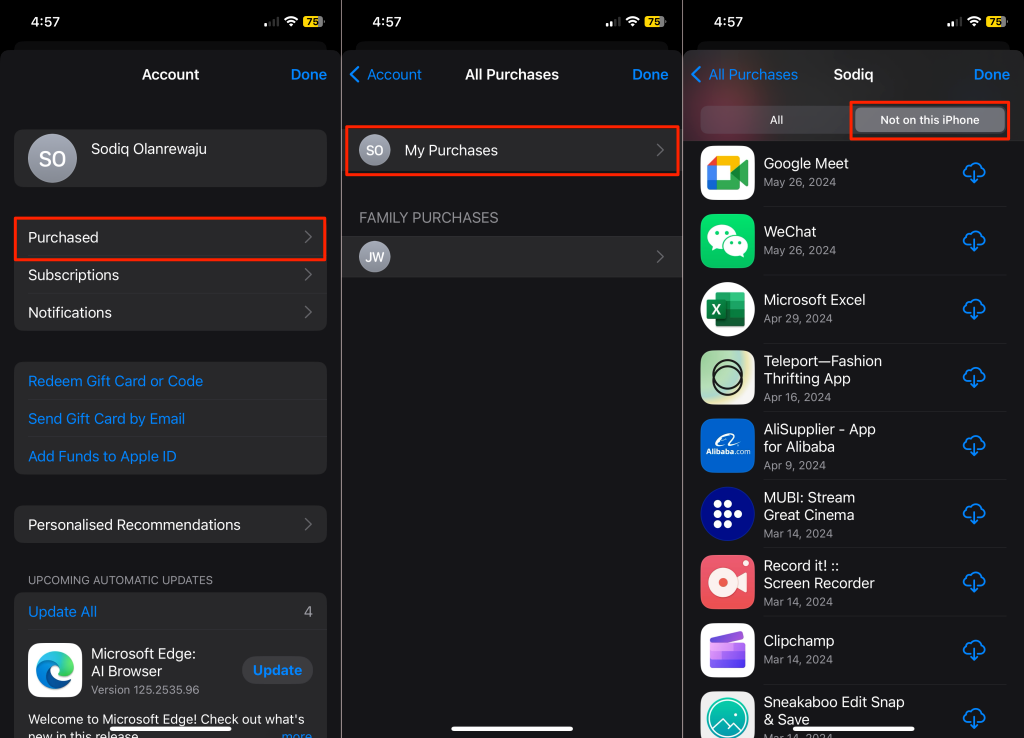
- Open the App Store.
- Click on your profile picture on the top right.
- Choose buy. If you have Family Sharing, you must first tap on My Purchases.
- In the “Not on this iPhone/iPad” tab, you will find applications that you have deleted but remain available for download through your purchase history.
2. Find hidden apps
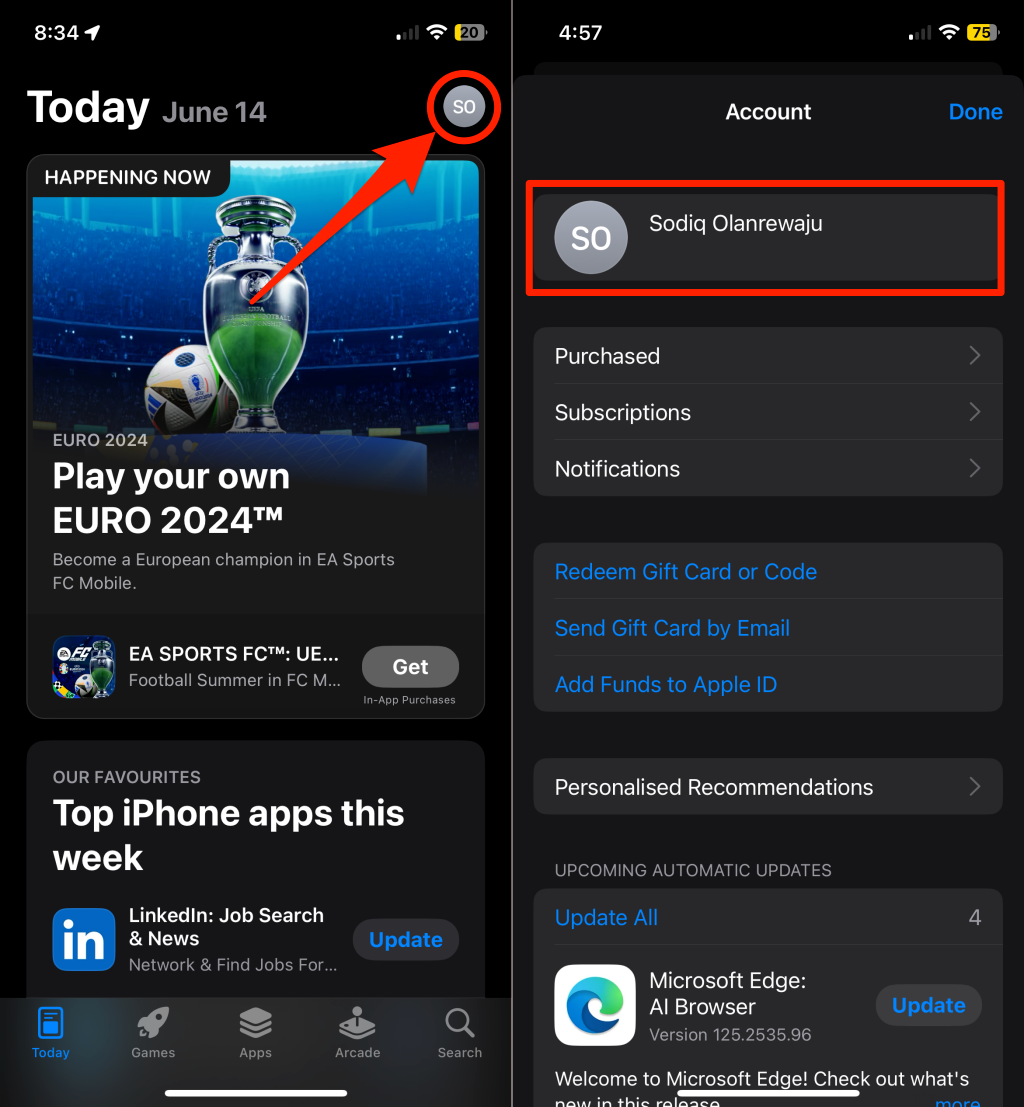
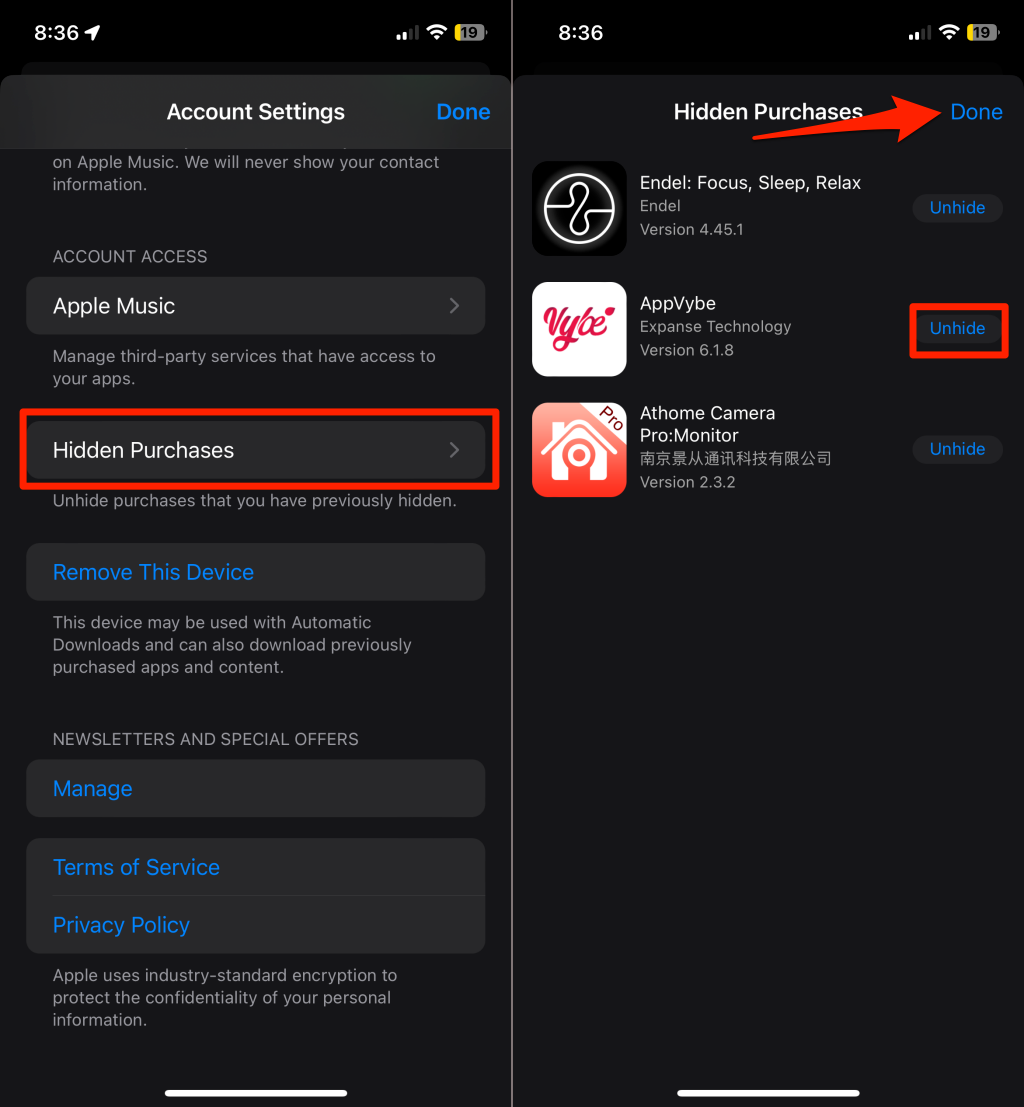
If the app should be hidden from your purchase history, you can recover it:
- Go to your profile in the App Store.
- Click on the name or Apple ID at the top of the window.
- Scroll down to Hidden Purchase.
- Find the app you want to add back, tap the Unhide icon, and it will reappear in the list of your purchased apps.
- If you have located a deleted app in your purchase history or in your hidden purchases, you can click the download icon to reinstall it.
3. Restore app data
While installing an app is easy, getting data from that application is another matter. Apps, such as WhatsApp and Snapchat, have pre-installed backup systems, so they can be automatically reset by the application. For some of them, however, if their data is lost, you need to restore your phone from iCloud or iTunes.
8 Hidden iPhone Tricks That Will Make Your Life Easier
How to access recently uninstalled applications on Android?
Android users have other means of recovering deleted apps, most of which can be accessed through the Google Play Store. Here’s how to find and restore recently deleted apps:
1. Install Google Play Store app
- Open Google Play Store.
- Tap on the profile picture on the top right.
- Click on Manage apps & device.
- Go to the Manage tab, check Installed, then click Do not install now. All applications that appear there are those that are not on the device.
2. Recently deleted apps filter
Android doesn’t have a direct delete history; However, you can filter applications based on the date of installation or uninstallation.
- Tap on Not Installed List. Select the filter icon.
- Sort by recently installed: Show applications by their last installation date.
- This will give you a general idea of which applications have been removed recently, although it will not show you the date the application was removed.
3. Restore Deleted Apps
Select an app and tick the box next to it; now click download to reinstall this app. Actually, you can also select multiple apps for a multiple restore.
How to see recently deleted applications in Samsung phone
If you have a Samsung, you’ll find pre-installed apps in the Galaxy Store – which may have been uninstalled but can no longer be found in the Google Play Store. Some of the apps that are missing can be found by the Samsung apps by accident.
- Open Galaxy Store now.
- Tap the menu icon in the lower right corner.
- Tap My Apps, then tap the Apps tab.
- Tap the filter icon and disable Show installed apps to show only those applications that have been removed from your phone.
- Just like with the Google Play Store, a click on the download icon restores all apps deleted from the Galaxy Store.
Can you see if someone is checking your location on an iPhone?
Use third-party apps to track recently removed apps
Both Google Play and the App Store track downloads and deletions; however, it does not always log an uninstall. If you ever need to, especially if you use Android, you may want to track this information through third-party app management software.
One of the most used utilities among Android users is the App Manager, developed by AndroidDeveloperLB. This app lets you track installed and uninstalled applications for an even more comprehensive understanding of your recent activities.
How to use the App Manager in the Google Play Store
Follow the steps below to use the App Manager on Google Play:
- Launch the app and accept all the necessary permissions.
- Start the app and tap on the menu button.
- Select Removed Apps to see a list of all recently removed apps.
- Click the filter icon and then sort the list by deletion time to view the most recent deletions.
- From here, you just type your way to install any application from the Google Play Store.
How to record screen on iPhone 13?
How to recover recently deleted apps on Android and iPhone
Very often, restoring deleted apps is as easy as starting from scratch again from your favorite app store.
For Android: Open the Google Play Store. Then go to the Not Installed tab under the Manage Apps category. Select the Restore checkbox next to any applications you want to restore. Press Download.
For iPhone users: Launch the App Store. Go to your shopping list. Click the iCloud icon next to the app you want to reinstall. In case your app was sideloaded or removed from the third-party store, it requires reinstallation in your device with an original APK file.
Where to find clipboard on iPhone?
conclusion
You can recover accidentally deleted apps or just curious about what is deleted from your device. Android and iPhone present it very easy to track and recover the apps. With the App Store and Google Play Store, you can check the apps that no longer reside on your device and restore them effortlessly. Through third-party apps, Android users can know how many numbers of their contacts they have previously deleted, but iPhone users can check their purchase history, including hidden purchases. The next time you wonder where your favorite app has gone, you’ll know exactly how to find and recover it – no need to panic!