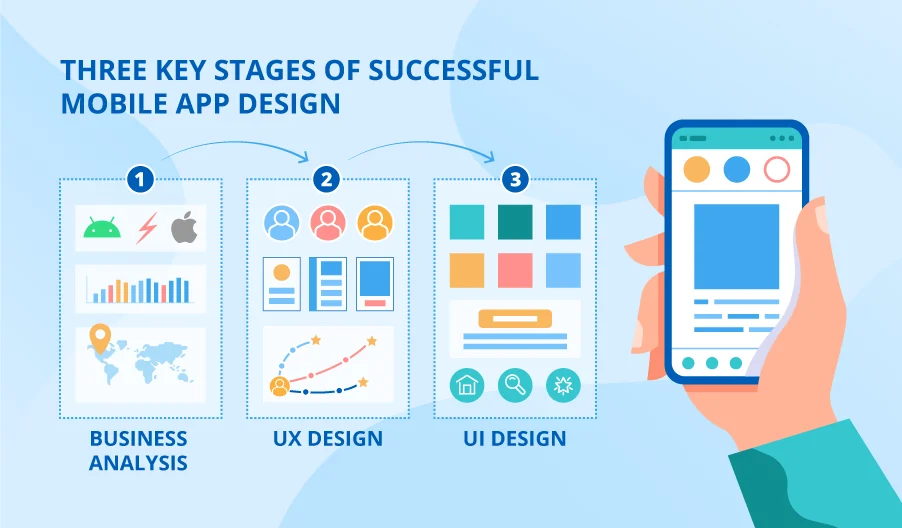
Editor’s note: In the article, Anastasia shares what specific actions contribute to the success of the 3 stages of mobile application design and points out the decisions your project team is expected to make. ScienceSoft specializes in UX and UI design for demanding industries, including healthcare, insurance, and investment, and guides clients through every stage of mobile app design.
Mobile app design can appear extremely vague and pose a lot of questions to businesses considering asking for it. “What are the steps? What are the artifacts? How many people will be involved, and what will my role in it?”
In this article, I answer all these questions and more as I explain what lies behind each of the three main stages of mobile application design.
1. Business analysis
At the first stage of any mobile app development project, you need to define the target platform (iOS or Android or both), the development method and the functional requirements. Although this sounds too techy for a start, I can’t stress enough how difficult further steps are depending on the decisions you make at this point. To get a load of your mind and make a calculated and confident choice, I recommend completing this step together with a professional business analyst who has a focus on mobile design.
To decide on the platformYou need to define your target audience and analyze their platform preferences, which depend on geography and income. For example, if you are targeting an average US user, you can win the audience with only one iOS version. But if you want your app to go global, you won’t succeed without an app version for Android, which is overwhelmingly popular in Europe.
Once you have defined the platform(s) you need to reach, you should de development approach. Your options here are:
- Native development – UX and UI design of the app is adapted to the original guidelines of the platform, it looks and feels exactly like any factory app for this platform. This development option entails high implementation costs, but guarantees high user satisfaction.
- Hybrid development – UX and UI design is identical on different platforms and may therefore feel unnatural to some users at first. Implementation costs are almost 2x lower than with native development.
- Cross-platform development – UX and UI design provides an almost native look and experience on either platform. This option requires about 70% of the native development budget.
Define functional requirements is the core objective of business analysis. The requirements help build a detailed concept of your future app and describe all the tasks it handles in the form of a project specification. Without this document, UX designers cannot even begin their work.
2. UX design
Once you have defined the functional requirements of your future app, your vendor can proceed from the selection to the actual design action. The first stage is user experience design which is usually performed by a UX expert in collaboration with a business analyst.
The team works to create fictional profiles of the future users of your mobile app (aka persons) and their interaction patterns with the application (aka User scenarios). Although it depends on the functionality of your app, mobile app design usually requires 5-7 personas with at least 2 different user scenarios created for each.
Both personas and scenarios help a UX designer understand what goals users want to achieve while using your app. This understanding, in turn, allows the designer to give the detailed form of wireframes, either hand drawn or digital, for interaction flow between a user and the mobile app.
The finished UX wireframes – about 40 mockups on average – go through rigorous, multi-round UX testing. Aimed at getting early feedback, testing makes it possible to eliminate UX issues while still being cheap to fix. I also advise you (or someone from the project team on your side) to participate in this test to see the first results for yourself.
3. UI design prototyping
UX wireframes – which usually look like monochromatic schemes – are the basis for the work of user interface designers. By combining your company’s brand book, platform-specific guidelines (the big ones are Google’s Material Design and/or Apple’s Human Interface), and the latest mobile design trends, transform the lo-fi wireframes into a colorful, hi-fi digital prototype. If you already have a web application with a similar functionality pack, UI designers make sure that the look of the mobile app is consistent with that of the web app.
Once the prototype is complete, the UI team will contact you and ask for your review. Be sure to share all your thoughts and doubts on this point. Even if some major fixes or additions end up being expensive, they will still be at least 2 times cheaper than they are later, in the form of code.
Only after your project team has approved the final version of the UI prototypes, the design is complete, and you can safely proceed to development.
Don’t let hesitation slow down your design project
Although I have covered the most common choices and actions involved in the mobile app design process, each project has its own specifics that raise more questions and require more decisions on your part. If you feel like these decisions cause uncertainty that keeps you from launching your mobile app development project, don’t hesitate to reach out to our mobile designers for a consultation.