Introduction
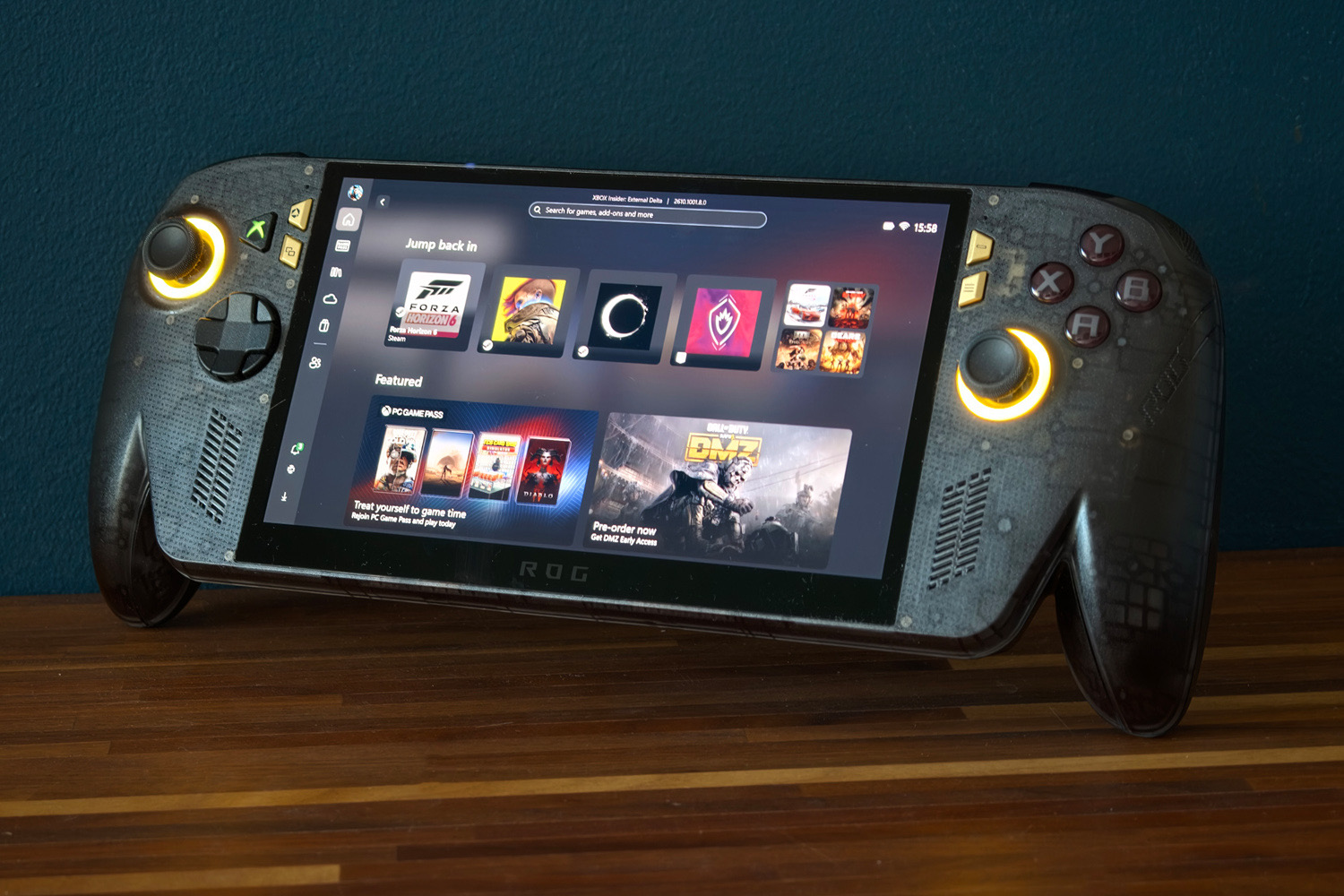
As anniversary presents to yourself go, the ROG Xbox Ally X20 is truly something special. The Xbox-badged, Asus-built gaming handheld marks two decades of the Republic of Gamers sub-brand with a slick new semi-transparent case, some fettled controls, and finally – finally – adds an OLED display.
Underneath it has essentially the same hardware as the regular Asus Xbox ROG Ally X, headlined by an AMD Ryzen AI Z2 Extreme chipset. That made the X20’s original special anniversary bundle rather tough to swallow at $2,499, even if that did come with a pair of Xreal augmented reality glasses in the box. Asus thankfully saw sense and gave us this standalone version – but at $1300/£1299, it’s still a significant step up from the $999/£899 Xbox Ally X.
After spending the last few weeks playing some of my favourite games, both old and new, I’m convinced the OLED upgrade is transformational. Whether it justifies the price hike, however, is another matter…
How has the Xbox ROG Ally X20’s design changed?

The X20 sits somewhere between the blacked-out Xbox Ally X and the all-white Xbox Ally, rocking a smoked black case that’s just translucent enough to give you a glimpse at the circuitry underneath. Asus has added a bit of bling up front with gold shortcut buttons next to the dedicated Xbox button – which now lights up in the console’s signature green hue. A 20th Anniversary holographic sticker on the rear acts as a reminder this isn’t your typical Ally. It’s an absolute stunner in person.
Yellow LEDs around the thumbsticks continue the flashy theme, but I wish they weren’t so obnoxiously bright; you only have four levels to pick from and even the lowest setting is a lot for night-time gaming.
I’m relieved Asus didn’t try to mess with the shape, as I thought it absolutely nailed it with the regular Xbox Ally X. Chunky controller grips either side of the 7.4in screen feel almost indistinguishable from an Xbox controller. A rubberised finish (cunningly embossed with hundreds of tiny ROG letters) should mean even the sweatiest of hands won’t accidentally slip off mid-game. I still think this is the comfiest handheld out there, despite its 756g heft.
Connectivity is identical, with two USB-C ports (one USB4, one USB3.2) on the top edge alongside a microSD card slot, 3.5mm headphone port, and a power button that doubles as a fingerprint sensor for biometric security. I found it got me past the Windows lock screen more consistently than the MSI Claw 8 EX AI+, which often needed me to reposition a digit before it recognised me.
How have the Xbox ROG Ally X20’s inputs been upgraded?

It might not look like a lot has changed with the controls, as they keep the same layout as previous Ally models. That includes the offset analogue sticks, eight-way directional pad, four face buttons, two bumpers, two triggers, and two customisable rear buttons. Only those coming from a Steam Deck might grumble about the lack of touchpads. For controller-based gaming, it really does nail the comfort factor.
Underneath, however, Asus has upgraded the joysticks to use magnetic TMR sensors, which completely eliminates the possibility of stick drift over time – a very welcome change for long-term ownership. The bumpers have been lightly reshaped to better fit your grip and the face buttons are more domed than before, making each press that little more reassuring your inputs have been registered.
I’m still a huge fan of the Impulse Trigger haptics, which are that bit more immersive than the regular force feedback found in other handhelds. You can really feel it through your fingers when firing up a Lancer assault rifle in Gears of War or flooring the accelerator in Forza Horizon 6.
The D-Pad has also gained a new party trick, lifting up and twisting to swap between 4- and 8-way inputs. I found the difference was subtle in action games that only look for four-way inputs, but had a much easier time landing special moves in fighting games.
These are all minor gains, but added together it makes for an altogether more enjoyable system to game on.
Is the Xbox ROG Ally X20’s OLED screen worth the cost of admission?

The X20’s 7.4in OLED screen really is the main event. Every previous Ally used LCD displays, leaving them in second place to rivals like the Steam Deck OLED for contrast, colour reproduction and black levels. Asus has redeemed itself here with a simply gorgeous panel, which doesn’t demand too much from the underlying hardware.
You’re getting a Full HD, 1920×1080 resolution, which looks that much sharper than the Steam Deck, along with a faster 120Hz for smoother gameplay. AMD’s FreeSync Pro variable refresh tech helps avoid stuttering in more demanding titles that hover closer to 40fps than 60fps. Response times are instant. Ghosting is non-existent.
HDR is now onboard too, with a peak brightness of 1400 nits giving compatible content some serious visual oomph. Cyberpunk 2077‘s neon signs glow with an intensity no previous Ally could manage.
Everything looks wonderfully detailed at the native resolution, viewing angles are fantastic and colours are gloriously rich. Forza Horizon 6’s Tokyo simply pops as you navigate wet city streets lined with blossoming sakura leaves. Contrast and shadow definition are fantastic: Resident Evil Requiem‘s opening levels are even more terrifying now the shadowy halls of the Rhodes Hill Chronic Care Center appears truly black.
An anti-reflective layer can’t completely cancel out reflections on the glossy screen, but it does help make darker levels that bit easier to navigate when playing in a well-lit space. It may not be quite as large as the Lenovo Legion Go 2‘s display, but I was just as absorbed once I started playing. Simply put, this is a wonderful way to game on the go.
I couldn’t detect any changes on the sound side of things, but that’s not a criticism as older Allys got plenty loud and used Atmos virtual upmixing to give a convincing sensation of stereo separation. While it’s no bass cannon, games never sound too shrill or hollow; explosions still have a good amount of impact and speech is perfectly clear. Headphones are still a sensible choice for full immersion, of course.
Is Asus’ software worth using?

A snazzy boot animation and custom wallpaper aside, there’s little here to mark the X20 out from any other ROG Xbox Ally. That means the same Full Screen Xbox Experience once you get past the initial Windows setup screens, and Asus’ Armory Crate SE software taking care of device settings and input modes. There’s very little reason to use it as a game launcher anymore, given how streamlined the Xbox UI feels on a small screen now, plus how nicely it plays with third-party launchers like Steam and the Epic Games store.
After finding MSI’s Claw 8 EX AI+ a little lethargic with settings changes, the X20 was a breath of fresh air. The menu appears the instant you ask for it and doesn’t pull focus from the game, so you don’t have to tap the touchscreen again when you close the menu. You can customise it to put important settings within easy reach; I quickly added a slider for the thumbstick LEDs, so I didn’t get blinded by them while playing in the dark.
Is Windows now as slick as SteamOS for handheld devices? Not quite. There are still reasons to head to the desktop, like operating system updates and new drivers, and you’re prompted to reboot the whole device when returning to the Xbox UI to free up precious system resources. You’ll never have issues with anti-cheat software refusing to play ball, though, which could be a big win depending on your choice of games.
Does the Xbox ROG Ally X20 deliver smooth gaming performance?

With Asus having used Ryzen hardware for every previous Ally and AMD still developing its next silicon generation, I wasn’t surprised to see the ROG Xbox Ally X20 arrive with the same internals as the regular Xbox Ally X. That means a Ryzen AI Z2 Extreme chipset with 8 cores and 16 threads, which can run in a 35W thermal window while on mains power. It’s paired with 24GB of RAM, which is shared with the onboard graphics, and has 1TB of on-board storage.
Desktop performance is unsurprisingly identical to the Xbox Ally X, which was only about 10% quicker than the original Asus Ally X’s Z1 Extreme chipset. Anyone planning to use this handheld as a mini Windows computer will find web browsing, image editing and general productivity perfectly responsive; it’ll be interacting with tiny UI elements on the small screen that slows you down rather than the hardware. Plugging into an external display makes a lot of sense here.
Intel’s Arc G3 Extreme has a small lead, mainly in multi-threaded tasks, but not enough that you’d notice within Windows.
| Asus ROG Xbox Ally X20 productivity benchmarks | |
| Geekbench 6 single-core | 2476 |
| Geekbench 6 multi-core | 12446 |
| Geekbench AI | 6341 |
| Speedometer 3.1 | 30.8 |
This is first and foremost a games machine, of course. The onboard Radeon graphics are again the same as the Xbox Ally X so performance in all my test titles was essentially identical, with minor variations in benchmark runs largely chalked up to temperatures and different driver versions.
That basically means mostly smooth 1080p gaming at medium settings in most games while plugged in, though pushing details higher or playing newer, more demanding titles will see this nudge closer to 30fps. FSR upscaling becomes more important here: Cyberpunk 2077 effectively sees its frame rate doubled once you add frame generation to the mix. Things aren’t so rosy at lower power limits though, with more stuttering and lower frame rates across the board; these modes are best saved for less demanding 2D and indie fare, or when you’re really trying to eke out longer battery life.
If you’re wondering what the AI part of AI Z2 Extreme refers to, it’s support for Microsoft’s Automatic Super Resolution (ASR), which can boost 720p content to 1080p without a dramatic visual penalty. But only when connected to a power source. And not when HDR is enabled. It’s still officially in preview and while it should work with all games, not just ones programmed to support it (like Nvidia’s DLSS) the benefits can be as little as a few frames per second.
In isolation this is a capable 720p/1080p handheld, but it’s a fact that the Steam Deck OLED doesn’t have to work so hard because of its lower native display resolution. Intel Arc G3 Extreme-powered handhelds are comfortably ahead by as much as 40% depending on the game (though the gap is much closer in others) and cope a bit better at lower power limits too. If you value outright performance, you’ll have to swallow the extra cash on something like the MSI Claw 8 EX AI+.
| Asus ROG Xbox Ally X20 gaming benchmarks | Native rendering (1920×1080) | Upscaling |
| 3DMark Steel Nomad | 24.1fps | N/A |
| Shadow of the Tomb Raider (RT off) | 41fps | N/A (Auto SR) |
| Shadow of the Tomb Raider (RT on) | 24fps | N/A (Auto SR) |
| Cyberpunk 2077 (Steam Deck) | 40.6fps | 85.2fps (FSR balanced + frame generation) |
| Cyberpunk 2077 (RT Low) | 24.2fps | 58.3fps (FSR balanced + frame generation) |
| Forza Horizon 6 (High) | 39fps | 44fps (FSR balanced) |
Asus does get top marks for an effective cooling system that doesn’t get toasty around the main touchpoints, even after a long play session, or get distractingly loud even while in the highest performance profile. Thank the additional cooling vent for that.
How good is the Xbox ROG Ally X20’s battery life?

With the same chipset and 80Whr battery as the regular ROG Xbox Ally X, how long the X20 lasts away from the mains was always going to boil down to how power-hungry that OLED display was. In my experience there wasn’t an awful lot in it: you can still sap the battery dry in a few hours playing new games with the highest performance profile.
Once again you can pick from 7W, 13W, 17W and 25W profiles, with the juiciest 35W option reserved for while plugged in. With the screen brightness at 50%, thumb stick LEDs disabled and flight mode switched on, I averaged 125 minutes in Cyberpunk 2077, versus the hour and a half I got the from the LCD-equipped Xbox Ally X. That’s a nice little boost.
Switching to the 17W power profiles and playing the less demanding roguelite Demon Hunt prolonged playback to north of three hours. The simplest 2D and indie titles like addictive card game Balatro will net you the most play time, without compromising on frame rate. I couldn’t quite get the six-plus hours a Steam Deck OLED can manage while sipping power at its lowest settings, but it was still a great performer.
Recharging should still take around an hour and a half using the bundled 65W power brick, which is wonderfully compact for taking with you on the move, although it wasn’t sent out with my review unit.
Should you buy the Asus ROG Xbox Ally X20 in 2026?

If Asus had slapped an OLED screen inside the Ally X20 and called it a day, it would still be the best iteration we’ve had to date. Once you factor in the refined controls and new transparent/gold colour scheme, this really does feel close to the total package.
However, it doesn’t exist in a bubble. The regular ROG Xbox Ally X can be found for a lot less; the new batch of Intel Arc G3-powered handhelds have the performance lead; and a Steam Deck OLED continues to hold the value crown, even after a price hike of its own.
Asus obviously can’t help being affected by ongoing component cost rises, but with no performance gains on offer you’ve got to really want that screen – or value the comfy, Xbox-inspired shape – to justify buying one at full retail price.
What are the Asus ROG Xbox Ally X20’s technical specifications?
Scroll to see more →
| Specifications | Asus ROG Xbox Ally X20 |
|---|---|
| Screen | 1920×1080, 120Hz OLED touchscreen |
| Processor | AMD Ryzen Z2 Extreme |
| Memory | 24GB RAM |
| Graphics | AMD Radeon (integrated) |
| Storage | 1TB SSD, microSD expansion |
| Operating system | Windows 11 |
| Connectivity | 1x USB4, 1x USB3, 3.5mm |
| Battery | 80Whr |
| Dimensions | 300x121x27.5mm, 756g |

