Unless you’re using a device from Boox – which typically runs Android – most e-readers and other E Ink devices are often only good at reading and writing. This is often a deliberate way for people to focus on a few core tasks and avoid the distractions of notifications and endless feeds. It is also often a reflection of the limited power of this type of hardware, and the slow refresh rate of their E Ink screens.
Boox devices like the Palma 2 Pro are a good example that this doesn’t have to be the case: you can have a smartphone-shaped device that performs smartphone-type tasks while still reaping the benefits of E Ink. The new software features Amazon gives the Kindle Kindle writer are also a good example of a company realizing that its devices can do more. You don’t have to wait for a new E Ink tablet or e-reader to reap the benefits of a more capable device. ReKindle, a free browser app, leverages the functionality of the e-reader you already have to add features like an RSS reader, to-do list app, and even a messaging app, all designed to run on a Kindle or whatever e-ink device you have handy. It may not reinvent the humble e-reader, but it makes the case that much more is possible than just reading books.
ReKindle is like a new home screen for your Kindle Scribe
The web app works in any browser, but feels right at home on Amazon’s larger device
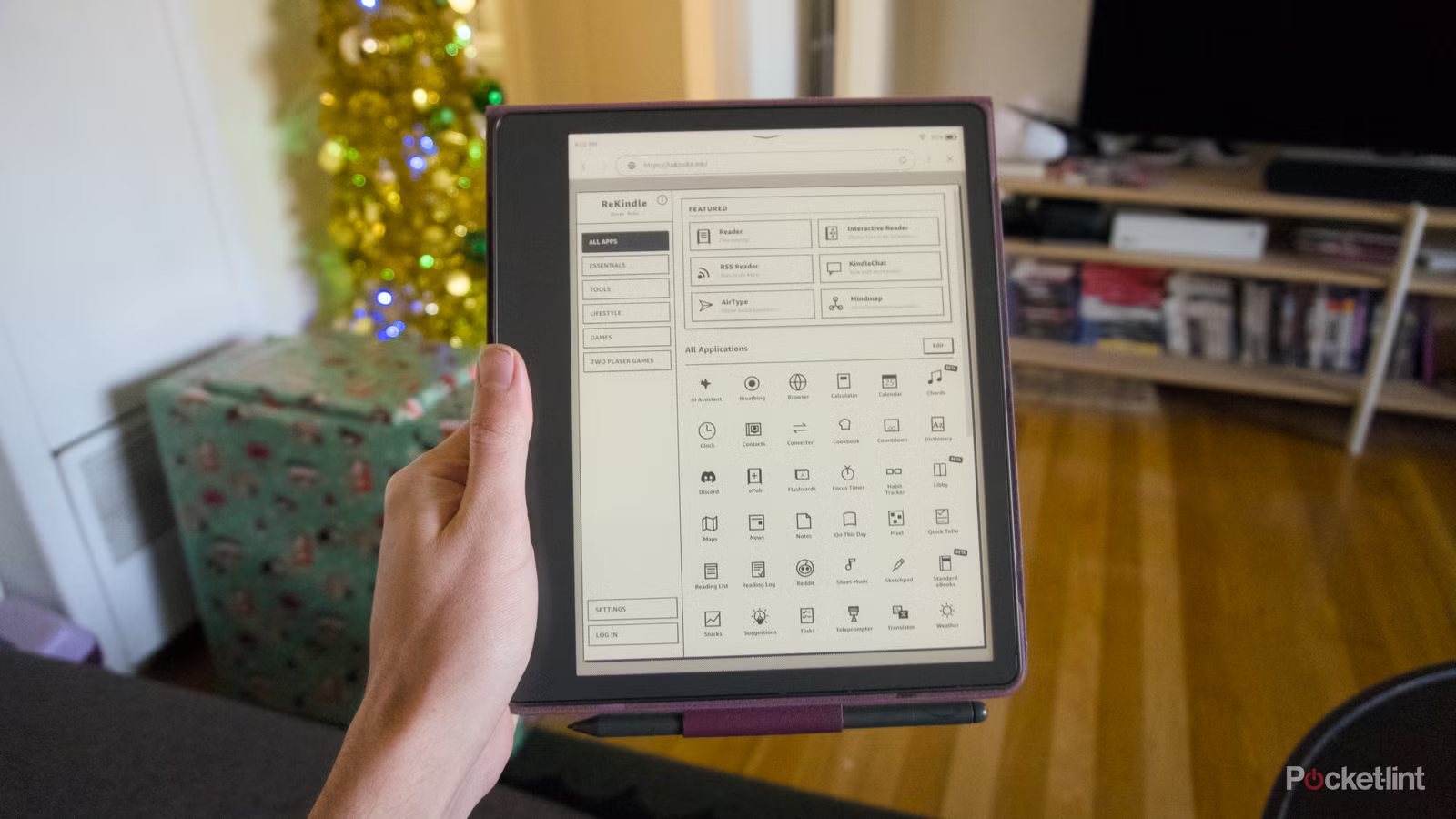
Unlike other software tweaks you can make to the Kindle, ReKindle doesn’t make serious changes to the hard-selling parts of the Amazon e-reader and adds functionality to a mostly hidden, but still easily accessible, place: the web browser. To get it, you just need to go to rekindle.ink in your e-web reader or E Ink tablet’s browser. If your device lets you bookmark web pages, you can make it easier to visit ReKindle later. E Ink devices running Android even let you add these bookmarks to your home screen.
ReKindle draws inspiration from the minimalist gray software of Apple’s early computers, with simple icons that denote the many features the web app makes available in the browser. It’s best to think of ReKindle as a dashboard of various mini-apps, divided into different categories such as “Essentials” (calendar, contacts and weather), “Tools” (focus timer, calculator, and tasks), “Lifestyle” (Reddit and Wikipedia) and two different categories for games. It’s a lot of content, and not every app is as fully featured as the last, but the majority of ReKindle’s options get the job done.
There’s more to ReKindle’s dashboard than most people could reasonably need or want from an e-reader, but even if you only use a fraction of what the website offers, I think it’ll be worth it.
The weather app is pleasant to look at and has most of the important information you want from a smartphone weather forecast app. With some setup, the Calendar app can connect to your Google Calendar and display your events (you can also use it without an account and save your events locally). On a Kindle Scribe, Tasks can even automatically convert handwritten tasks to text. Sure, writing in a browser is a lot more laggy than it is in one of Scribe’s regular notebooks, but it’s a neat addition.
There’s more to ReKindle’s dashboard than most people could reasonably need or want from an e-reader, but even if you only use a fraction of what the website offers, I think it’ll be worth it. We’re confronted every day with what’s possible with a web app with things like Google Docs and Canva, so why shouldn’t simpler app ideas work on something like a Kindle? For e-readers who may not be able to run something as demanding as what you can on the Boox Note Air4 CWhy shouldn’t they try to bridge that gap with web apps? ReKindle asks, and answers that they can.
The current landscape of E Ink software is a mixed bag
You could have Android or a collection of subpar custom options
On the Kindle, these types of quasi-apps stand out because Amazon has focused things on reading for so long. Every Kindle the company currently sells includes a simple web browser, but they aren’t really meant to do anything other than read and listen to audiobooks out there. The only exception is the Kindle writer, which gives equal attention to writing. Even with the AI features Amazon promised to bring to its new Kindle Scribe, what the E Ink tablet can actually do is limited.
In Pocket-lint’s review of the Kindle Scribe Colorsoft, the most useful of Amazon’s new additions was AI-powered search. “The AI indexes everything you’ve written on Scribe … and can group different topics together to answer specific questions about them,” says the Pocket-lint review. These can be specific if you’re looking for a particular piece of information, or more open if you’re looking for trends across multiple documents and notes.
The E Ink note community is full of people figuring out ways to add apps and expand the software from reMarkable, Ratta, and Amazon devices, but the best option is still official first-party software.
That might prove a helpful capability for diligent Kindle Scribe note takers, but it doesn’t dramatically expand what the device can actually do. It’s also not clear if it will be exclusive to the new Kindle Scribes, or trickle down to the older models as they get the latest updates. The software experience is similarly limited to reMarkable devices, such as the reMarkable Paper Pro Move. While the Note tablet is great at what it does, it is narrow in its capabilities and the pace of development for new features remains slow.
There are charms for downloading any Android app you want on a Boox tablet, but the sweet spot in terms of focus and software features might be the Supernote Manta and Nomad. Ratta, the company behind both devices, offers a mix of core features and side-loaded apps, like Amazon’s Kindle app. The Android-based Supernote operating system focuses on opening and reading files and notes, but Ratta has created custom calendar and email apps for customers who want a simple version of those functions. It’s far from perfect, but it goes a long way to making a Manta or a Nomad more of a stand-alone tool, rather than a digital notepad that you use alongside something else.
There is room for experimentation
Rekindle is not practical, but it makes it clear that there is more to do

ReKindle is free and will now come into play if you want to do more with your e-reader or e-ink tablet. It’s not as useful as normal Android apps on a Boox tablet, or the desktop operating system experience you get from iPadOS 26 on an iPad Pro, but it’s better than nothing. And in the absence of e-readers with the ability to do more than just read, listen to audiobooks and take handwritten notes, that might be more than enough.