 Skip to content

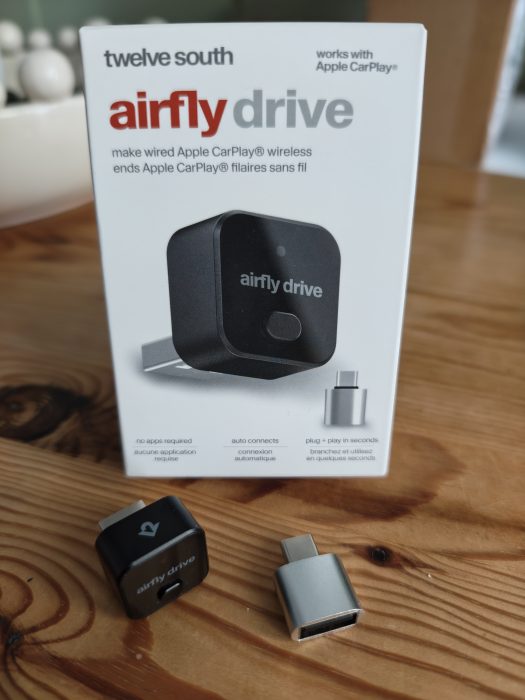
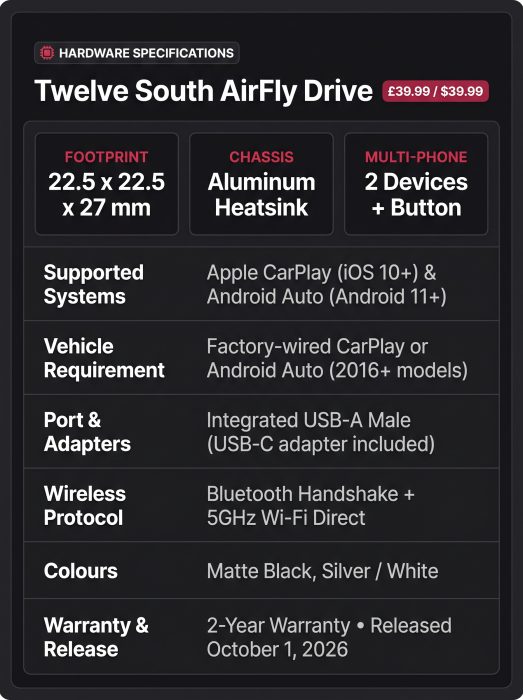
The Twelve South AirFly Drive is a compact, aluminum-housed wireless adapter released in October 2026 that converts factory-wired Apple CarPlay and Android Auto systems into wireless connections for £39.99 / $39.99. Designed to sit nearly flush inside a vehicle’s USB port, it eliminates cable clutter while offering single-button switching between two paired smartphones and passive thermal dissipation.
For nearly a decade, Twelve South has owned a specific niche in consumer electronics: solving annoying analog-to-wireless gaps with minimal, well-engineered hardware. The original AirFly series liberated frequent flyers and gym-goers from tangled 3.5mm headphone cords on seatback screens and treadmills. With the launch of the AirFly Drive on October 1, 2026, the company turned its attention to the daily commute, targeting one of the most persistent friction points in modern motoring.
Despite widespread adoption of Apple CarPlay and Android Auto across vehicles manufactured over the past decade, millions of cars on the road today—particularly models built between 2016 and 2023, as well as many base-trim newer vehicles—still require a physical USB tether to project smartphone interfaces onto the dashboard screen. For short errands, school runs, or frequent stop-start driving, pulling a phone out of a pocket or bag, plugging in a Lightning or USB-C cable, and finding a spot to rest the handset quickly becomes tedious.
While generic wireless CarPlay and Android Auto dongles have flooded online marketplaces for years, the category has earned a mixed reputation. Budget adapters from unverified brands frequently suffer from cheap plastic shells that overheat in summer cabins, sluggish boot times, erratic firmware, or frustrating mid-drive disconnects. Twelve South enters this crowded space not by reinventing the underlying wireless protocol, but by applying disciplined industrial design, thermal management, and multi-user ergonomics to a proven formula.
Pricing and Value Proposition.
Retailing at £39.99 in the United Kingdom and $39.99 in the United States (with periodic promotional discounts dropping it closer to £31.99), the AirFly Drive occupies a strategic middle ground in the automotive accessory market.
To understand its value, it helps to look at the two extremes of the wireless adapter market:
-
Ultra-Budget Generic Dongles (£15–£25): Dozens of unbranded or white-label dongles promise wireless CarPlay and Android Auto at rock-bottom prices. While they often use similar system-on-chip (SoC) architectures, they typically cut corners on thermal dissipation, housing durability, firmware maintenance, and customer support.
-
Legacy Premium Adapters (£60–£90): Early pioneers in the wireless CarPlay space—such as CPlay2Air or earlier iterations of Carlinkit and Motorola MA1—originally launched at much higher price points and often featured bulky, puck-style bodies attached to short, dangling pigtail cables.
Twelve South has priced the AirFly Drive aggressively enough to make it an easy impulse upgrade, while still delivering the build quality, two-year warranty, and ongoing compatibility updates associated with a reputable tier-one accessory maker. Furthermore, because the box includes both a native USB-A connector and a matching USB-A to USB-C adapter, buyers do not need to spend extra money on dongles if they switch vehicles or drive a car with modern Type-C data ports.
The only caveat regarding cost is understanding what the device cannot do. At £39.99, the AirFly Drive is strictly a bridge for cars that already possess factory-wired CarPlay or Android Auto. It does not add smart infotainment capabilities to older vehicles equipped only with standard Bluetooth audio or a 3.5mm auxiliary jack. For drivers with pre-2016 vehicles lacking native screen projection, an aftermarket dashboard display remains the necessary route.
Build Quality and Industrial Design.
Where the AirFly Drive immediately separates itself from competitors is its physical construction and miniature footprint. Measuring roughly 22.5 × 22.5 × 27 mm (less than an inch in length and width), the unit is shaped like a tiny, rounded-edge cube that plugs directly into the vehicle’s data USB port without any trailing cables.
Form Factor and Ergonomics
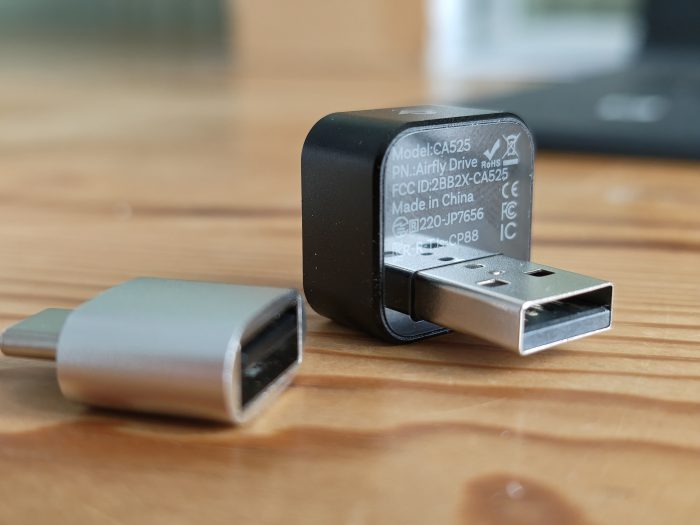
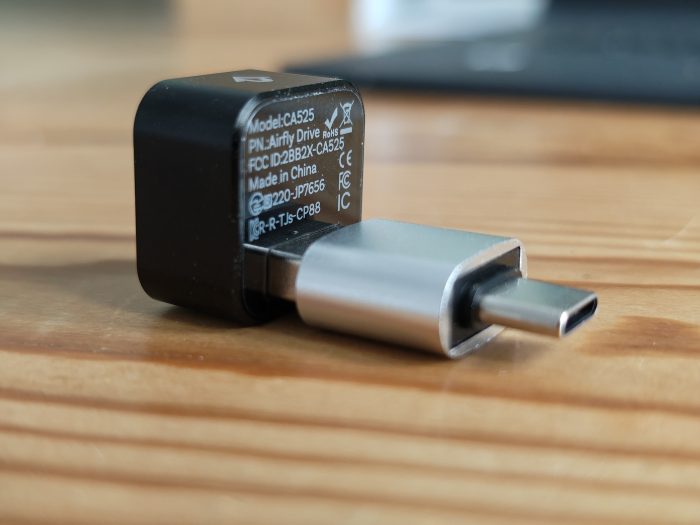
Twelve South describes the adapter as “designed to disappear,” and in most vehicles, that claim holds up remarkably well. When inserted into an exposed dashboard USB port beneath the infotainment screen, the adapter protrudes barely a centimeter, sitting almost flush against the trim. If your vehicle houses its CarPlay USB port inside a covered center console armrest or a sliding cubby compartment—as is common in many Honda, Ford, Volkswagen, and Mazda interiors—the AirFly Drive is compact enough to allow the compartment lid to close completely without pinching or stressing the port.
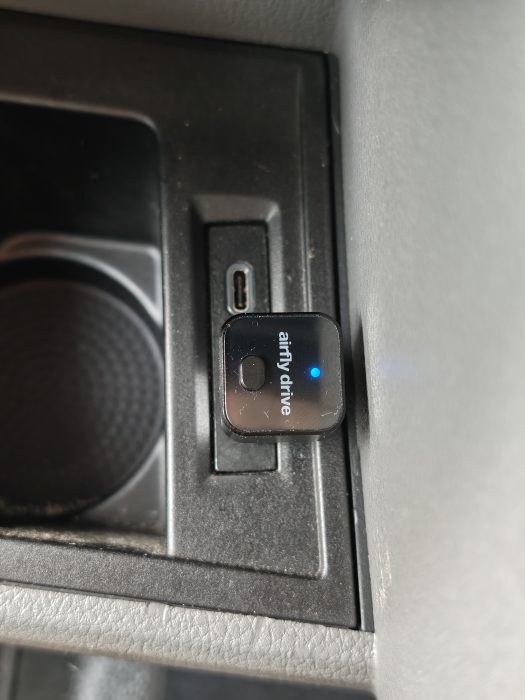
However, there is one minor ergonomic trade-off inherent to this flush, cable-free cube shape: port clearance. In vehicles where two USB-A ports sit tightly side-by-side in a recessed bezel, the 22.5 mm width of the AirFly Drive’s body can slightly overhang or block the adjacent port. If you rely on a neighboring USB slot to power a dashcam or charge a passenger’s device, you may need to verify spacing or use the included USB-C adapter (if a separate Type-C port is available) to keep both slots accessible.
Aluminum Construction and Thermal Management
Most inexpensive wireless adapters are encased entirely in lightweight ABS plastic. While plastic keeps manufacturing costs low, it acts as an insulator. Translating real-time video feeds, GPS telemetry, and audio streams over wireless protocols generates noticeable continuous heat. Inside a closed center console or on a dashboard baking in summer sun, plastic-bodied dongles frequently thermal-throttle, leading to audio stuttering, screen freezes, or complete connection drops after 30 to 45 minutes of driving.
Twelve South engineered the AirFly Drive with a machined aluminum alloy outer casing paired with polycarbonate accents. Beyond giving the adapter a tactile, automotive-grade feel that blends seamlessly with modern cabin switchgear, the aluminum shell serves a critical functional purpose: it acts as a passive heat sink. By drawing thermal energy away from the internal wireless chipset and dissipating it across the metal exterior, the AirFly Drive maintains stable operating temperatures even during prolonged motorway journeys in warm weather.
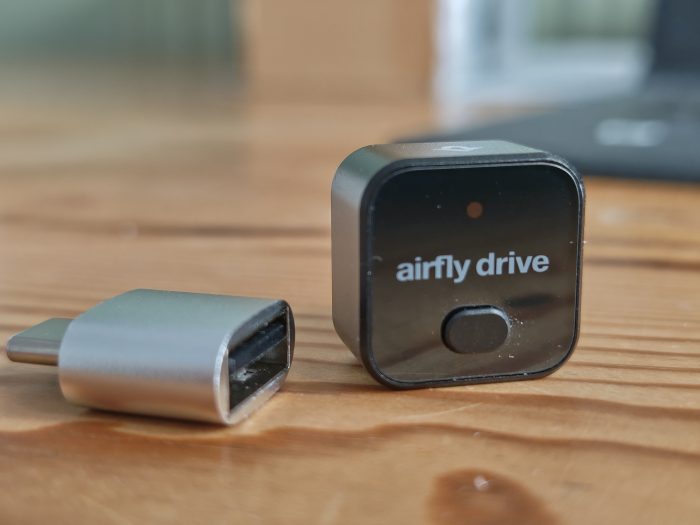
On the front face of the unit sits a single, tactile physical button. It is subtle, easy to locate by feel without taking your eyes off the road, and provides a clean click when pressed. Available in matte Black and Silver finishes, the hardware looks like an OEM component rather than an aftermarket afterthought.
Ease of Use and Daily Workflow.
Consumer automotive tech succeeds or fails based on friction. If a wireless adapter requires troubleshooting every third morning, it becomes worse than the cable it replaced. Fortunately, Twelve South has stripped the onboarding and daily operation down to absolute essentials.
Zero-App Initial Setup
Unlike several competing adapters that ask you to download a companion smartphone app, create a user account, or navigate local IP addresses in a web browser just to get started, the AirFly Drive is genuinely plug-and-play.
-
Insert the adapter: Plug the AirFly Drive into the vehicle’s designated CarPlay/Android Auto USB port (using the included USB-C adapter if required). Because it draws power directly from the car’s USB bus, there is no internal battery to charge or maintain.
-
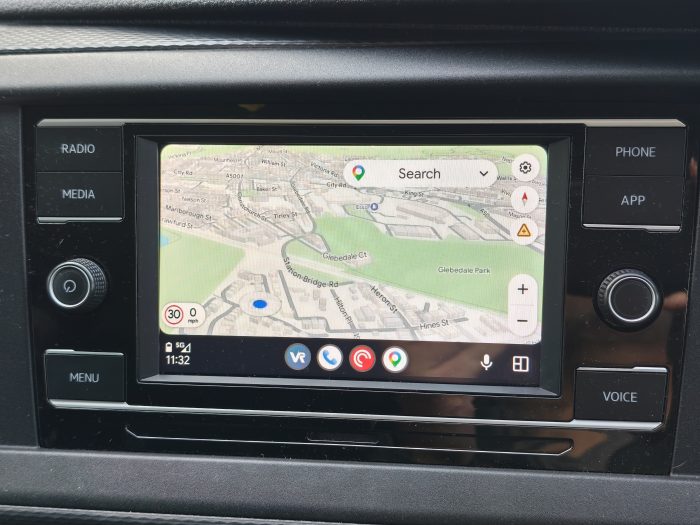
Follow the on-screen prompt: Within moments of turning on the ignition, a clean splash screen appears on your car’s infotainment display showing the adapter’s Bluetooth device name and simple pairing instructions.
-
Pair once via Bluetooth: Open the Bluetooth settings on your iPhone or Android handset, select the AirFly Drive, and approve the CarPlay or Android Auto prompt.
The entire pairing sequence takes less than 60 seconds. Once completed, your phone automatically negotiates the handshake every subsequent time you enter the vehicle.
Multi-Driver Switching
One of the standout quality-of-life features borrowed from Twelve South’s headphone transmitters is dual-phone memory with single-button switching. Many wireless CarPlay adapters struggle in households where two partners share a vehicle; if both drivers walk out to the driveway together, the dongle often latches onto whichever phone connected last, forcing the actual driver to toggle Bluetooth off on their partner’s phone or dive into buried infotainment menus.
The AirFly Drive stores profiles for up to two smartphones simultaneously. If the car connects to the passenger’s device instead of yours, a single press of the physical button on the front of the AirFly Drive cleanly drops the active session and switches over to the second paired phone within seconds. For couples or families sharing a daily commuter car, this physical override button eliminates one of the biggest headaches of wireless automotive systems.
Retained Vehicle Controls
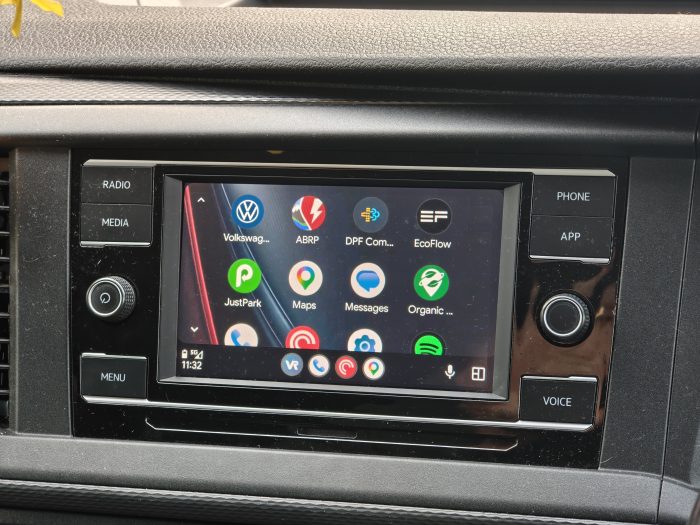
Because the AirFly Drive emulates a native wired handshake with your vehicle’s head unit, all factory ergonomics remain completely intact. Touchscreen gestures, rotary control dials (such as Mazda’s Commander knob or BMW’s iDrive controller), dashboard track-skip buttons, and steering-wheel voice-assistant triggers continue to function identically to a wired setup.
Connectivity, Latency, and Real-World Performance.
To evaluate the AirFly Drive fairly, it is important to separate the performance of Twelve South’s hardware from the inherent characteristics of wireless CarPlay and Android Auto protocols.
How the Wireless Handshake Works
Like factory-installed wireless CarPlay and Android Auto systems, the AirFly Drive uses a dual-radio approach. When you start the engine, Bluetooth handles the initial discovery, authentication, and handshake. Once paired, the adapter immediately establishes a high-bandwidth local Wi-Fi Direct link between your phone and the dongle to transmit compressed video frames for the map interface, album art, and stereo audio streams.
In real-world testing, boot-up and reconnection speeds are brisk. Typically, within 5 to 12 seconds of turning the ignition—often by the time you have fastened your seatbelt and shifted out of park—the CarPlay or Android Auto interface populates the dashboard screen. Connection stability during drives is a clear strong suit: aided by the aluminum heat sink, the link remains rock-solid across multi-hour highway drives without random dropouts or static bursts.
Audio Quality, Visual Sharpness, and Input Latency
Reviewers and early adopters consistently note three technical trade-offs that apply to all wireless CarPlay and Android Auto implementations—whether built into a £60,000 luxury sedan or added via a £40 adapter:
-
Slight Input Latency: Over a physical USB cable, pressing “Next Track” on your steering wheel or scrubbing a podcast timeline happens instantaneously. Over the AirFly Drive, there is a minor, predictable wireless buffer—roughly 0.5 to 1 second of delay between pressing a physical skip button and hearing the audio respond. Navigation prompts and voice calls are synchronized properly, and touchscreen responsiveness feels snappy for everyday map panning, though the slight audio skip delay is noticeable if you are accustomed to a direct copper wire.
-
Audio Compression: Wired CarPlay transmits uncompressed LPCM audio to your car’s digital-to-analog converter. Wireless CarPlay compresses the audio stream over Wi-Fi (typically using AAC). For podcasts, audiobooks, radio streams, and standard Spotify/Apple Music playback in a moving vehicle, the difference is virtually imperceptible. Audiophiles with high-end factory sound systems playing lossless tracks may notice slightly richer dynamics when plugged in via cable, though convenience usually wins out for daily driving.
-
Smartphone Battery Drain: Running continuous GPS navigation, cellular data, and high-bandwidth Wi-Fi projection without a charging cable naturally draws down your phone’s battery. For 15-to-30-minute commutes, the battery impact is negligible and far outweighs the hassle of plugging in. On multi-hour road trips, however, you will want to place your phone on a Qi/MagSafe wireless charging mount—or simply unplug the AirFly Drive and revert to your charging cable for that specific journey.
Compatibility Scope
The AirFly Drive supports iPhones running iOS 10 or later and Android smartphones running Android 11 or later. On the vehicle side, Twelve South validates compatibility across more than 75 automotive makes featuring factory-wired CarPlay or Android Auto from model year 2016 onward (with select supported models dating back to 2014). Twelve South maintains a searchable compatibility database on its website and pushes periodic firmware updates to ensure ongoing stability as Apple and Google release major OS revisions.
(Note: Because the AirFly Drive relies on a local Wi-Fi link to stream display data to your phone, your phone cannot simultaneously connect to an external in-car Wi-Fi hotspot, such as a mobile router or satellite terminal, while using wireless CarPlay—a standard limitation of Apple’s wireless projection architecture.)
Strengths and Limitations.
What Excels
-
Flush, Cable-Free Footprint: At less than an inch cubed, it fits inside tight center consoles with closed lids and keeps exposed dashboards clutter-free.
-
Thermal Reliability: The machined aluminum housing dissipates heat far better than cheap plastic rivals, preventing mid-drive thermal disconnects.
-
Dedicated Two-Phone Switch Button: Physical one-tap toggling makes sharing a car between two drivers effortless.
-
Universal Port Readiness: Includes a USB-A to USB-C adapter right in the box, covering both older and newer vehicle interiors.
-
Zero Bloatware: No companion apps, accounts, or manual charging required.
Trade-Offs to Consider
-
Requires Factory Wired Support: Cannot add CarPlay or Android Auto to older vehicles that lack native wired support.
-
Inherent Wireless Latency: Exhibits the standard ~0.5–1 second audio skip delay common to all wireless CarPlay/Android Auto adapters.
-
Adjacent Port Clearance: Its 22.5 mm cube body may crowd tightly spaced side-by-side USB-A ports.
-
No Charging During Use: Leaves your phone running on battery power unless paired with a separate wireless charger.
Final Verdict.
The Twelve South AirFly Drive does not attempt to reinvent how Apple CarPlay or Android Auto work—instead, it executes the wired-to-wireless conversion with the build quality, thermal stability, and thoughtful ergonomics that budget dongles routinely miss. At £39.99 / $39.99, it is competitively priced, genuinely invisible once installed, and backed by a trusted brand with a two-year warranty. For drivers tired of fumbling with cables on daily errands—and especially for couples sharing a single vehicle—it is one of the cleanest, most dependable cockpit upgrades available.