Active Directory single sign-on (SSO) usually means one of two architectures:
- Native Windows SSO: A user signs in to a domain-joined Windows device and uses Kerberos tickets to access permitted domain resources without entering a password again.
- Federated application SSO: An identity provider authenticates an Active Directory-backed identity and sends a SAML assertion or OpenID Connect (OIDC) token that a web or SaaS application accepts.
Active Directory Domain Services (AD DS) stores identities and supports domain authentication and access control. It is not, by itself, a universal browser-based SSO service for cloud applications.
For IT administrators, the practical task is to identify which resources can use native Kerberos, which need federation, and how MFA, provisioning, authorization, and session controls will work for each application.
Key Takeaways
- Active Directory SSO can work in different ways: Kerberos commonly provides SSO for compatible domain resources, while web and SaaS applications typically use an identity provider with SAML or OIDC.
- AD, LDAP, and SSO are not the same: AD stores and manages identities, LDAP accesses directory information, and SSO lets users reuse an authenticated session across compatible resources.
- SSO is only one part of access management: MFA, provisioning, authorization, session management, and offboarding still require separate controls.
- The right AD SSO approach depends on the application: Protocol support, identity architecture, security requirements, and session behavior should determine the implementation.
- OneIdP can extend AD-backed authentication to application SSO: Organizations can use AD as an authentication source while providing SSO and supported Conditional Access for compatible applications.
What is Active Directory SSO?
Active Directory SSO lets users reuse an authenticated AD identity to access authorized resources. The experience depends on the resource and the protocol it supports.
For an internal file share, SSO may use Kerberos directly within an AD domain. For a SaaS application, an identity provider typically authenticates or synchronizes the AD-backed identity, then sends the application a SAML assertion or OIDC token.
This can reduce password prompts, centralize application-access policy, lower password-reset demand, and improve sign-in visibility. Those benefits do not replace MFA, provisioning, application authorization, or session management.
What Active Directory Domain Services does
AD DS is a directory and domain authentication system. It stores users, computers, groups, and shared-resource objects. Domain controllers authenticate users and support access decisions based on identity, group membership, and permissions.
AD DS commonly uses:
- Kerberos for ticket-based authentication and native domain SSO
- LDAP for querying and interacting with directory information
- NTLM for compatibility with systems that cannot use Kerberos
An application still needs to support an authentication method that AD DS or an attached identity provider can supply.
Active Directory, LDAP, and SSO are different things
| Term | What it is | What it does | Does it provide SSO? |
|---|---|---|---|
| Active Directory | A directory platform | Stores and manages users, computers, groups, and other directory objects | Can support SSO through mechanisms such as Kerberos, but AD itself is not synonymous with SSO |
| LDAP | A directory access protocol | Retrieves directory information and, in some designs, validates credentials against a directory | No. An LDAP bind does not by itself create an SSO session |
| SSO | An authentication experience/process | Lets users reuse an established authentication session to access compatible resources | Yes—SSO is the resulting access experience, implemented through supported authentication mechanisms |
An application that performs an LDAP bind at every login may use AD as its identity store, but it does not necessarily provide SSO. The user may still submit credentials directly to that application. LDAP also does not issue SAML assertions or OIDC tokens for federated browser sign-in. For a more detailed side-by-side comparison of LDAP and Active Directory, see LDAP vs. Active Directory.
Native Windows SSO versus federated application SSO
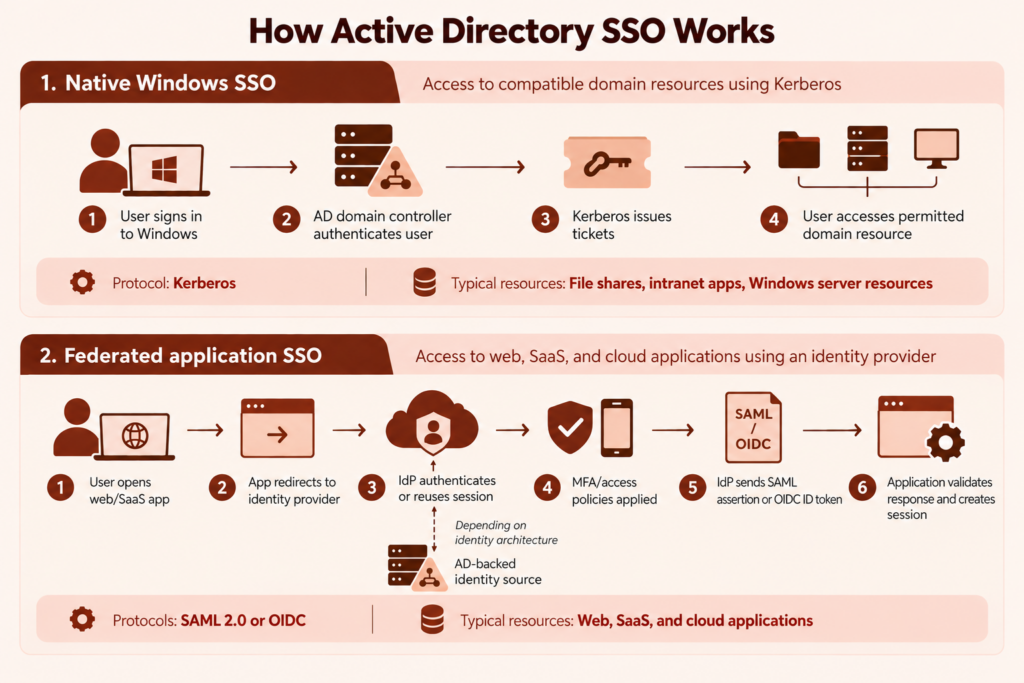
Native Windows SSO works in a trusted domain environment. After Windows sign-in, Kerberos can request tickets for authorized services without repeatedly sending the user’s password.
Federated SSO works across application or organizational boundaries. An identity provider authenticates the user and sends a signed response to the application, which trusts the identity provider instead of validating the user’s password directly against AD.
How Active Directory SSO works
Windows sign-in to domain resources with Kerberos
In a Windows domain, the Key Distribution Center on an AD domain controller uses AD DS as its account database. After successful domain authentication, the user receives a ticket-granting ticket. When the user requests a permitted service, Kerberos uses that ticket to obtain a service ticket for the target resource.
The service validates the ticket and grants access according to its permissions. The user does not need to enter a password for each compatible resource. Microsoft describes this process in its Kerberos authentication overview.
Kerberos SSO still requires correct domain trust, service configuration, DNS, network connectivity, and time synchronization. Authentication also does not override authorization: users still need permission to access the resource.
AD-backed sign-in to cloud applications through an identity provider
AD DS does not natively integrate with most SaaS applications. Organizations commonly use AD FS, Microsoft Entra ID, or another identity provider between AD and the application.
A typical federated flow is:
- The user opens an application.
- The application redirects the browser to its trusted identity provider.
- The identity provider authenticates the user or reuses an existing identity-provider session.
- The identity provider applies configured MFA and access policies.
- It returns a signed SAML response or OIDC ID token.
- The application maps the identity and attributes to an account, role, or entitlement.
- The application creates its own session.
That final application session is important: ending an AD or identity-provider session does not always terminate an application session that already exists.
Where SAML, OIDC, OAuth, Kerberos, and LDAP fit
- Kerberos: Ticket-based authentication and SSO for compatible domain resources.
- LDAP: Directory lookup and interaction. It is not a federation protocol.
- SAML 2.0: XML-based authentication assertions exchanged between an identity provider and service provider. It remains common for enterprise SaaS and established web applications.
- OIDC: An identity layer built on OAuth 2.0, commonly used for modern web, mobile, and cloud-native applications.
- OAuth 2.0: A framework for delegated authorization to APIs and protected resources. It is not interchangeable with SAML or OIDC user authentication.
For new application development, OIDC is generally preferred where supported. SAML remains appropriate when required by an enterprise application or an existing integration. Use the application’s documented capabilities to decide, as outlined in Microsoft’s SAML and OIDC decision guide.
What are the benefits of Active Directory SSO?
Active Directory SSO reduces repeated sign-in prompts without requiring users to manage separate credentials for every integrated application.
For users, the main benefit is a simpler sign-in experience. For IT teams, AD-backed SSO can centralize authentication and access policies around known identities, groups, and identity-provider controls. It can also reduce helpdesk demand related to password resets and account confusion.
For security and compliance teams, SSO can improve visibility into sign-in activity through identity-provider logs, application assignments, MFA events, and failed access attempts.
These benefits depend on correct implementation. SSO simplifies authentication, but it does not automatically solve provisioning, authorization, stale sessions, or offboarding.
Active Directory vs. AD FS vs. Microsoft Entra ID
| Service | Primary role | Typical SSO use |
|---|---|---|
| Active Directory Domain Services | Directory, domain authentication, and access control | Kerberos-based SSO to domain resources |
| Active Directory Federation Services (AD FS) | On-premises federation service | Issuing claims for trusted web applications and external services |
| Microsoft Entra ID | Cloud identity and access platform | SaaS and cloud application SSO using SAML and OIDC |
When AD DS alone is enough
AD DS may be sufficient when users and resources are in a Windows domain or trusted forest and the resources support Kerberos. Typical examples include compatible file, print, intranet, and Windows server workloads.
AD DS alone is generally insufficient when an application expects a SAML assertion, OIDC token, or an internet-reachable identity provider.
When AD FS is used for federation
AD FS extends AD-backed authentication to claims-aware and internet-facing applications. It can be appropriate when an organization already operates AD FS or has specific application, data-location, or federation requirements that its deployment meets.
AD FS is not required for every AD SSO deployment. Microsoft currently recommends migration to Microsoft Entra ID rather than upgrading AD FS. For a new SaaS federation design, evaluate cloud identity options before adding new AD FS infrastructure.
When Microsoft Entra ID or another identity provider is a better fit
A cloud identity provider is often a better fit for SaaS-heavy environments, cross-platform users, or access policies that must evaluate factors beyond the corporate network.
Microsoft Entra ID can integrate AD-backed identities with cloud applications. Other identity providers may suit multivendor, cross-platform, or specialized legacy environments. Choose based on application compatibility, lifecycle management, security controls, resilience, and operational ownership—not only on where the original account is stored.
Which Active Directory SSO approach should you use?
Start with the resource rather than a preferred vendor or protocol.
- Windows domain resources: Use Kerberos when the service, device, trust relationship, and network path support it.
- Established enterprise web applications: Use SAML when that is the application’s supported federation method.
- Modern custom or cloud-native applications: Prefer OIDC when it is supported and appropriate to the design.
- Applications without federation support: Evaluate a supported application proxy, authentication gateway, or documented integration. Connecting an application to LDAP does not automatically create federated SSO.
Confirm whether the application supports identity-provider-initiated or service-provider-initiated sign-in, required identifiers, signing or encryption certificates, redirect endpoints, logout behavior, and attribute mappings.
Keep lifecycle and access controls separate from authentication
SSO proves an identity to an application. It does not necessarily create the application account, assign a license, select a role, remove access when employment ends, or end an existing session.
For each application, document:
- How the user is authenticated.
- Where MFA and access policy are applied.
- How accounts, assignments, and permissions are provisioned or removed.
- How tokens and application sessions are revoked or allowed to expire.
Provisioning may be manual or automated through an application API or a standard such as SCIM where supported. Applications can also maintain their own roles and permissions. Microsoft defines provisioning as the creation, update, and disabling of application user records in its enterprise application provisioning guidance.
What should you check before setting up AD SSO?
Build an application and identity inventory
For each application, record:
- Current identity source and login method
- Supported SSO protocols
- Required user identifier, such as user principal name or email address
- Required groups, roles, and claims
- Existing local application accounts
- Provisioning and deprovisioning support
- Session and logout behavior
- Business owner and rollback contact
Resolve identifier conflicts before rollout. If a SAML integration sends one email address while the application expects another, it can cause sign-in failures, duplicate accounts, or access under the wrong identity.
Check certificates, DNS, network access, and time synchronization
Verify:
- Identity-provider and application URLs
- SAML assertion consumer service (ACS) or OIDC redirect URLs
- Issuer, entity ID, audience, and tenant values
- Signing and encryption certificate requirements
- Certificate expiration and rollover procedures
- DNS resolution and network reachability
- Time synchronization among domain controllers, identity systems, and applications
- Required firewall, proxy, and connector paths
Exchange metadata and certificates through a verified channel. A bad federation trust configuration can send authentication data to the wrong endpoint or cause an application to trust an unintended issuer.
Plan MFA, conditional access, and fallback access
Decide where MFA will be enforced and whether policies should consider user risk, device state, network context, or other supported signals. Avoid duplicate MFA prompts at multiple layers unless there is a defined reason.
Maintain tested emergency-access procedures that do not depend entirely on the federation path. Define token lifetimes, application session limits, certificate ownership, monitoring responsibilities, and rollback steps before the pilot.
How do you set up Active Directory single sign-on for an application?
The interface differs by identity provider and application, but the implementation sequence is broadly consistent.
Connect Active Directory to your identity provider
Configure the identity provider to authenticate against or synchronize identities from AD through its supported method. Confirm which domains, organizational units, users, groups, and attributes are included.
Test how disabled accounts, password changes, group updates, and directory outages affect authentication. Do not assume directory changes are reflected immediately.
Configure application trust and user attributes
Create the application integration in the identity provider and configure identity-provider details in the application. Depending on the protocol, this can include:
- SAML entity IDs, ACS URLs, metadata, and signing certificates
- OIDC client IDs, redirect URIs, issuer details, and client authentication settings
- User identifiers and required claims
- Group, role, or custom attribute mappings
- Login and logout URLs
Treat client secrets and signing keys as sensitive credentials. Restrict access, assign rotation ownership, and do not place them in tickets, scripts, or repositories without appropriate protection.
Assign users or groups and test a pilot
Grant the application to a small test group before rollout. Include normal users and, where useful, people from different domains, group structures, device types, and access locations.
Test first-time and repeat sign-in, MFA behavior, account matching, group and role assignment, disabled-user denial, certificate validation, logout, session expiry, provisioning, deprovisioning, recovery, and rollback. Keep an alternate administrative login available while changing a production federation configuration.
How do you secure Active Directory SSO?
Review authentication, MFA, provisioning, application authorization, session management, and revocation as separate controls. A successful SSO test does not prove that application roles, offboarding behavior, or active-session handling are correct.
Protect against token theft and misconfigured federation
Limit administrative access to identity-provider and application trust settings. Monitor changes to issuers, endpoints, redirect URIs, certificates, claims, and privileged group assignments.
Use supported certificate and key rotation procedures. Review token and session lifetimes against the application’s sensitivity, and avoid logging tokens or authentication responses where unauthorized parties could retrieve them.
Review account disablement, session lifetime, and stale access
Disabling an AD account may prevent new authentication, but it does not guarantee immediate termination of every existing application session. Directory synchronization, provisioning jobs, issued-token validity, and application-side sessions can have different timelines.
Test offboarding end to end. Confirm when the identity provider recognizes the disablement, whether the application account is deactivated, how existing sessions are handled, and whether local or recovery credentials remain usable.
Monitor sign-in logs and failed access attempts
Review identity-provider sign-in logs together with application, connector, and domain logs. Investigate failed authentication, unexpected MFA prompts, repeated redirects, rejected assertions, certificate errors, disabled-account attempts, and changes to sensitive federation settings.
How does AD SSO work for remote and hybrid teams?
Internal resources that depend on reachable domain controllers, Kerberos, LDAP, or private application endpoints may require a VPN or another secure published-access design. A remote user cannot reach those dependencies merely because the user has an AD account.
Cloud application SSO can work without a VPN when the identity provider and application are internet reachable and the design does not require the user’s device to contact on-premises services directly. On-premises synchronization agents or authentication connectors may still need outbound or private connectivity from the corporate environment.
Where supported, device trust and Zero Trust-style policies can supplement identity checks. For example, access to a sensitive application may require MFA and a managed or compliant device. Device state is an additional access signal, not a substitute for authentication or application authorization.
Why is Active Directory SSO not working?
Use the failure point to narrow the investigation. A Kerberos issue, identity-provider authentication failure, invalid SAML response, and missing application role require different fixes.
Repeated password prompts
Check whether the user and device can reach required domain services, whether the account has a valid domain sign-in, and whether the resource is configured for the intended authentication method. Review DNS, time synchronization, domain trust, and whether the service is falling back from Kerberos to another method.
For federated applications, confirm that the user has an identity-provider session and that a policy is not deliberately requiring reauthentication or MFA.
Redirect loops or failed SAML/OIDC responses
Compare both sides of the trust. Common checks include issuer and entity ID, ACS or redirect URI, audience, reply URL scheme and hostname, signing certificate, OIDC client configuration, application assignment, browser cookie restrictions, and system time.
Use identity-provider logs and application error details instead of repeatedly changing unrelated settings.
Wrong-user access or missing permissions
Confirm the attribute that the application uses as its unique identifier. Inspect the actual claims sent to the application, including name, email, user principal name, groups, and roles.
A valid SSO response can still produce incorrect access if the application maps the user to an old local account, receives the wrong group value, or maintains permissions independently of the identity provider.
Certificate, DNS, time sync, and claim-mapping issues
Check for expired or newly rotated certificates, stale federation metadata, incorrect DNS records, blocked connector traffic, clock differences, and delayed directory synchronization. During certificate rollover, confirm whether the application can trust more than one signing certificate and follow the vendor’s documented sequence.
How OneIdP can fit an AD-backed SSO rollout
If you want to retain on-premises AD as the credential source while adding application SSO, OneIdP is one option to evaluate. Scalefusion documents that its On-Premise Connector can authenticate custom-domain users against AD. OneIdP can connect compatible SAML or OIDC applications and apply managed-device access conditions. For example, an administrator could assign a SAML application to the appropriate users and require a Scalefusion-managed device where that policy is appropriate. Confirm connector requirements, licensing, protocol support, attributes, and session behavior before deployment. Evaluate OneIdP for AD-backed application SSO.
FAQs
1. Is LDAP the same as Active Directory SSO?
No. LDAP is a protocol for interacting with directory information and can be used by some applications to validate credentials. It does not, by itself, create a federated SSO session or issue SAML assertions or OIDC tokens.
2. Does every AD SSO deployment require AD FS?
No. AD FS is one federation option. Kerberos can provide native SSO to domain resources, while Microsoft Entra ID or another identity provider can provide SSO for compatible cloud and web applications.
3. Does disabling an AD account immediately end every application session?
Not necessarily. Directory synchronization, application deprovisioning, token validity, and application sessions can have different timelines. Test each application’s disablement and session-revocation behavior as part of offboarding.
4. Is a VPN required for remote users to access AD-backed SSO?
It depends on the architecture. Internal resources that require direct access to domain services or private endpoints may need a VPN or another secure access design. Internet-reachable identity providers and SaaS applications can often provide AD-backed SSO without routing the user’s device through a VPN.
5. Can Active Directory SSO work with SaaS applications?
Yes, but usually through an identity provider. Active Directory Domain Services does not directly issue the SAML assertions or OIDC tokens that many SaaS applications expect. An identity provider such as Microsoft Entra ID, AD FS, OneIdP, or another compatible IdP connects the AD-backed identity to the SaaS application.