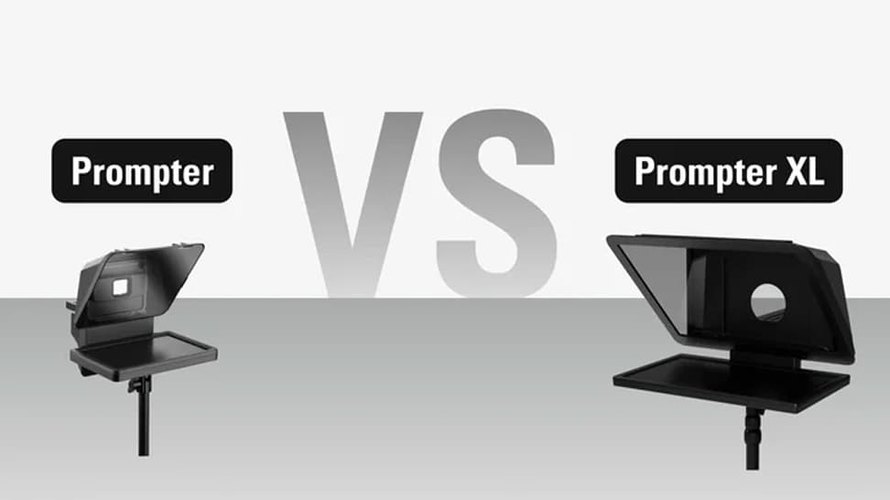
Elgato offers two teleprompters with their own displays: the compact prompter and the larger prompter XL. Both place a reflective screen in front of the camera lens, allowing a presenter to read while looking at the audience. The useful comparison starts with the room and the camera position. Screen size changes reading distance, while mounting and USB power determine how the equipment fits into an existing setup.
Set the reading distance before selecting the screen

The Prompter has a built-in 9-inch display with 1024 x 600 pixels and a listed brightness of 400 nits. XL moves to a removable 15.6-inch Full HD display with 600 nits. Both operate at 60Hz and use 70/30 beam splitter glass. Neither requires a separate tablet to provide its prompt screen.
Elgato’s current specifications recommend reading from up to six feet with Prompter and 15 feet with XL. Treat that as a manufacturer’s guide. Font size, viewpoint, room lighting and the amount of text on the screen will affect a given recording. A trial at the intended camera distance is more useful than assuming that every script fits the maximum range.
For someone sitting at a desk, the original screen can already occupy a comfortable part of the view. A presenter who stands further back, or works in a wider shot, has a clearer reason to consider XL. Its additional pixels also provide more space when using the display for other windows between recordings.
Test a representative paragraph with the intended speaker rather than an unusually short sample. Long lines may require more eye movement, while oversized type visibly reduces the number of words at once. Adjusting the script layout is part of choosing a workable setup, even if the larger display has enough physical space.
Inspect the lens and support as an assembly

Both packages include nine step-up rings covering 49–82mm and interchangeable backplates. Elgato lists a maximum lens length of 11cm for Prompter and 22cm for XL. Check the specific camera and lens combination, including how the lens moves when zooming, before deciding that a suitable filter gain will create complete compatibility.
The original can attach directly to a compatible lens or use its mounting capabilities. XL needs a tripod or stand that supports its camera mounts. Its larger area should not hang from the lens. This is a meaningful change to an existing desk arrangement as the supporting hardware becomes part of the equipment footprint.
Prompter provides two quarter inch threads in top cold shoe mounts. XL adds a three-eighths-inch thread, a reinforced aluminum camera bracket and an accessory rail. Count the camera, teleprompter and attached accessories when selecting support. Space around the rig is also important to reach controls and adjust the camera without disturbing the prompt position.
Budget USB power in addition to the cable connection

Prompter lists 4.5W consumption and includes a USB-C-to-A USB 3.0 cable. XL lists 15W and includes a USB-C-to-C USB 3.2 cable. Each uses one cable for power and display data, but the XL’s higher power requirement makes the host port or powered dock a more consistent part of the setup.
A USB-C socket alone does not create adequate power or the required data connection. Check the computer or dock specifications and Elgato’s setup requirements before routing the Teleprompter through a hub. The XL Setup Guide also requires DisplayLink software to be installed during its setup process.
Allow time to adjust the screen in the computer’s display settings and see what the camera actually picks up. Legibility for the presenter and an unobstructed image for the camera are separate controls. Perform both with the latest framing and lighting on location.
Keep the shared software features in comparison

Both work with Camera Hub for script management, text adjustments and display modes. Both also support stream deck control and voice sync. Voice tracking requires supported hardware: Elgato specifies an NVIDIA RTX GPU or Apple Silicon M1 or newer. Current desktop requirements list Windows 11 and compatible macOS versions; check the full requirements of the selected model against the recording computer.
Physical script controls can sit alongside other production shortcuts, as discussed in our Stream Deck + and + XL comparison. The decision here depends on screen distance, mounting, and available power since the main prompt tools are shared.
Up to date US store prices are $299.99 for Prompter and $599.99 for XL, with order offers when checked. The original launches October 17, 2023; XL became available on October 9, 2025. Specifications and purchase options are from Elgato.
| specification | Prompter | Prompter XL |
|---|---|---|
| Display | 9-inch built-in; 1024×600 | 15.6 inch removable; 1920×1080 |
| Brightness/Frequency | 400 pieces; 60 Hz | 600 nits; 60 Hz |
| Manufacturer’s range | Up to 6 ft / 1.8 m | Up to 15 ft / 4.6 m |
| Glass | 70/30 beam splitter | 70/30 beam splitter |
| Maximum lens length | 11 cm | 22 cm |
| Including step-up rings | 9; 49-82 mm | 9; 49-82 mm |
| mounting | Lens attachment where compatible; 2 × ¼ inch threads | Camera bracket on tripod/stand; 2 × ¼ inch and 1 × ⅜ inch thread |
| Power consumption | 4.5 watts | 15 w |
| Cable included | USB-C to USB-A; USB 3.0 | USB-C to USB-C; USB 3.2 |
| desktop software | Camera Hub; DisplayLink required | Camera Hub; DisplayLink required |
| Voice Sync / Stream Deck | Both supported; Voice Sync hardware requirements apply | Both supported; Voice Sync hardware requirements apply |
| Start/availability date | October 17, 2023 | October 9, 2025 |
| Where to buy | Buy Prompter at Elgato | Buy Prompter XL at Elgato |