Way back in February 2025 I was sent a pair of Reyax LoRa modules to try out and review. They are right in the increasingly dangerous pile of interesting hardware waiting for attention and frankly, I never got around to using them. Having no idea how to use LoRa and moving home didn’t help (a multi-month, still ongoing) process.
That is until today:
I decided to start with absolutely no big plan – just two NodeMCU ESP8266 boards (just because I have them), two identical Reyax RYLR998 LoRa modules and the desire to see how difficult it would be to make a simple remote connection work.
Trust me, I’ve tried ALL ways to get a signal to my mailbox – including 433Mhz dedicated sensor and receiver boxes from AliExpress (one way) – let me bore you first… my office is surrounded by thick stone in a cave house – behind my room a mountain (big hill) – in front, the living room – all walls are SOLID – Exit from a SOLID – Exit semi-closed foyer – again breezeblock – around the barbecue area – stone and Breezeblock again stops line of sight… across our parking area, big enough for 3 cars, to our gates – a total of 70 steps so far – I’m tall. Then down a 20 degree curved slope – our shared footpath with our neighbor – 76 more steps to our mailbox – a total of 146 steps.
First things first – talk to the modules
The RYLR998 modules are wonderfully straight forward if you know what to expect. Connected with a USB serial adapter, both respond (at standard 115Kbaud) to a simple:
AT
along with:
+OK
They also happily reveal their firmware version:
+VER=RYLR998_REYAX_V1.2.3
That was encouraging. Both modules were alive. I configured them with different addresses (1 and 2 – the default was 0) but with the same network ID and radio frequency, then I tried to send messages between them and rather pleasant:
It worked.
Add the NodeMCUs
Next came a pair of very ordinary NodeMCU ESP8266 boards. No Bluetooth, fancy displays or anything complicated – just a few ESP8266s talking to the LoRa modules via software serial at 115K baud.
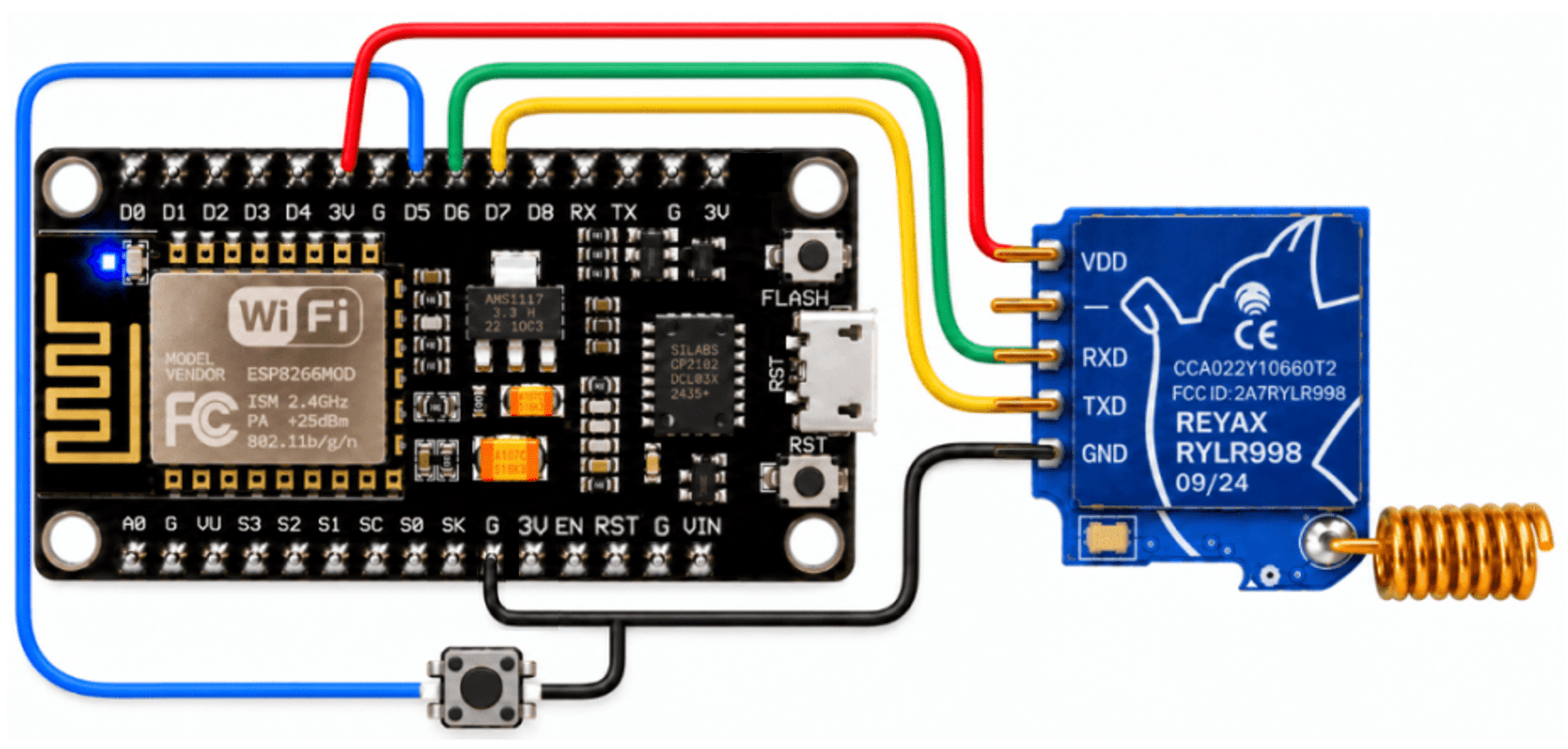
The ESP8266 board below is generic – not all have the same pins and capacitors – the pinouts here match my boards – handy reference…
The LoRa module’s TX and RX pins were connected to the ESP8266 with D6 and D7, using the usual crossed serial arrangement.
The first experiment couldn’t be much easier: send one ON Command one NodeMCU from the other – and turn on its built-in blue LED. Send OFF and switch off.
Soon I was doing this from one side of the property to the other.
Rock walls are surprisingly effective
My house is not exactly ideal for radio experiments.
I took the “remote” NodeMCU +LoRa board, now running on a USB battery… first to our gate and then down to the mailbox.
At the final destination, rotating the LoRa transceiver by just a small amount could make the difference between success and failure, but – that’s better than I’ve managed to date.
That immediately made the next idea obvious: why not put the house on Wi-Fi?
LoRa meets ESPHome
The Indoor NodeMCU has been moved from the Arduino IDE to ESPHome.
It now connects to one of several available Wi-Fi networks and offers a simple web interface as well as direct access to the Home Assistant.
The first control was deliberately basic: a single switch in the web UI.
Turn it on:
Wi-Fi
  ↓
ESP8266
  ↓
LoRa ON command
  ↓
Remote Node
  ↓
LED ON
Turn it off and the remote LED will turn off.
That meant I could move the LoRa base unit around the house, power it from a USB battery and control the remote node directly from my phone.
But did the remote node actually receive the command?
Sending a LoRa command is one thing. Knowing that it has actually arrived is rather more useful. Anyone old enough to remember Steve Ciarcia’s Circuit Cellar and that hideous X10 home control setup? Long before Wi-Fi, Zigbee, ESPHome and LoRa, there was X10 – the home control system that sent simple commands around the house via the network cable. It was very much a one-way affair: send a command and hope the light, socket or what it actually received, with none of the useful feedback we now take for granted.
And return on-message… so the remote NodeMCU (Arduino IDE) was modified to send a message back after completing each command.
DONE:ON
or:
DONE:OFF
The indoor ESPHome node continuously listens for these responses and displays the result both in its web interface and in the Home Assistant.
The result is a true two-way LoRa link:
ESPHome
    ↓
LoRa command
    ↓
Remote Node
    ↓
Action completed
    ↓
LoRa acknowledgement
    ↓
ESPHome
Signal strength free
The returned LoRa messages also contain useful radio information.
The base unit can therefore extract the received signal strength and signal-to-noise information from the returning packet and display:
- signal strength;
- SNR;
- a simple quality assessment of excellent through to trash.
That immediately turned this little project into a pretty useful LoRa test rig as well as a remote control system.
Add a remote input
The next experiment was even more interesting:
GPIO14 on the remote NodeMCU has been configured as an input with its internal pull-up enabled. A simple connection between the GPIO pin and ground changes its state.
When this happens, the remote node sends:
INPUT:ON
or:
INPUT:OFF
back via LoRa radio.
The ESPHome transceiver turns these messages into a real binary sensor, visible both in its own web interface and in the Home Assistant.
So we now have:
Remote sensor
      ↓
ESP8266 GPIO
      ↓
LoRa
      ↓
ESP8266 + ESPHome
      ↓ Wi-Fi
Home Assistant
And that gave me an idea…
The mailbox at the bottom of the hill is metal, so my original thoughts about some kind of presence sensing become unnecessarily complicated and battery-consuming.
Then I noticed something rather obvious… the postman can only operate one part of the mailbox: the flap.
A small microswitch attached to that flap could trigger the GPIO input on the remote unit. This state can then be sent directly back to the Home Assistant.
A simple, long range, battery operated “You have mail” sensor.
And that’s probably where this experiment is going next.
Not bad for an afternoon’s work
Starting with two LoRa modules that have been sitting unused for 18 months, I now have:
- two-way LoRa communications;
- Remote control LED;
- command recognition;
- signal strength monitoring;
- a remote GPIO sensor;
- a Wi-Fi-connected ESPHome gateway;
- Home Assistant integration.
MY THANKS to Rayax for entering me in the first place. And the whole thing is (not necessarily) built from two extremely cheap and familiar ESP8266 NodeMCU boards and the two Rayax modules. Since I only use 4 signal wires (RX, TX, LED, INPUT – and the LED is built in so no wire is needed or shown here) any old ESP12 module would do.
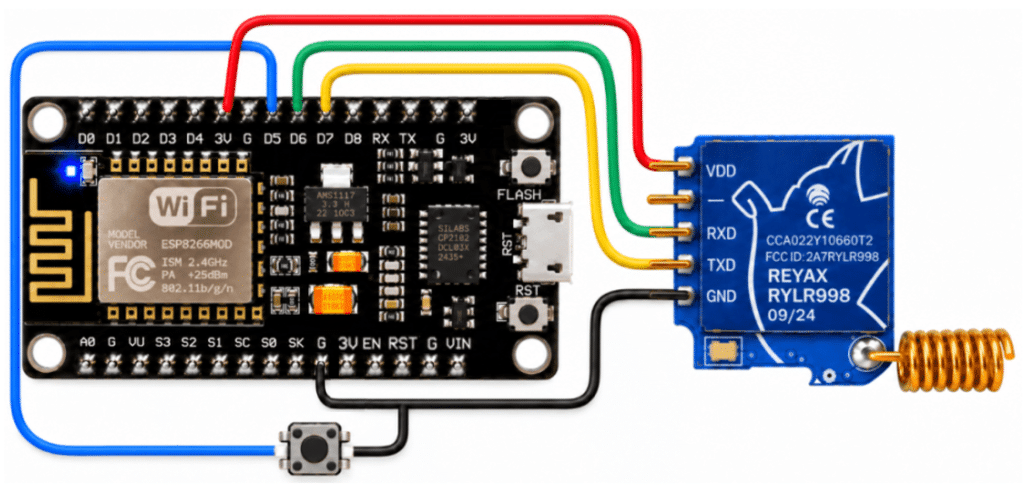
Not bad for a first real afternoon playing with LoRa – actually the first time I touched LoRa other than looking at the boards (gnd, tx, rx and 3v3 – I didn’t touch the RST pin). Don’t even ask why I didn’t use the second G pin (NodeMCU) to return the button – ChatGPT is brilliant at cat photos but rubbish at wiring – I’m going back to PowerPoint.
Now I just need to sort out the wiring so it doesn’t break every time I take a breath… 😄
I may develop this into a full source code blog if there is enough interest.. or I don’t care… 😄
Oh, moving on then… the home unit in the ESPHOME YAML and the remote unit in the Arduino code –
# LoRa/ESP8266-based Letterbox sensor

substitutions:
  device_version: "0.1"

esphome:
  name: lora-transmitter
  friendly_name: LoRa Transmitter

esp8266:
  board: nodemcuv2

wifi:
  networks:
    - ssid: !secret wifi_ssid
      password: !secret wifi_password

    - ssid: !secret wifi_ssid2
      password: !secret wifi_password

    - ssid: !secret wifi_ssid3
      password: !secret wifi_password

    - ssid: !secret wifi_ssid4
      password: !secret wifi_password

    - ssid: !secret wifi_ssid5
      password: !secret wifi_password

  power_save_mode: none
  post_connect_roaming: true

api:

ota:
  - platform: esphome

web_server:
  port: 80
  version: 3
  local: true
  log: false

  sorting_groups:
    - id: controls
      name: "Controls"
      sorting_weight: 10

    - id: remote_status
      name: "LoRa Remote Status"
      sorting_weight: 20

    - id: lora_signal
      name: "LoRa Signal"
      sorting_weight: 30

    - id: wifi_status
      name: "WiFi Status"
      sorting_weight: 40

    - id: system
      name: "System"
      sorting_weight: 50

time:
  - platform: sntp
    id: sntp_time

logger:
  baud_rate: 0

script:
  - id: check_lora_remote
    mode: restart

    then:
      - lambda: |-
          id(lora_remote_connection).publish_state("CHECKING");

      - if:
          condition:
            switch.is_on: lora_test_led
          then:
            - uart.write:
                id: lora_uart
                data: "AT+SEND=1,2,ON\r\n"
          else:
            - uart.write:
                id: lora_uart
                data: "AT+SEND=1,3,OFF\r\n"

      - delay: 5s

      - lambda: |-
          if (id(lora_remote_connection).state == "CHECKING") {
            id(lora_remote_connection).publish_state("OFFLINE");
          }

interval:
  - interval: 5min
    then:
      - script.execute: check_lora_remote

uart:
  id: lora_uart
  tx_pin: D7
  rx_pin: D6
  baud_rate: 115200

  debug:
    direction: RX
    dummy_receiver: true

    after:
      delimiter: "\n"

    sequence:
      - lambda: |-
          std::string received(bytes.begin(), bytes.end());

          if (received.find("DONE:ON") != std::string::npos) {
            id(lora_status).publish_state("ON");
            id(lora_test_led).publish_state(true);
            id(lora_remote_connection).publish_state("ONLINE");

            if (id(sntp_time).now().is_valid()) {
              id(lora_led_last_changed).publish_state(
                id(sntp_time).now().strftime("%d/%m/%Y %H:%M:%S")
              );
            }

          } else if (received.find("DONE:OFF") != std::string::npos) {
            id(lora_status).publish_state("OFF");
            id(lora_test_led).publish_state(false);
            id(lora_remote_connection).publish_state("ONLINE");

            if (id(sntp_time).now().is_valid()) {
              id(lora_led_last_changed).publish_state(
                id(sntp_time).now().strftime("%d/%m/%Y %H:%M:%S")
              );
            }

          } else if (received.find("INPUT:ON") != std::string::npos) {
            id(lora_remote_input).publish_state(true);

            if (id(sntp_time).now().is_valid()) {
              id(lora_input_last_changed).publish_state(
                id(sntp_time).now().strftime("%d/%m/%Y %H:%M:%S")
              );
            }

          } else if (received.find("INPUT:OFF") != std::string::npos) {
            id(lora_remote_input).publish_state(false);

            if (id(sntp_time).now().is_valid()) {
              id(lora_input_last_changed).publish_state(
                id(sntp_time).now().strftime("%d/%m/%Y %H:%M:%S")
              );
            }
          }

          // RSSI and SNR extraction
          size_t last_comma = received.rfind(',');
          size_t previous_comma = received.rfind(',', last_comma - 1);

          if (last_comma != std::string::npos &&
              previous_comma != std::string::npos) {

            std::string rssi_string =
              received.substr(previous_comma + 1,
                              last_comma - previous_comma - 1);

            std::string snr_string =
              received.substr(last_comma + 1);

            int rssi = atoi(rssi_string.c_str());
            int snr = atoi(snr_string.c_str());

            id(lora_rssi).publish_state(rssi);
            id(lora_snr).publish_state(snr);

            if (rssi >= -60) {
              id(lora_quality).publish_state("Excellent");
            } else if (rssi >= -80) {
              id(lora_quality).publish_state("Good");
            } else if (rssi >= -100) {
              id(lora_quality).publish_state("OK");
            } else if (rssi >= -115) {
              id(lora_quality).publish_state("Poor");
            } else {
              id(lora_quality).publish_state("Rubbish");
            }
          }


binary_sensor:
  - platform: template
    name: "LoRa Remote Input"
    id: lora_remote_input
    device_class: opening

    web_server:
      sorting_group_id: remote_status
      sorting_weight: 30

text_sensor:
  - platform: template
    name: "LoRa Remote LED Status"
    id: lora_status
    icon: "mdi:radio"

    web_server:
      sorting_group_id: remote_status
      sorting_weight: 20

  - platform: template
    name: "LoRa Signal Quality"
    id: lora_quality
    icon: "mdi:signal"

    web_server:
      sorting_group_id: lora_signal
      sorting_weight: 30

  - platform: wifi_info
    ip_address:
      name: "LoRa WiFi IP Address"
      icon: "mdi:ip-network"

      web_server:
        sorting_group_id: wifi_status
        sorting_weight: 20

    ssid:
      name: "LoRa WiFi SSID"
      icon: "mdi:wifi"

      web_server:
        sorting_group_id: wifi_status
        sorting_weight: 10

  - platform: template
    name: "LoRa Transmitter Version"
    id: lora_transmitter_version
    lambda: |-
      return {"${device_version}"};
    update_interval: 60s

    web_server:
      sorting_group_id: system
      sorting_weight: 10

  - platform: template
    name: "LoRa Remote LED Last Changed"
    id: lora_led_last_changed
    icon: "mdi:clock-outline"

    web_server:
      sorting_group_id: remote_status
      sorting_weight: 40

  - platform: template
    name: "LoRa Remote Input Last Changed"
    id: lora_input_last_changed
    icon: "mdi:clock-outline"

    web_server:
      sorting_group_id: remote_status
      sorting_weight: 50

  - platform: template
    name: "LoRa Remote Connection"
    id: lora_remote_connection
    icon: "mdi:radio-tower"

    web_server:
      sorting_group_id: remote_status
      sorting_weight: 10

sensor:
  - platform: template
    name: "LoRa Signal Strength"
    id: lora_rssi
    unit_of_measurement: "dBm"
    icon: "mdi:signal"

    web_server:
      sorting_group_id: lora_signal
      sorting_weight: 10

  - platform: template
    name: "LoRa Signal SNR"
    id: lora_snr
    unit_of_measurement: "dB"
    icon: "mdi:signal"

    web_server:
      sorting_group_id: lora_signal
      sorting_weight: 20

  - platform: wifi_signal
    name: "LoRa WiFi Signal Strength"
    update_interval: 60s
    icon: "mdi:wifi"

    web_server:
      sorting_group_id: wifi_status
      sorting_weight: 30

switch:
  - platform: template
    name: "LoRa Remote LED"
    id: lora_test_led
    optimistic: true

    web_server:
      sorting_group_id: controls
      sorting_weight: 10

    turn_on_action:
      - uart.write:
          id: lora_uart
          data: "AT+SEND=1,2,ON\r\n"

    turn_off_action:
      - uart.write:
          id: lora_uart
          data: "AT+SEND=1,3,OFF\r\n"
And the significantly simpler Arduino-type code remote…
void setup() {
  // Disable Wi-Fi completely
  WiFi.mode(WIFI_OFF);
  WiFi.forceSleepBegin();
  delay(1);

  pinMode(LED_BUILTIN, OUTPUT);
  digitalWrite(LED_BUILTIN, HIGH);  // LED OFF (active-low)

  pinMode(inputPin, INPUT_PULLUP);
  lastInputState = digitalRead(inputPin);

  Serial.begin(115200);
  loraSerial.begin(115200);

  Serial.println();
  Serial.println("LoRa Remote Node ready");

  // Send initial input state
  if (lastInputState == LOW) {
    loraSerial.print("AT+SEND=2,8,INPUT:ON\r\n");
  } else {
    loraSerial.print("AT+SEND=2,9,INPUT:OFF\r\n");
  }
}

void loop() {

  // Check the input for a change
  bool inputState = digitalRead(inputPin);

  if (inputState != lastInputState) {
    delay(30);  // Simple debounce
    inputState = digitalRead(inputPin);

    if (inputState != lastInputState) {
      lastInputState = inputState;

      if (inputState == LOW) {
        Serial.println("Input ON");
        loraSerial.print("AT+SEND=2,8,INPUT:ON\r\n");
      } else {
        Serial.println("Input OFF");
        loraSerial.print("AT+SEND=2,9,INPUT:OFF\r\n");
      }
    }
  }

  // Process incoming LoRa commands
  if (loraSerial.available()) {
    String message = loraSerial.readStringUntil('\n');
    message.trim();

    Serial.println(message);

    if (message.indexOf(",ON,") >= 0) {
      digitalWrite(LED_BUILTIN, LOW);
      Serial.println("LED ON");
      loraSerial.print("AT+SEND=2,7,DONE:ON\r\n");
    }

    if (message.indexOf(",OFF,") >= 0) {
      digitalWrite(LED_BUILTIN, HIGH);
      Serial.println("LED OFF");
      loraSerial.print("AT+SEND=2,8,DONE:OFF\r\n");
    }
  }
}
Let’s see what the WebUI looks like – ok, so I have to stop calling it a transmitter (Maybe Lora-ESP8266 letterbox base unit or similar): The thing you learn as you do more ESPHOME projects is useful information to reuse in new projects.

At this point, a thought…. I already have an answer on the blog here in question about using the ESP8266 on the remote end – power consumption, and fair enough. One thought that just came to mind: the Arduino Pro Mini (AliExpress – prices vary a lot, but can be cheaper than an ESP8266 or ESP32) would use quite similar code for the remote end, and I believe it runs on 3 V and can use very low power. I used to have a shed load of these but tied them up when I got involved in ESP programming….
However, I wrote back to Reyax this morning and asked them for the power consumption of their radio module. If it turns out that this is quite high, then there is no point in looking for another microphone for the remote end. Fingers crossed. For the base unit I am more than happy with the ESP8266 NodeMCU board. If you think about it – the Wemos D1 Mini would be much smaller… I bet many of us are the ones lying around doing nothing.
Oh, they sent me LoRa module links for Digikey, eBay, Amazon and their own Reyax site. I haven’t verified these and they may or may not be useful depending on where in the world you live (eBay.com would be useless to me – and eBay Spain is AWFUL). Enjoy.
The Wednesday Power Update
I got fired up enough yesterday that I decided to measure the current today. Whether I use USB on the NodeMCU board or actually use a power supply with an accurate meter, the LoRa unit takes 17 mA typically. The entire project (connecting) to USB only takes about 37 mA. So, with USB out, I took my life in my hands and measured the current, put 3V3 in the 3V pin to power the unit (only 3V3, not that in USB). The total current consumption was about 36 mA. Add 1 mA when the LED is on.
Just because I could, I tried to put from my power supply 3 volts instead of 3V3… and everything works perfectly, but no significant power reduction. So we were still looking at 36 mA. Although I would use an ESP32, we have the 17 mA for the LoRa sensor. Now that I know I can use 3V3 or 3V, should I use some kind of larger battery, let’s see, what, 2,000 milliamp hour? That’s only 55 hours, so I think we can say goodbye to long-term use on a letterbox without any form of power. Also, something dramatic, if I could get a processor that uses no power, I still have 17 mA. What? 110 hours? Not good at all.
BUT all is not lost – I looked up the specs of the Reyax – turns out it’s a mode 2 … .. we could put a Wemos D1 into sleep mode with periodic wakeup and have the REYAX wake up … this could still go somewhere for my little mailbox idea. Meanwhile – if anyone has ideas for a project where power is available – the only problem is distance – well, what we have here already looks good.
One thing at a time, has anyone realized how ridiculous 115kbaud is to turn an LED on and off or read a sensor – 9600 is my next step….
More in PART 2 – under development…