 Skip to content

The latest device I got from Athom is the IoTorero PG01 V5 EU16A.
This 16-amp smart plug uses ESPHome and is perfect for home assistants. What sets it apart is that it comes with ESPHome pre-installed, but perhaps more importantly – it can handle 2.4Ghz Wi-Fi and 5GHz Wi-Fi (not a lot of stuff you see out there), which means I’m guessing it must be using the new ESP32C5 or similar. Anyway, it works with 50 to 60hz power, 16 amps max, 100 to 250 volts. You have it via app control (I guess they mean the Home Assistant app on your phone), it has overload protection, it’s flame retardant and (claimed to be) safe and reliable. It has energy monitoring and power consumption measurement.
It can be paired via Bluetooth or Wi-Fi. The instructions say to turn on the device, use your computer or mobile phone to search for its Wi-Fi WiFi access point, find Athom_xxx and wait for the connection. Wait a few seconds until the configuration page pops up or manually access 192.168.4.1 in a web browser. You can then select the Wi-Fi SSID you want to use. Then go to Home Assistant and it will display the new devices discovered. Press config to add successfully.
OK, open the box, unplug it, plug it in, turn on your phone and check if you have the new Wi-Fi SSID on your phone. I have a normal Wi-Fi access point. Are there any new ones? not yet. Ah, yes, the Athom Smart Plug V5, and then some numbers and letters. I’ll connect to that.
“Check the quality of your network connection.” connect.
Now, if I go into that SSID in WiFi settings, click on the gear and manage its router, it pops up the plug and asks me for the SSID and password. I’m going to enter my office’s SSID and it says Connecting. So it must have died.
Yes, they are all dead. All I have to do now is go to Home Assistant – look at the “Devices & Services” section in Settings – and there it is – a new device – I agree to add it and have the option to rename it – I do this because I have two devices… Done.
Find the device in “Devices” in Home Assistant settings – it’s there.
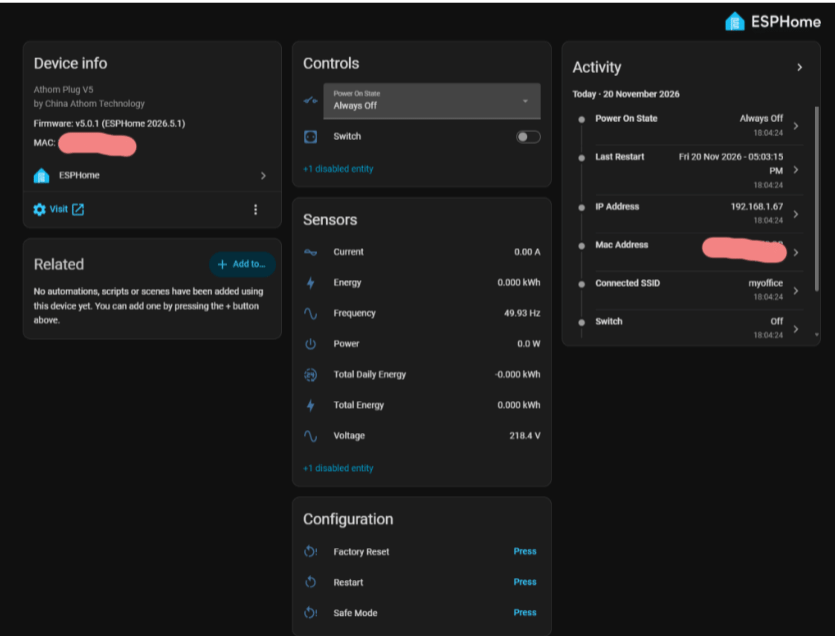
Ah – they even added a standard ESPHome webUI. Since the device is at 192.168.1.67 on my system, I can simply visit that address in my browser and…

Since this is within ESPHome, you can choose to cover a single WiFi and put in an ESPHome WiFi “network” if you wish – as I have done on many ESPHome projects since I have multiple SSIDs in my home. I already like it! !