A small business can adopt zero trust without replacing its network or deploying an enterprise-scale security stack. Start with one critical application, dataset, or workflow. Require multifactor authentication (MFA), separate administrative access, remove unnecessary permissions, and consider both user identity and device condition when deciding whether to allow access.
Zero trust is not a product or a one-time project. It is a security approach that limits the damage a stolen credential, unmanaged device, contractor account, or excessive permission can cause.
Key Takeaways
- Zero trust for small businesses means verifying identity, device conditions, and permissions before granting access to critical resources.
- Start small: Protect one business-critical application or workflow before expanding zero trust controls.
- Apply essential controls: Use MFA, least-privilege access, device security policies, and application-specific restrictions.
- Test and improve: Pilot access policies, monitor suspicious activity, review permissions, and address security gaps regularly.
- Use existing tools: Small businesses can begin adopting zero trust without replacing their entire IT infrastructure.
What zero trust means for a small business
Zero trust protects individual resources instead of assuming that a user or device is safe because it is inside the office, connected to a virtual private network (VPN), or owned by the company. NIST defines zero trust as an approach focused on users, assets, and resources, with no implicit trust based solely on network location or asset ownership.
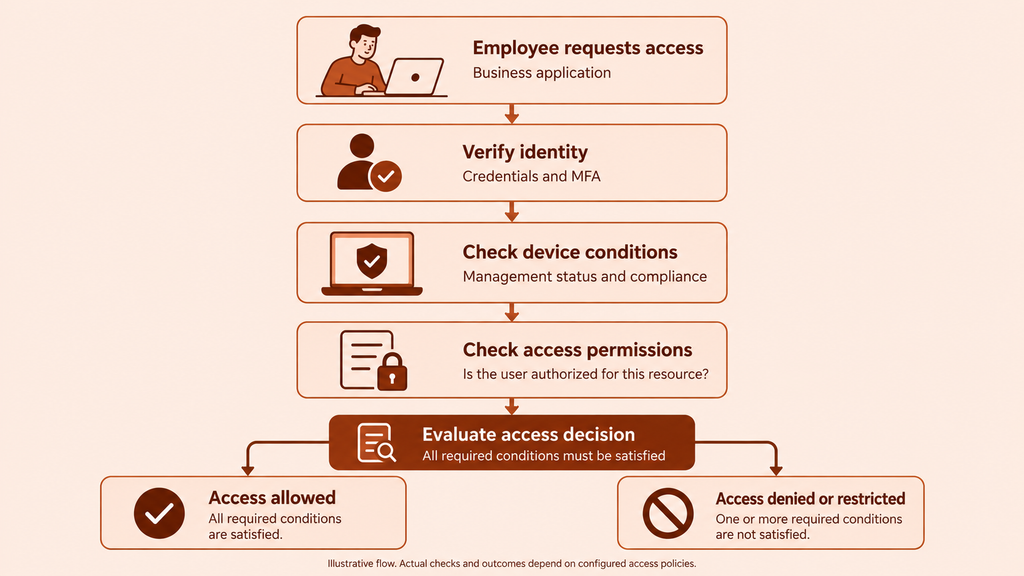
In practical terms, each access decision should answer four questions:
- Who is requesting access? Verify the employee, administrator, contractor, or service account.
- What are they requesting? Identify the specific application, data, or administrative function.
- What device and context are involved? Consider device ownership, management status, location, network, and other available signals.
- Should this identity have this access now? Apply least-privilege permissions and the business’s access rules.
A successful password or MFA challenge does not automatically justify access to every system. Authentication establishes identity; authorization determines what that identity is allowed to do.
Start with one resource and its access path
Trying to apply zero trust to every account, endpoint, and application at once can overwhelm a small IT team. NIST’s zero trust implementation guidance recommends first understanding protected resources and current capabilities, then formulating and validating access policies. For a small business, that can begin with one high-value resource.
Choose one critical app, dataset, or workflow
Prioritize resources using four factors:
- Business impact: Would losing access stop sales, payroll, customer support, production, or another essential operation?
- Data sensitivity: Does the resource hold financial, employee, customer, authentication, or proprietary information?
- External exposure: Can users access it from the internet, home networks, or third-party devices?
- Access population: How many employees, contractors, administrators, and service accounts can reach it?
A cloud email tenant, accounting platform, customer database, source-code repository, or remote administration tool can be a suitable first resource. Choose one where stronger controls will meaningfully reduce risk and where the affected user group is small enough for a controlled pilot.
Identify every user and device involved
Map the resource’s complete access path before changing its rules. Record:
- Employees who use the resource
- Administrators with elevated permissions
- Contractors, vendors, and temporary workers
- Service accounts and integrations
- Company-owned and personal devices
- Remote access methods, including VPN connections
- Recovery accounts and emergency access procedures
- The person who approves access and the person who supports users
Do not rely only on the employee directory. An application may contain local accounts, shared credentials, old contractor access, or integrations that are not visible in a central identity system.
Implement zero trust in a practical order
The first rollout should establish a minimum set of enforceable controls. Add complexity only when the resource, threat, or operating environment justifies it.
Require MFA and separate administrator accounts
Enable MFA for accounts and services, beginning with email, administrative accounts, remote access, finance systems, and the selected critical resource. CISA recommends MFA for small businesses because an additional authentication factor can help protect an account when its password is compromised. MFA is foundational, but it does not replace device checks, application permissions, monitoring, or incident response.
Prioritize phishing-resistant MFA, such as FIDO2 security keys or passkeys, wherever supported, particularly for administrator accounts and critical applications.
Anyone who administers a system should have two identities where the system supports it:
- A standard account for email, browsing, collaboration, and daily work
- A privileged account used only for approved administrative tasks
This reduces the time that elevated privileges are exposed during routine activity. Separate privileged and non-privileged use is also consistent with NIST access-control guidance.
Maintain a documented emergency-access method so an authentication or identity-system failure does not lock the business out. Protect that access carefully, monitor its use, and test the recovery procedure during the pilot.
Replace broad permissions with least-privilege access
Give each person only the permissions required for their current responsibilities. A salesperson who reads customer records may not need to export the entire database. A bookkeeper may need to create payments without being able to change account administrators. A support contractor may need temporary access to one system rather than permanent access to the full network.
Use roles where the application supports them, but inspect what each role actually permits. Default roles such as “manager” or “power user” can include more access than their names suggest.
For the first resource:
- List its available roles and privileged actions.
- Match each user to a documented business need.
- Remove dormant, duplicate, shared, and unjustified access where it can be done safely.
- Give temporary access an owner and an expiry point.
- Record who can approve future changes.
Set different rules for company-owned and personal devices
Device ownership alone should not establish trust. A company-owned computer may be outdated or otherwise fail policy, while a personal device may have no management or compliance information available at all.
Define what each device category may do:
- Managed and compliant company devices: Permit normal access to approved resources according to the user’s role.
- Company devices that fail policy: Block sensitive access or direct the user to remediation.
- Personal devices: Decide whether to deny access, permit only lower-risk applications, or restrict sensitive actions such as downloads and administration where the application provides those controls.
- Unknown devices: Treat them as unmanaged until their status can be established.
If a personal device cannot meet the access requirements for critical work, issue an approved device or redesign the workflow. Avoid creating permanent informal exceptions that no one reviews.
Limit access to specific apps and data
Network access should not equal unrestricted access to every resource behind the network. Apply controls as close as practical to the selected application or dataset.
For example, a contractor supporting one web application may need access to that application and its support console, but not the file server, finance platform, or internal administration network. Application-specific access narrows the impact if the contractor’s credentials or device are compromised.
Check both the access gateway and the destination application’s own permissions. A strong sign-in policy cannot compensate for an application role that allows unnecessary exports, configuration changes, or user administration.
Assign an owner for alerts, exceptions, and incidents
A policy has limited value if no one is responsible for its output. Name a primary owner and a backup for:
- Reviewing sign-in and device alerts
- Approving and recording exceptions
- Disabling accounts when someone leaves
- Investigating suspicious access
- Coordinating password resets, session revocation, and device checks
- Restoring access after an incident
If an external IT provider performs these tasks, document which alerts it monitors, when it acts, how it contacts the business, and which decisions still require internal approval.
Pilot access rules before broad rollout
Test the policy with a small group that represents the real user and device mix. Start in a monitoring or report-only mode when the available tool supports it, then enforce the rule after reviewing the expected effect. Do not assume a rule is correct because its configuration screen accepted it.
Define expected allow and deny scenarios
Write down the expected result before each test. A simple test matrix might look like this:
| Scenario | Expected result | What to verify |
|---|---|---|
| Approved employee using an approved, policy-compliant device | Allow | Correct application role and no unnecessary administrator access |
| Approved employee using an unmanaged device | Deny, restrict, or request remediation according to policy | Message clearly explains the next step |
| Contractor after the engagement ends | Deny | Account, active sessions, and temporary permissions are removed |
| Standard user attempting an administrator action | Deny | Attempt is logged and routed to the correct owner if necessary |
| Sign-in with suspicious context | Challenge, restrict, or deny according to available controls | Alert reaches the responsible person with enough information to investigate |
Also test ordinary conditions that often cause accidental lockouts: a replacement phone, a new company laptop, travel, password recovery, and an unavailable administrator.
Walk through a suspicious sign-in from alert to recovery
A useful incident test follows the full process rather than stopping when an alert appears:
- Generate or simulate a suspicious sign-in condition that the tool can identify.
- Confirm that the alert reaches the assigned owner.
- Check whether the owner can identify the account, device, resource, time, and relevant context.
- Follow the documented containment steps, such as disabling access or revoking active sessions where supported.
- Verify the user through an approved channel before restoring access.
- Reset affected credentials and review MFA methods when compromise is suspected.
- Inspect the account’s permissions and recent activity.
- Record what happened, what was changed, and whether the access rule needs adjustment.
This exercise exposes missing ownership, incomplete logs, untested recovery methods, and dependencies on a single administrator.
Common rollout problems and practical fixes
Legitimate users are locked out
First determine whether the policy is wrong or the user or device does not meet a valid requirement. Review the denied request’s identity, device, application, and policy result rather than immediately disabling the control.
Reduce avoidable lockouts by piloting with a representative group, communicating requirements in advance, and giving users a clear remediation route. Any temporary exception should identify the approver, reason, affected resource, and expiry point. Emergency access should remain separate from routine exceptions.
Personal devices cannot meet access requirements
An unmanaged device may be unable to report the status required by an access policy. Do not label it compliant without evidence simply to preserve convenience.
Choose among three explicit options: provide a managed device, limit the user to resources that permit lower-risk access, or deny access to the protected workflow. Base the decision on the sensitivity of the resource and the work the user must perform, not on a blanket rule for all applications.
MFA prompts create unnecessary friction
Frequent prompts can indicate overlapping rules, short session settings, device-registration problems, or multiple applications enforcing authentication independently. Review which system is generating the prompt and whether the frequency matches the risk of the requested action.
Do not remove MFA from critical accounts solely to reduce support requests. Correct duplicate or poorly scoped policies, improve enrollment instructions, and test recovery before expanding enforcement.
Use existing tools, add a platform, or hire an MSSP?
Use existing tools first when they can provide a reliable account inventory, MFA, suitable application roles, device-management information, usable logs, and enforceable access policies. This keeps the first rollout focused on policy and process rather than procurement.
Consider adding an identity, device, or access platform when important applications cannot share sign-in controls, device state cannot inform access decisions, local accounts are difficult to govern, or administrators cannot see and enforce policy consistently.
A managed security service provider (MSSP) may be appropriate when the business cannot assign internal ownership for alert monitoring and incident response. Before signing an agreement, define:
- Which identities, endpoints, applications, and logs are covered
- Which events the provider investigates
- Response hours and escalation paths
- Who can disable an account or device
- Who approves exceptions and restores access
- How the provider documents incidents and policy changes
Buying a platform does not resolve unclear roles or excessive permissions. Hiring a provider does not remove the business’s responsibility to approve access and decide which risks are acceptable.
How Scalefusion supports zero trust for small businesses
Scalefusion helps small businesses address common zero trust implementation challenges through its UEM and OneIdP capabilities.
- Unmanaged device access: OneIdP conditional access policies help restrict sign-in to supported business applications based on device management status.
- Noncompliant endpoints: OneIdP Extended Access Policies (XAP) help evaluate device compliance, OS update status, and contextual conditions for supported applications, subject to the required configurations.
- Excessive endpoint privileges: OneIdP Just-in-Time Admin provides time-limited administrative privileges for supported tasks on managed Windows and macOS devices.
- Inconsistent device security: Scalefusion UEM helps IT teams apply device configurations and security policies across managed endpoints.
Together, these capabilities support device-aware application access and endpoint security as part of a broader zero trust strategy.
Explore device-aware conditional access with Scalefusion OneIdP.
FAQs
1. Is zero trust the same as ZTNA?
No. Zero trust is the broader security strategy. Zero Trust Network Access (ZTNA) is a remote-access approach that applies defined access policies to specific applications, data, or services. NIST distinguishes ZTNA from the broader zero trust framework.
A small business might consider ZTNA when remote users need access to selected applications and broad VPN-based network access exposes more resources than necessary. ZTNA does not automatically replace every VPN use case, and its suitability depends on the applications and access paths involved.
2. Can a small business start without an identity provider or Active Directory?
Yes. Start by inventorying accounts in each critical application, enabling the MFA options already available, removing unnecessary permissions, separating administrator use, and documenting account creation and removal. As the number of users and applications grows, assess whether an identity provider—or a solution that can manage the relevant local users—would improve consistency and visibility.
The controls available without a central identity system depend on the account and policy features supported by each application.
3. Do you have to replace your network or devices to adopt zero trust?
No. Zero trust can begin incrementally with existing identity, application, endpoint, and network controls. Protect one critical resource, identify gaps during the pilot, and buy or replace technology only where the current environment cannot enforce the required policy or provide the necessary evidence.
4. How often should a small business review access permissions?
Review access whenever someone changes roles, completes a contract, or leaves the organization. Also schedule periodic reviews for privileged accounts, contractors, service accounts, and critical applications. NIST Cybersecurity Framework guidance supports both event-driven and periodic reviews but does not prescribe one universal interval. Set a frequency based on the sensitivity of the resource, rate of staff changes, and ability to detect outdated access.