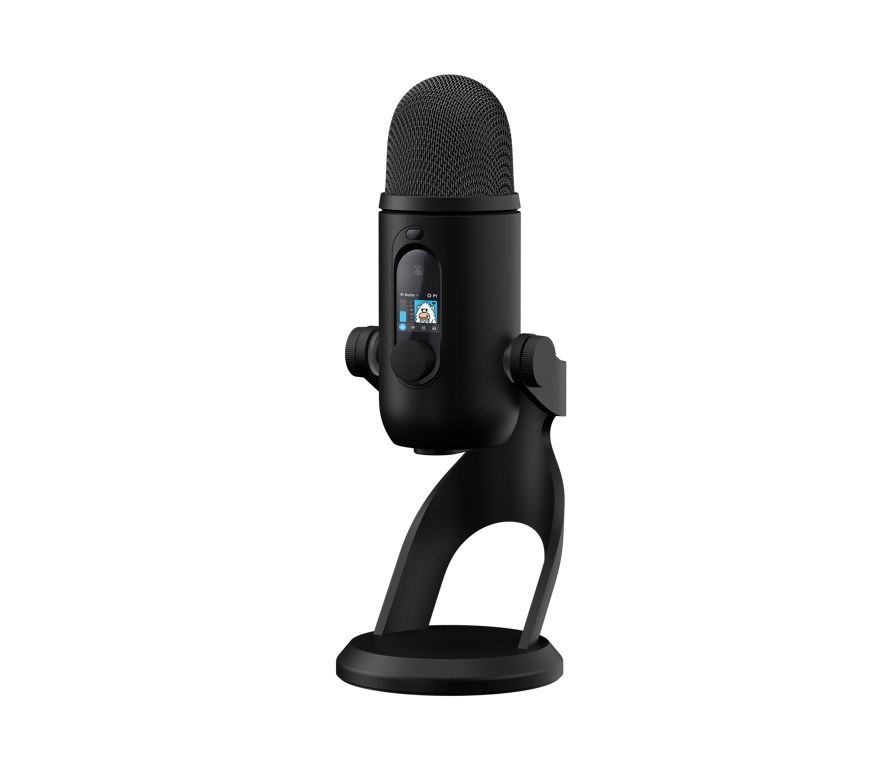
Logitech Yeti 2 puts more of a desktop recording workflow on the microphone itself. His onboard Blue VO!CE controls and screen are the central changes to understand: they let a creator achieve settings without continuously going back to a software window. Automatic voice tracking adds another layer of assistance, although a sensible recording setup is still important.
Start with placement, then let automation help

A Voice proximity sensor tracks the speaker in three dimensions, according to Logitech, with automatic adjustment of gain, EQ and pickup behavior. This is intended to help if someone changes position during a stream or presentation. It should be understood as the manufacturer’s description of the system, rather than a measured guarantee for identical sound from each seat.
A useful first step is to choose a comfortable speaking position and make a short recording there. Then move as you normally would during a session and listen back. That examines the behavior that’s important to your job, rather than judging a microphone only while you’re sitting perfectly still.
The screen reduces travel and software

Those 1.3 inch display works with a dial to lay out settings and presets on the hardware. Blue VO!CE processing is available directly on Yeti 2, while G HUB offers deeper control. Logitech also supports a custom on-screen avatar through its software.
The practical benefit depends on how often you need adjustments while another application occupies the screen. A visible control can be useful during a call, lesson or live show. It still makes sense to settle on a repeating starting configuration so an audience doesn’t hear a sequence of experimental changes.
Treat noise reduction as part of the recording chain

An AI-assisted de-noiser should suppress unwanted background sounds. Logitech highlights keyboard noise and computer fans as examples. The feature doesn’t automatically determine what a particular room, voice or keyboard will sound like, so listen to a sample made in the actual environment before relying on it for a session.
Also control the processing in the calling or streaming application. When both the microphone and the app make automatic changes, diagnose one stage at a time if a recording sounds different than you expected. Keep notes of settings that work, instead of changing several controls together and losing the result.
Keep the USB workflow straight

Yeti 2 connects through USB-C and starts with automatic modes enabled. No separate mixer or microphone preamp is required for this connection. For context on Logitech’s broader Creator hardware, our previous streaming equipment coverage discusses the company’s desktop approach.
Before an important recording, confirm that the intended microphone is selected in the application, check the monitoring and do a short playback test. These steps remain useful even if the microphone does more internal processing. Automation can reduce the number of adjustments; it cannot decide whether the recording meets your purpose.
Announced on September 23, 2026, Still 2 was listed black at $159.99 and in stock on Logitech G’s US product page when checked. Availability and offers may change, so confirm the selected finish and package before ordering.
| specification | Logitech Yeti 2 |
|---|---|
| Start date | September 23, 2026 |
| Connection | USB-C |
| Voice help | 3D proximity tracking with automatic gain and EQ adjustment |
| Processing | Onboard Blue VO!CE and AI-assisted de-noiser |
| Display | 1.3-inch display with dial controls |
| Software | G HUB for deeper settings and customization |
| Package | Microphone with attached desktop stand; USB cable |
| Where to buy | Buy from Logitech G |